


Wan 2.6 Prompt Guide: How to Master AI Video Generation
AI video generation model is about to take its next great leap. With the imminent arrival of the Wan 2.6 architecture, the technical and creative community is preparing for a new standard of consistency, duration, and realism.
This guide is your definitive map. Here, you won't just understand the technology; you'll walk away with 3 ready-to-use Wan 2.6 prompts, a battery of 10 benchmark tests to push the model to its limits, and a universal structure that works on Wan, Sora, or Kling.
Start Here: 3 Prompts to Test Right Now (Quick Start)
Don’t want the theory yet? No problem.
- Go to Wan 2.6 AI video generator.
- Copy and paste one of the prompts below.
- Click “Create” and review the result.
1) The Perfect Portrait (Focus: Skin and Light)
Use this prompt to test the model's ability to render organic textures without that "waxy" look. Ideal for judging raw image quality.
Prompt: Extreme close-up, 85mm lens, female model looking at camera, detailed skin texture, pores visible, vellus hair, soft studio lighting, rim light, shallow depth of field, 8k resolution, hyperrealistic.
2. Animal Realism (Physics and Fur)
Test the ability to render complex textures in motion. See how AI handles thousands of fur strands and water particles simultaneously.
Prompt: Slow motion close-up of a golden retriever dog shaking off water, water droplets flying everywhere in 4k, sunlight backlighting the droplets, highly detailed wet fur texture, bokeh background, joyful expression.
3. Living Nature (Documentary)
A time-lapse of a flower blooming. Test the smoothness and temporal coherence of a biological transformation.
Prompt: Time-lapse of a pink lotus flower blooming, soft natural morning light, dew drops on petals, blurred jungle background, high quality, national geographic style, smooth transition.
🚀 Don't Want to Wait? Open SeaArt Video Generator Now
Wan 2.6 and the Future of AI Video: What the Data Indicates
ℹ️ Note: This article is based on official roadmaps and leaked beta tests to prepare you in advance. Specific features may vary in the final public release.
Before diving into complex prompts, it's crucial to understand the tool. Wan 2.6 isn't just an incremental update; it's an architectural shift.
🟡 For Beginners (30s read)
👉 You don't need to memorize technical terms. Just know that, unlike older versions that "hallucinated" (created strange things) in long videos, version 2.6 was designed to "understand" the physical world. This means longer videos where people don't melt and objects don't disappear.
Technical Analysis (Deep Dive)
For enthusiasts and developers, here's what differentiates Wan 2.6 (based on technical roadmaps):
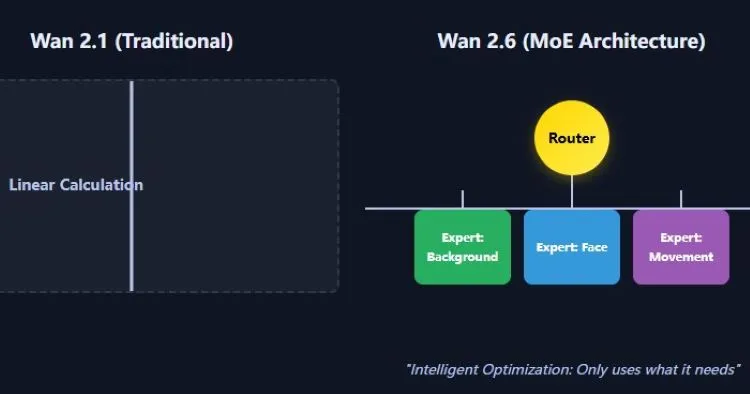
1. MoE Architecture (Mixture of Experts)
Instead of using the entire AI "brain" for every pixel, the model activates specialists. Thanks to MoE, video doesn't freeze in complex scenes, allowing it to render a detailed background and an expressive face simultaneously with efficiency.
2. Native Multimodality
The model is expected to process text, image, and audio natively. This means it "understands" the relationship between the sound of an explosion and the visual of fire, allowing much more precise synchronization (audio to video).
3. Temporal Stability
The development focus has been on maintaining consistency in 5-10 second clips, surpassing the common 2-4 second limit where coherence used to fail.
Advanced Wan 2.6 Prompt Structure: The Universal Logic
Writing prompts for video is harder than for static images. You need to control time and space.
🟡 For Beginners (30s read)
👉 Forget luck. A good video prompt is just a cake recipe with 3 mandatory ingredients:
Main ingredient (Subject): What is it? (Ex: A cat).
Preparation method (Camera): How do we see it? (Ex: Slow motion, zoom in).
Decoration (Light/Atmosphere): What's the mood? (Ex: Neon light, rain).
Without one of these, the cake falls flat.
The 3 Pillars of Prompt Engineering
💡 Who should read: If you've tried writing prompts "by feel" (just by intuition) and got unstable results (deformed hands, abrupt cuts), this structure explains why.
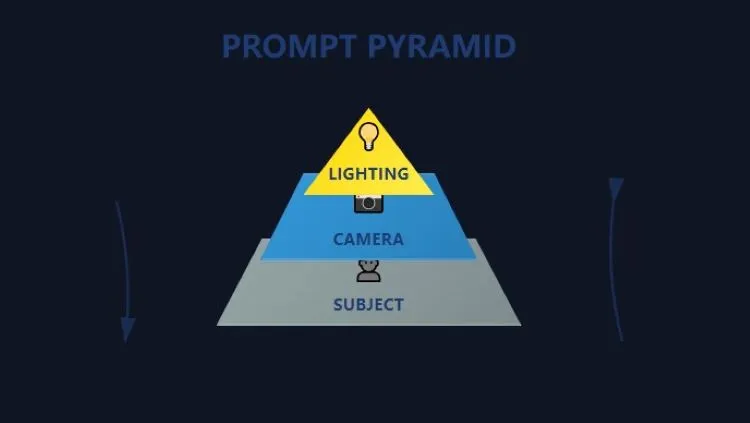
1. Material (Subject and Physics)
Define not only who the subject is, but their weight and materiality. A "giant robot" needs to move slowly; a "hummingbird" needs to be fast. Add weight adjectives.
2. Dynamics (Camera and Movement)
Use cinematic vocabulary. Tracking shot (following camera), Dolly zoom (vertigo effect), Pan right (panoramic to right). This instructs the AI on how to move the virtual "eye".
3. Render (Atmosphere and Lighting)
Light defines realism. Terms like Volumetric fog, Ray tracing, and Global illumination force the model to calculate complex shadows.
The Golden Rule of Input (I2V)
In Wan 2.6, as in other advanced models, the quality of the Reference Image (Image-to-Video) defines 80% of success. If the base image has anatomical errors, the video will multiply those errors by 24 frames per second. Always start with a perfect image.
Essential Wan 2.6 Prompt Library and Benchmark
How to use: Each prompt below can be copied and used directly, but was designed structurally as a technical test to evaluate specific model capabilities. Use them to verify if your setup (or current model) is delivering maximum quality.
Phase 1: The Physical World (Render and Physics)
1. The Rendering Test (Macro Texture)
Objective: Evaluate sharpness and physics of translucent materials (water and fruits).
Prompt: Macro shot of a fresh lemon slice dropping into sparkling water, high speed photography, air bubbles rising, detailed pulp texture, backlit by sunlight, 8k resolution, refreshing atmosphere.
❌ Bad: Water looks like solid gelatin; lemon texture is blurred or too smooth.
✅ Good: Individual bubbles are sharp; light passes through lemon pulp (subsurface scattering) realistically.
2. Movement Dynamics (Complex Action)
Objective: Evaluate body consistency (movement consistency) at high speed.
Prompt: Professional parkour athlete jumping between rooftops, dynamic low angle, motion blur, debris flying, 60fps fluid motion, cinematic color grading.
❌ Bad: Athlete gains a third arm during jump; legs pass through ground; body loses volume.
✅ Good: Consistent anatomy from start to finish; real physical weight at landing moment (impact).
3. Camera Control (Drone FPV)
Objective: Evaluate 3D spatial coherence and rendering speed.
Prompt: FPV drone shot, flying fast through a narrow canyon, river below, rock textures, banking left, speed ramping, immersive perspective.
What to observe: Rocks at screen edges should pass quickly with correct motion blur, without "melting" or changing shape geometrically.
4. Fluid Physics (Product Commercial)
Objective: Evaluate particle simulation and liquid interaction (essential for Ads).
Prompt: Luxury perfume bottle spinning in the air, golden liquid splashing around it, slow motion, refraction, studio lighting, water droplets freezing.
What to observe: Light should refract through liquid and glass realistically.
🔄 Rhythm Transition: The "Level Up"
So far, we've tested physical and visual capabilities. Now, we enter territory where inferior models fail: time, emotion, and abstract narrative.
Phase 2: Time and Emotion (The AI Frontier)
5. Long-Duration Narrative (Temporal Stability)
Objective: Evaluate temporal stability in 5s+ clips.
👉 Translation: "If the model fails here, any long narrative video becomes unviable."
Prompt: A lone astronaut walking on Mars surface towards a giant monolith, wide shot, dust storms, camera tracking forward strictly, consistent character suit.
Bad: Astronaut suit design changes (color, details) every few seconds (morphing - unwanted transformation).
Good: Helmet and suit remain identical from frame 0 to frame 150.
6. Emotional Narrative (Micro-Consistency)
Objective: Evaluate semantic subtlety and facial muscle control.
Prompt: Cinematic medium shot, elderly man reading a letter, hands trembling slightly, a single tear rolling down cheek, expression changing from sorrow to relief.
What to observe: Expression transition should be smooth, without "jumps" or scary facial distortions (Uncanny Valley).
7. Artistic Stylization (Anime/2D)
Objective: Fidelity to 2D style and color palette.
Prompt: Anime style, Makoto Shinkai aesthetics, shooting star crossing a purple night sky, vibrant colors, lens flare, highly detailed clouds, 2D animation look.
What to observe: Video should look like hand-drawn animation, not a 3D model trying to look 2D.
8. Architectural Timelapse
Objective: Temporal global illumination logic.
Prompt: Modern minimalist living room, timelapse video, sunlight shadows moving across the floor and furniture, day turning into evening, photorealistic.
What to observe: Shadows should move synchronized with the supposed sun position.
9. Volumetric Atmosphere
Objective: Rendering of multiple environment layers (light + particle + reflection).
Prompt: Cyberpunk street level, heavy rain, neon lights reflecting on wet pavement, volumetric fog, steam rising from vents, people with umbrellas.
What to observe: Complex interaction between colored neon light, falling rain, and fog.
10. Creative / Text (Experimental) ⚠️
Objective: Evaluate OCR/Text Generation capability (Experimental Feature).
Prompt: Neon sign on a brick wall flickering the word "FUTURE", electrical sparks, dark alley, cinematic lighting.
Note: Generating legible text is the "Holy Grail". Use this prompt to check if the current model version has reached this readability milestone.
Practical Tutorial: From Zero to Final Video (Step by Step)
Theory is good, practice is better. Let's create a complete cinematic video using the SeaArt ecosystem, which integrates the best image and video tools in one place.
Step 1: Base Image Generation (Visual Foundation)
An excellent video starts with an excellent image. Think of it as drawing the storyboard before filming. This is where you define the soul of the scene.
- Action: On SeaArt, use the SeaArt Film v2.0 or SeaArt Infinity model.
- Prompt: Use Prompt #9 from our library above.
- Links: SeaArt Film v2.0 | SeaArt Infinity
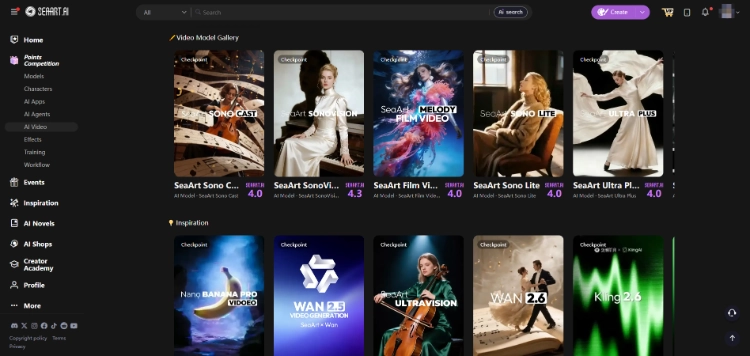
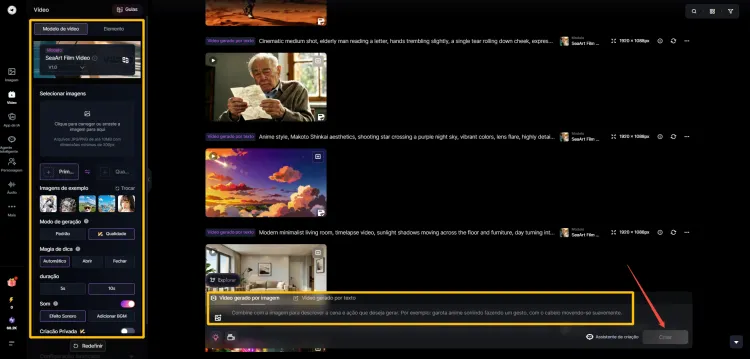
Step 2: Animation (Wan 2.6 and Alternatives)
Now you're the director. With a simple command, you tell the camera what to do, without needing expensive equipment.
- Action: Send your image to the AI Video tool. Here you have total flexibility to choose the engine that best fits your vision:
- Movement Prompt: Insert: Camera pan right, slow motion, heavy rain
- Creative Shortcut (Templates): If you don't want to configure everything manually, explore SeaArt's video model library. With one click, it automatically adjusts all parameters for specific styles (like "Cyberpunk", "Anime" or "Cinematic"), saving hours of testing.
Step 3: Sound Design and Music (Pocket Studio)
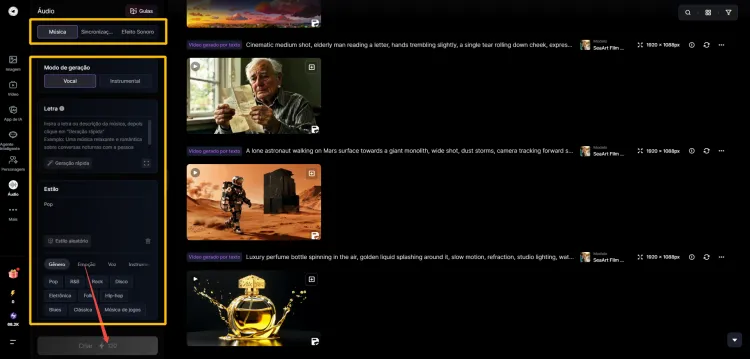
SeaArt goes beyond visual; it's a complete production studio. Because a video without sound is just an image that moves.
- Video with native audio: Wan 2.6 can already generate videos with synchronized sound effects (SFX), based solely on your prompt.
- Custom soundtrack: Want total control? Generate the video "mute", access SeaArt's AI Audio tool and create:
- Final mixing: Upload your video and add the created audio tracks. It's a professional editing studio in your browser: no technical barriers, but infinite customization.
Note: AI models and audio resources available on SeaArt may vary according to your region and chosen plan.
Technical Requirements and Conclusion
To run 40B parameter models (as estimated for Wan 2.6 Full) locally, you would need enterprise-level hardware (multiple A100 GPUs or extreme optimizations on RTX 4090 with 24GB VRAM).
For most creators, the cloud (Cloud Rendering) is the only viable option. Platforms like SeaArt democratize this access, allowing you to use the "brain" of a supercomputer in your browser.
The Practical Challenge (Choose Your Path)
Don't close this tab without testing. AI is only learned by doing.
🐣1. Beginner (Never made video):
Copy Prompt #1 (Portrait) from Quick Start and run it on SeaArt. See the magic happen.
🦅2. Pro (Already know basics):
Go straight to Prompt #5 (Astronaut) in the Prompt Library. Test the temporal stability of the model you're using.
☁️3. No Hardware:
Access SeaArt AI, generate an image in Flux and transform it into video right now.
The future of generative video isn't about who has the best GPU, but about who has the best vision and the best Wan 2.6 prompt. Now you have both.
Related Articles
10 Best Kling 2.6 Prompts: How to Use for Video Synchronization
Kling 2.6 vs Sora 2: Production Reality vs. The Hype
12 Best Gemini AI Prompts for Old Photo Restoration [Detailed]
Wan 2.6 vs Wan 2.5: Complete Comparison of Features and Improvements
Wan 2.6 Usage Guide: Complete Tutorial for Video, Image & Music Generation with Pricing & Comparison
Wan 2.6 vs Veo 3.1: Full Comparison for Video Creators
20 Grok Video Prompts to Generate Videos and Control Motion