


Wan 2.6 Usage Guide: Complete Tutorial for Video, Image & Music Generation with Pricing & Comparison
Are Wan 2.6's powerful new features tempting, but you're unsure if you can master them? This comprehensive guide breaks down everything you need to know - from 15-second video generation to music creation - in a way that's easy to follow, even for beginners.
We'll cover installation, prompting techniques, pricing plans, and more. By the time you finish reading, you'll have a complete understanding of Wan 2.6 and be ready to start creating right away.
What You'll Learn in This Guide:
- All new features in Wan 2.6 (video, music & image generation)
- Step-by-step setup for both Web and Local (ComfyUI) versions
- Recommended settings and prompting strategies to avoid common mistakes
- Version comparisons with older models and competing tools
What is Wan 2.6? The Next-Gen AI for Unified Video, Image & Music Creation
Wan 2.6 is the latest multimodal AI model developed by Alibaba Cloud. Its standout feature is the ability to generate videos, images, and music (BGM) all in one place, making it a powerful "all-in-one" creative tool that streamlines your entire production workflow.
Traditionally, content creators needed multiple services: one for video generation, another for BGM (music libraries or composition tools), and yet another for editing and adding captions. Wan 2.6 consolidates all these steps into a single unified platform, dramatically reducing the time and effort needed to bring your ideas to life.
(Note: The information in this section is based on official announcements and early demonstrations.)
Video Generation: 15-Second Storytelling with Multi-Camera Angles
Wan 2.6 video generation takes this technology to a whole new level compared to earlier versions. With support for up to 15 seconds of video, you're no longer limited to simple "moving pictures" - you can create actual short films. Enhanced shot composition and rhythm control make cinematic expressions truly possible.
The Video-to-Video (human video reference generation) feature allows you to input a video of a person (still images are not supported) as reference material. The AI extracts appearance and voice characteristics to generate new video content based on those features.
Image Generation: Smart Text Integration Powered by Advanced AI Reasoning
Image generation capabilities have also been significantly enhanced, serving as an important foundation for video creation. With text placement abilities similar to tools like Nano Banana, Wan 2.6 can generate text-integrated images suitable for advertisements and poster design.
Thanks to its advanced reasoning capabilities, the model can also understand and create complex compositions like infographics with logical structure.

Music Generation: Full 4-Minute Song Structure for MVs and BGM
Wan 2.6 can generate music to accompany your videos. It understands complete song structures, including verses, pre-choruses, and choruses, creating full tracks up to 4 minutes long.
Vocal styles are diverse, including male, female, and duet options, with multilingual support - making it a powerful tool for music video and BGM production.
How to Use Wan 2.6: Step-by-Step Tutorial
This Wan 2.6 usage guide will walk you through two approaches: You can get started with the web version in as little as 5 minutes, or dive into the ComfyUI version for more advanced settings and control.
We recommend starting with the official web version first - there's no need to dive into complex configurations right away.
✅ Before You Start:
- Pricing: You can start with a free plan. For more serious use, upgrade to the $5/month Pro plan, $20/month Premium plan, or purchase credit packs starting at $1.50.
- Commercial Use: Commercial use is generally permitted, but we recommend reviewing the terms of service for final confirmation.
Currently, there are two main ways to use Wan 2.6: the official web version and the local environment (ComfyUI).
Using the Official Web Version
This is the easiest way to get started, requiring no high-spec PC. Complete these 3 simple steps:
1. Create an Account and Log In
Visit the official website, create an account, and log in.
2. Select Your Mode (Tab)
Choose either "Text-to-Video" or "Image-to-Video" tab.
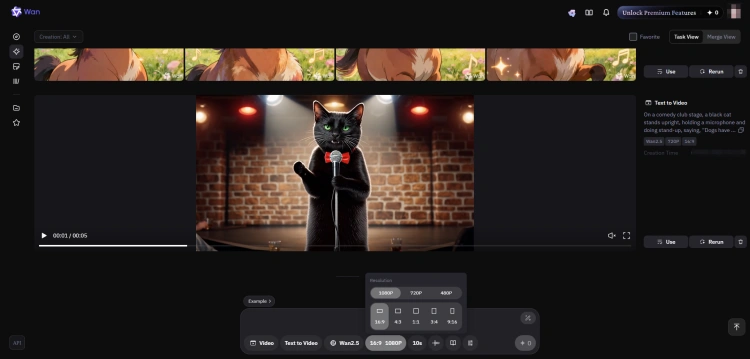
3. Configure Parameters and Generate
Set the aspect ratio (16:9, 9:16, etc.) and video duration (in seconds), then click the generate button.
Advanced: ComfyUI Setup and Configuration
For users who want fine-grained control in a local environment, here's the advanced setup.
⚠️ Important Considerations Before Setup
Setup can be time-consuming. Model files can be tens of GBs, increasing storage requirements significantly. VRAM load is also high (16GB+ recommended). Make sure your PC specs can handle it before proceeding.
Standard Installation Flow
- Use ComfyUI Manager: Install Wan 2.6-compatible custom nodes through ComfyUI Manager.
- Place Model Files: Place the checkpoint model in the models/checkpoints directory.
- Load Workflow: Drag and drop the distributed JSON workflow file to complete setup.
Note: Specific Git URLs and file names will be added after the official release.
Writing Effective Prompts to Maximize Wan 2.6's Generation Quality
To bring out the AI's full understanding capabilities, there are effective "formulas" for writing prompts. Following these structures helps reduce variability in results and achieve outputs closer to your intent.
While Wan 2.6 has strong language comprehension, organizing your instructions clearly makes it much easier to get the desired output.
Basic Structure for Video Generation Prompts
No need to overthink it - just fill in the template below:
Formula: "Subject" + "Action" + "Camera" + "Environment" + "Style"
Example:
A cyberpunk cat running in a back alley, running towards the camera, low angle, neon lights, rain, cinematic style
Specifying Style for Music Generation
For music generation, specifying not just genre but also mood and instruments improves accuracy.
Key Elements: Genre / Mood / Instruments / Language (if vocals)
Example:
Emotional J-Pop, female vocals, piano accompaniment, bittersweet atmosphere
Locking Character Consistency with Prompt Settings
To maintain the same character across generations (ID preservation), input a reference image and describe specific features in your prompt.
Align visual elements like hair color, hairstyle, eye color, clothing, and age across all generations.
Example:
Blue-haired girl (short bob), blue eyes, white hoodie, teenage, same person
Practical Use Cases for Wan 2.6
Beyond simple video generation, Wan 2.6 offers practical applications for music video production and marketing materials.
Case 1: Short Film Production
Leverage the 15-second generation capability to create story-driven short movies by combining multiple cuts. The multi-angle camera feature makes it easy to depict the same scene from different perspectives.
Case 2: Advertising & Social Media Marketing Materials
Use the text generation capability to create promotional videos where product-name-integrated poster images come to life. This significantly boosts engagement on social media.
Case 3: Music Video (MV) Production
With Wan 2.6, you can complete everything from song composition to video generation in one place. More and more creators are generating visuals that match their lyrics and posting original MVs to YouTube and TikTok.
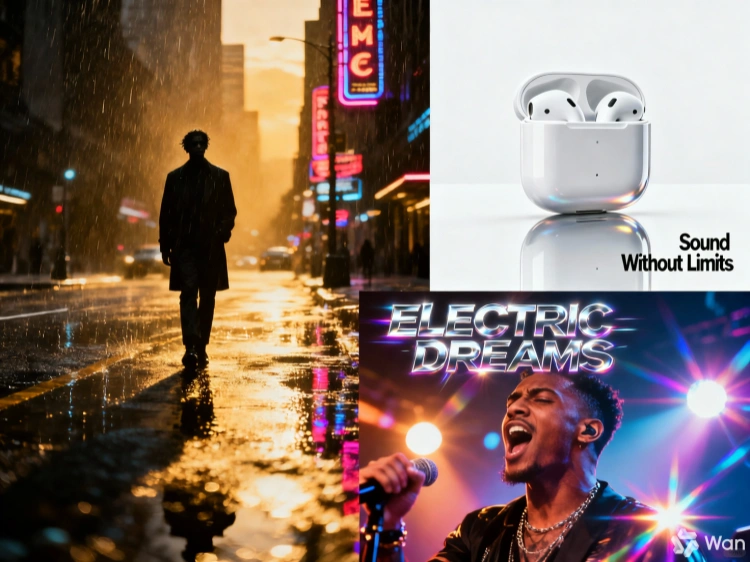
Wan 2.6 vs. Older Models (2.5 / 2.2 / 2.1)
Wan 2.6 dominates older models with its long-form, multimodal capabilities. The distinctions from competing tools are also clear.
| Feature | Wan 2.6 | Wan 2.5 | Wan 2.1 / 2.2 |
|---|---|---|---|
| Video Length | Up to 15 sec (stable) | Short (~5 sec) | Short (~2-4 sec) |
| Consistency (ID preservation) | Extremely high (maintains face & structure) | Prone to collapse (facial distortion) | Low (unstable) |
| Motion Smoothness | Natural and continuous | Breaks down with intense motion | Noticeable jitter |
| Prompt Understanding | Complex direction & context | Simple instructions only | Keyword-dependent |
| Music & Lip Sync | Supported (emotion & mouth movement sync) | Not supported | Not supported |
| Image Generation | Text integration & advanced reasoning | Basic generation only | Not supported |
| Recommended Use | Storytelling, ads, MVs | Short GIFs, experimental videos | Technical testing |
Bottom Line: If you want to create longer videos or add music to your projects, Wan 2.6 is hands down the best choice.
Older models are fine for quick experiments or short GIFs, but when you're ready for serious video production, Wan 2.6's multimodal capabilities give you a major creative advantage.
Comparison with Kling 2.6 / Veo 3.1
Compared to major competing models (Kling 2.6 / Veo 3.1), Wan 2.6's position is as follows:
Kling 2.6: While Kling excels in human expression and natural motion, Wan 2.6 stands out with its "all-in-one" approach—seamlessly handling video, images, and music together to streamline your entire creative workflow.
Veo 3.1: While Veo shines in video texture and cinematic quality, Wan 2.6's unique advantage is its ability to integrate multiple creative elements (video, images, and music) in one unified workflow, maximizing production efficiency.
Conclusion: Wan 2.6's strength lies not just in standalone generation performance but in its ability to unify the entire creative process.
Frequently Asked Questions
1. Is Wan 2.6 free to use?
It depends on the current beta status. Like most high-performance AI models, Wan 2.6 will likely operate on a credit-based or subscription model. Please check the official website for the latest pricing details.
2. Can I use Wan 2.6 for commercial purposes?
Commercial use availability depends on the licensing terms. For business use, it's crucial to review the terms of service beforehand, including attribution requirements, prohibited uses, and redistribution policies.
3. Why does my video collapse or lose consistency?
Common causes include overly complex prompts with too many elements, or the influence of the Seed (random number). Simplify your instructions and try fixing or changing the Seed value before regenerating.
4. What should I do if generated music and video don't sync?
Using external editing software for fine-tuning is most reliable, but you can improve results somewhat by specifying "BPM" or "rhythm" in your prompt.
5. Can I use Wan 2.6 on SeaArt?
Yes, you can. Select Wan 2.6 on SeaArt AI to use it (if it doesn't appear, check the model list or search for "Wan 2.6").
Conclusion: Try Wan 2.6 and See the Future of Video Production
Wan 2.6 has evolved far beyond simple video generation - it's now a comprehensive multimedia production platform that handles video, music, and image creation all in one place.
With support for up to 15 seconds of video, it's the perfect tool to try if you want to create story-driven content. We hope this Wan 2.6 usage guide has given you everything you need to start your creative journey with confidence.
✅ Wan 2.6 is Perfect For:
- Anyone wanting to try cutting-edge video generation technology
- Creators who want to produce videos, music, and images all in one place
- Users who want fine-grained control through ComfyUI customization
⚠️ Important Notes:
- Running locally may require high-end PC specs (VRAM, etc.)
- Achieving polished results may require trial and error with prompt adjustments
If you're concerned about PC specs or want to skip the setup hassle, cloud services like SeaArt AI offer a great alternative.
With SeaArt, you can try the latest models like Wan 2.6 directly in your browser - no installation required. It's the perfect starting point for your creative journey.
Related Articles
Wan 2.6 Best Alternative for AI Image and Video Creation - 10 Top Choices
Wan 2.6 vs Kling 2.6 vs Kling O1: Complete Comparison
Wan 2.6 Prompt Guide: How to Master AI Video Generation
Wan 2.6 vs Sora 2: Which AI Video Model Fits You?
Wan 2.6 vs Wan 2.5: Complete Comparison of Features and Improvements

Mastering Nano Banana Pro Prompts: The Ultimate Guide