

Wan 2.6 vs Veo 3.1: Full Comparison for Video Creators
The AI video race just got interesting. In late 2025, two powerhouses are taking radically different approaches: Wan 2.6 brings a multimedia production studio—video, image, and music generation in one platform—while Veo 3.1 focuses on cinematic video with native audio and pro editing workflows.
The core difference? Wan 2.6 excels at 15-second multi-shot narratives, video-based reference for character consistency, and full-length music generation (3–4 minutes). Veo 3.1 leads with native audio synchronization, short photorealistic clips, and tools like Ingredients to Video and Frames-to-Video transitions.
This comprehensive comparison breaks down which AI video generator fits your specific needs—whether you're creating music videos, social content, or cinematic productions.
Wan 2.6 vs Veo 3.1: Quick Comparison
Here's how they stack up at a glance:
| Feature | Wan 2.6 | Veo 3.1 |
|---|---|---|
| Core Strength | Multimedia Creation (Video + Image + Music) | Cinematic Video Generation |
| Best For | Music creators, social media, multi-character scenes | Filmmakers, commercial production, enterprise |
| Video Duration | Text/Image: 5s, 10s, 15s; Video Reference: 5s, 10s only | 4, 6, or 8 seconds (extendable) |
| Audio Capability | Full music generation (3-4 min songs) | Native audio sync (ambient, dialogue, sfx) |
| Resolution | 480p/720p/1080p | 1080p / 24 fps |
| Unique Feature | Multi-character collaboration | Frames-to-Video transitions |
| Pricing | $0.05-0.15/sec (resolution-based) | $19.99/month |
TL;DR: Choose Wan 2.6 for multimedia storytelling and music creation. Choose Veo 3.1 for cinematic quality and enterprise workflows.
Reference Documents
Alibaba Cloud Wan 2.6 Official Documentation
- Model Studio - Supported Models
Official overview of Wan 2.6 and other models available on Alibaba Cloud Model Studio.
🔗 https://www.alibabacloud.com/help/en/model-studio/models - Billing for Model Studio
Official pricing and billing documentation for Wan 2.6 video and image generation.
🔗 https://www.alibabacloud.com/help/en/model-studio/billing-for-model-studio
Google Veo 3.1 Official Documentation
- Veo 3.1 Video Model Preview
Official introduction to Veo 3.1 on Google Cloud Vertex AI, including features and capabilities.
🔗 https://cloud.google.com/vertex-ai/generative-ai/docs/models/veo/3-1-generate-preview - Veo + Flow Updates Announcement
Google blog post detailing the Veo 3.1 and Flow updates, including audio and narrative control improvements.
🔗 https://blog.google/technology/ai/veo-updates-flow/
What Is Wan 2.6?
Think of Wan 2.6 as: A Multimedia Production Studio (Video + Image + Music in One).
Released globally on December 16, 2025, Wan 2.6 represents Alibaba's vision of unified multimedia creation. Unlike tools that specialize in one medium, Wan 2.6 consolidates three creative engines into a single platform—giving you flexibility most competitors can't match.
Core Capabilities:
- 15-Second Multi-Shot Narratives: Generate videos with natural scene transitions, optimized rhythm control, and multi-camera perspectives. Unlike single-shot tools, Wan 2.6 avoids the "frozen frame" problem by intelligently switching between shots.
- Character Reference from Video: Here's where Wan 2.6 stands apart. The Video Reference Mode uses video input (instead of single images) to extract dynamic character features. Upload 1-2 reference videos (single or dual collaboration) to capture appearance, voice texture, and movement patterns. Supports humans, cartoons, and any objects as protagonists. Input limits: MP4/MOV format, 2-30s per video, max 30MB per file.
- Full-Length Music Generation: Create complete 3-4 minute songs with verse, chorus, intro, and outro structure. Choose from solo, duet, or chorus vocals. Control genre, emotion, instrumentation, and language (Chinese, English, Japanese, Korean).
- Multi-Character Collaboration: Generate videos with multiple characters interacting—humans with bears, people with cartoon characters, or cross-species scenes. Supports 1-2 reference videos for single or dual protagonist collaboration. When using 2 videos, each is referenced as "character1" and "character2" in prompts.
- Voice Cloning & Audio Sync: Extract voice characteristics from input videos (requires audio track). Combine with external tools to synthesize specific voices (like movie star impressions).
- Image Generation with Text Rendering: Standalone image creation with text overlays. Think: posters, illustrations, product mockups with perfect typography.
- Multi-Language Music: Generate songs in Chinese, English, Japanese, or Korean with native-sounding vocals and lyrical flow.

What Is Veo 3.1?
Think of Veo 3.1 as: A Professional Film Studio (Cinematography + Native Audio + Advanced Editing).
Available now via Google AI Pro, Veo 3.1 brings professional-grade video generation to filmmakers and enterprise customers. Built on Google DeepMind's expertise in AI and machine learning, Veo 3.1 focuses on cinematic fidelity, stronger prompt adherence, and enhanced creative control through its Flow editing platform.
Core Capabilities:
- 8-Second Photorealistic Videos: High-quality visual output with exceptional realism, enhanced lighting, and true-to-life textures. Optimized for real-world physics and professional color grading.
- Native Audio Generation: Generate rich, synchronized audio across all features. Ambient sounds, atmospheric music, realistic dialogue with lip-sync, and sound effects generated automatically with your video.
- Ingredients to Video: Upload 1-3 reference images to control characters, objects, and style. Perfect for maintaining brand consistency or specific visual aesthetics across multiple videos.
- Frames to Video: Provide starting and ending frames—Veo 3.1 generates the seamless transition between them. Ideal for artful scene transitions and epic establishing shots.
- Extend Feature: Create longer videos lasting 60 seconds or more by extending your original 8-second clip. Perfect for longer narratives and establishing shots.
- Insert & Remove: Advanced editing within Flow. Insert new elements with realistic shadows and lighting. Object removal feature coming soon.
- Enterprise Integration: Available via Gemini API for developers, Vertex AI for enterprise customers, Gemini app for consumers, and Flow for advanced filmmaking workflows.
Wan 2.6 vs Veo 3.1: Feature Deep Dive
1. Video Duration & Narrative Control
Wan 2.6:
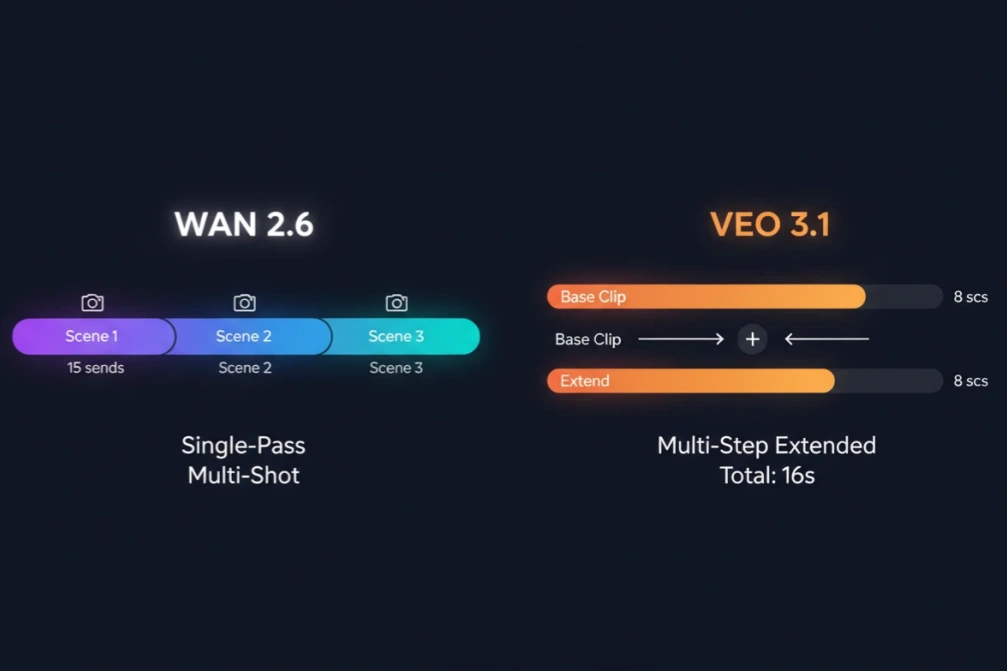
- Text/Image-to-Video: 5s, 10s, or 15s generation in single pass
- Video Reference Mode: Limited to 5s or 10s only
- Multi-Shot Capability: Intelligent scene transitions with simple prompts
- Longer Content: Requires stitching multiple clips together
Veo 3.1:
- Base Generation: 4, 6, or 8 seconds per clip with cinematic quality
- Extend Feature: Seamlessly continue action for longer sequences
- Longer Content: Requires extending clips in multiple passes
Winner: Both (depending on your workflow)
- Wan 2.6 advantage: Up to 15s single-pass with multi-shot transitions (text/image mode)
- Veo 3.1 advantage: Higher quality 8s base clips, better extension continuity
Neither model offers true one-click long-form generation. Choose based on whether you prefer longer single clips (Wan 2.6) or higher-quality shorter clips with better extension tools (Veo 3.1).
2. Audio Capabilities: Music Creation vs Native Sync
Key Difference: Wan 2.6 creates standalone music; Veo 3.1 synchronizes audio with video.
🌟 Wan 2.6: Standalone Music Generation
Beyond video audio sync, Wan 2.6 uniquely offers:
- 3-4 Minute Full Songs: Complete tracks with verse, chorus, bridge structure—not just background audio
- Independent Music Creation: Generate songs separately from video projects
- Music-First Workflow: Create soundtrack first, then match visuals to music
Tradeoff: Music duration is fixed at 3-4 minutes; cannot customize song length.
🌟 Veo 3.1: Cross-Feature Audio Integration
Beyond basic audio sync, Veo 3.1 uniquely offers:
- Consistent Audio Across Modes: Audio generation works seamlessly across Ingredients, Frames, and Extend features
- Realistic Lip-Sync: Speaking characters with accurate mouth movements
- Spatial Audio Quality: Professional environmental sound design
Tradeoff: Cannot create standalone music tracks; audio is always tied to video output.
Winner:
- 👉 Music video creators & musicians: Wan 2.6 (full song generation)
- 👉 Cinematic projects & dialogue scenes: Veo 3.1 (superior audio-video sync)
For music-driven content, Wan 2.6 is purpose-built. For cinematic atmosphere, Veo 3.1 delivers superior video generation with native audio sync.
3. Character Reference & Consistency
🌟 Wan 2.6: Video-Based Dynamic Reference
Key Advantage: Captures movement and voice, not just appearance.
Technical Specs:
- Input: 1-2 videos (MP4/MOV, 2-30s, max 30MB each)
- Reference Duration: Single video = 5s max; Dual videos = 2.5s each
- Prompt Syntax: Use "character1" and "character2" tags
- Supports: Humans, cartoons, pets, objects
Use Case Example: Upload video of your pet, generate scenes with same pet performing new actions while maintaining movement style and personality.
🌟 Veo 3.1: Image-Based Static Reference
Key Advantage: Precise visual style control across different scenes.
Technical Specs:
- Input: 1-3 static images (Ingredients to Video feature)
- Controls: Character appearance, object style, scene atmosphere
- Best For: Brand consistency, specific visual aesthetics
Use Case Example: Upload product photos, generate marketing videos maintaining exact product appearance and brand visual identity.
Winner:
- 👉 Dynamic character performance & multi-character scenes: Wan 2.6
- 👉 Precise visual style control: Veo 3.1
Wan 2.6's video-based approach captures movement and voice—essential for character-driven storytelling. Veo 3.1's image references work better for maintaining visual consistency without performance requirements.
4. Creative Control & Workflow
🌟 Wan 2.6: Prompt-Driven Multimedia Studio
Workflow Philosophy: Fast iteration with text prompts.
Unique Tools:
- Multi-Character Tagging: Control 2 characters independently ("character1 sings, character2 dances")
- Cross-Media Generation: Create video, image, and music in same platform
- Smart Multi-Shot: AI automatically creates scene transitions from simple prompts
🌟 Veo 3.1: Professional Editing Suite
Workflow Philosophy: Frame-level precision control.
Unique Tools:
- Frames-to-Video: Define exact start/end frames for seamless transitions
- Insert & Remove: Edit within generated videos (insert objects with realistic lighting; removal coming soon)
- Flow Platform: Professional interface for complex editing workflows
- Enterprise API: Gemini API + Vertex AI for scalable production
Winner:
- 👉 Script-driven narrative & quick iterations: Wan 2.6
- 👉 Granular editing & precise frame control: Veo 3.1
If you want to describe a scene and get results quickly, Wan 2.6 streamlines the process. For frame-level control and professional editing, Veo 3.1 offers the tools you need—check out how to make AI video for detailed workflows.
5. Image Generation Capability
🌟 Wan 2.6: Standalone Image Generator
- ✅ Text Rendering: Perfect text overlays in images
- ✅ Use Cases: Posters, illustrations, product packaging designs
- ✅ Multi-Subject Consistency: Maintains character appearance across e-commerce and comic scenarios
- ✅ Internal Reasoning: Understands relationships between text and visual elements
Independent image generation—not just a video assistant feature.
🌟 Veo 3.1: Video-Only Platform
- ❌ No Standalone Image Generation
- ✅ Ingredients as Reference: Images can be used as input for video generation
- Focus: Specialized for video creation only
Winner:
- 👉 Need cross-media creation (video + image): Wan 2.6
- 👉 Pure video generation focus: Veo 3.1
If your workflow requires both video and image assets, Wan 2.6 eliminates the need for separate tools.
6. Pricing & Accessibility
Wan 2.6 Pricing (Same as Wan 2.5)
Pay-Per-Second Pricing:
- 1080p: $0.15/second
- 720p: $0.10/second
- 480p: $0.05/second
Example: A 10-second 1080p video costs $1.50
Notes: Video reference input is billed based on actual reference duration (max 5s for single video, max 2.5s each for dual videos). Free testing quota: 50 images, 50 seconds of video.
Veo 3.1 Pricing
| Plan | Price | Credits/Month | Veo 3.1 Access |
|---|---|---|---|
| Free Tier | Free | Limited | ❌ No |
| Google AI Pro | $19.99/month | 1,000 | ✅ Limited |
| Google AI Ultra | $124.99/month* | 25,000 | ✅ Full |
*First 3 months at 50% off, then $249.99/month
Access Methods:
- Gemini App (consumer access)
- Gemini API (developer integration)
- Vertex AI (enterprise deployment)
- Flow (filmmaking workflows)
Winner:
- 👉 Budget-conscious creators: Wan 2.6 (pay-per-use from $0.05/sec)
- 👉 Enterprise & high-volume production: Veo 3.1 (subscription + API access)
How to Choose: Tips Based on Your Project Goals
✅ Choose Wan 2.6 For:
Music Creators & Musicians
- 3-4 minute full song generation with custom vocals, genres, and multi-language support (Chinese, English, Japanese, Korean)
- Music video production with synchronized visuals
- No competition here—it's purpose-built for music-driven content
Social Media Creators
- 15-second multi-shot videos perfect for TikTok, Reels, and YouTube Shorts
- Multi-character collaboration scenes (humans + cartoons + objects)
- Budget-friendly pay-per-second pricing ($0.05-0.15/sec)
E-commerce & Marketing
- Product demonstration videos with text overlays
- Creative social ads with custom soundtracks
- Cross-media creation (video + image + music in one platform)
✅ Choose Veo 3.1 For:
Filmmakers & Video Professionals
- Cinematic 1080p/24fps quality with film-grade lighting and color grading
- Professional editing tools (Frames-to-Video, Insert/Remove)
- Extended sequences using the Extend feature
- For related insights, check out Kling 2.6 vs Veo 3.1
Commercial Production
- High-quality advertising videos with photorealistic visuals
- Native audio synchronization (ambient sounds, dialogue, effects)
- Brand storytelling with premium production value
Developers & Enterprises
- Enterprise-grade API access via Gemini API and Vertex AI
- Scalable production infrastructure with proven reliability
- Comprehensive documentation and Google ecosystem integration
- Available now via Google AI Pro ($19.99/month)
FAQ
1. Can Wan 2.6 generate music like Suno or Udio?
Yes. Wan 2.6 generates 3-4 minute full songs with complete musical structure (intro, verse, chorus, outro). You control vocals, genre, language (Chinese, English, Japanese, Korean), and instrumentation through prompts. Veo 3.1 cannot generate music—it only syncs ambient audio with video.
2. Which is cheaper for low-volume production?
Wan 2.6 is more cost-effective for occasional use with pay-per-second pricing ($0.05-0.15/sec). Example: 10-second 1080p video = $1.50. Veo 3.1 requires $19.99/month minimum. For beginners testing AI video, Wan 2.6's pricing is friendlier.
3. Can I create 15-second TikTok videos in one generation?
Wan 2.6: Yes. Single 15-second generation with multi-shot transitions.
Veo 3.1: No. Maximum 8 seconds per clip; requires Extend feature for longer sequences (multi-step workflow).
4. Can I use these models on SeaArt AI?
SeaArt AI integrates leading video AI platforms with user-friendly interfaces and competitive pricing. Check the platform for the latest supported models and feature updates.
Conclusion
There's no universal winner — the "better" model depends on your workflow:
Choose Wan 2.6 when you need standalone music generation, 15-second multi-shot narratives, and cross-media creation in one platform.
Choose Veo 3.1 when you want cinematic quality, frame-level editing control, and enterprise infrastructure with proven API support.
Before committing to one pipeline, run a pilot test with your actual prompts to compare cost, generation speed, and output quality in your production environment.
Ready to explore both models? Discover more creative tools on the SeaArt AI homepage.
Related Articles
Wan 2.6 vs Sora 2: A Clear Guide to What Each Does Best
Kling 2.6 vs Veo 3.1: A Complete Video Model Breakdown
Kling 2.6 vs Sora 2: Production Reality vs. The Hype
Kling 2.6 vs Kling 2.5 Turbo: Is Native Audio a Game Changer?