


10 Best Kling 2.6 Prompts: How to Use for Video Synchronization
Have you ever felt the frustration of creating an incredible AI video, but it feels like a "silent film"? Until now, synchronizing voice and image required multiple tools and hours of editing.
With Kling 2.6, we enter the era of Native Audio: a model that generates pixels and sounds simultaneously, with perfect lip-sync. In this guide, master the Kling 2.6 prompts formula and learn to create immersive videos right now on SeaArt's video generator.
Inside Kling 2.6: What's New? (Technical Analysis)
Before we start writing prompts, it's crucial to understand what's happening "under the hood". Kling 2.6 isn't just an image quality update; it's a paradigm shift in AI audio-video synchronization.
Unlike tools that try to "glue" audio onto a finished video, Kling 2.6 generates both together. This means if a glass falls in the video, the "crash" sound happens exactly at the impact frame.
Real Specs (What You Need to Know)
To avoid frustrations, here are the real limitations and capabilities of the model (based on official documentation):
| Feature | Detail | Tip |
|---|---|---|
| Resolution | Up to 1080p | Ideal for YouTube/TV. |
| Duration | 5s (Standard) / 10s (Pro) | Use 10s for long dialogues. |
| Languages | English & Chinese | Use English for better lip-sync. |
| Modes | Text/Image-to-Video | Image-to-Video keeps face fixed. |
Kling 2.6 Prompts (Complete Masterclass)
The key to Kling 2.6 is structure. A vague prompt generates a generic result. To activate Native Audio, you must be explicit.
The Master Formula:
[Scene/Environment] + [Subject + Action] + [Audio/Dialogue] + [Technical Style]
1. The Film Director (Prompts for Suspense & SFX)
Here, the focus isn't speech, but immersion. We want AI sound effects that sell the reality of the scene.
- Scenario: A suspense film.
- The Secret: Describe the texture of sound.
Prompt: A dimly lit abandoned hospital corridor. [Camera: POV, shaky hand-held]. A wooden door at the end of the hall slowly creaks open.Audio: The sound of heavy, slow footsteps on broken glass, heavy breathing close to the microphone, and a sudden loud thunder clap outside.
🏷️ Video tags: AI horror video, sound effects generation, cinematic atmosphere
🔰 Why it works: "Creaks open" and "Footsteps on broken glass" give precise physical instructions.
2. The Advertiser (Prompts for Commercials and Narration)
Ideal for creating e-commerce commercials without hiring expensive voice actors.
- Scenario: Premium Coffee Commercial.
- The secret: Specify voice tone and separation between visual and audio.
Prompt: Extreme close-up of hot coffee being poured into a white ceramic cup, steam rising, golden lighting.Audio: [Narrator, soft female voice, premium tone]: "Wake up to perfection. SeaArt Coffee." Background sound of liquid pouring and soft jazz music.
🏷️ Video tags: AI product video, AI voiceover commercial
🔰 Why it works: The tag [Narrator, premium tone] activates professional narration mode, while "Background sound" creates audio layers.
3. The Screenwriter (Prompts for Multi-Character Dialogue)
This is the "Holy Grail" of AI talking video. Making two characters converse without the AI mixing voices.
- Scenario: A studio interview.
- The Hack: Use strict Character Tags ([]) and temporal transition words ("Immediately", "After that").
Prompt: A modern podcast studio. Two people sitting: a man in a suit (Host) and a woman in a casual jacket (Guest).Audio:[Host, deep male voice, serious]: "Welcome to the future of AI. Tell us, is it real?"Immediately after, [Guest, cheerful female voice, fast pace]: "It is absolutely real, and it's happening right now!"
🏷️ Video tags: AI lip sync, multi-character dialogue
🔰 Why it works: The word "Immediately after" prevents voices from overlapping, ensuring clean dialogue.
4. The Musician (Prompts for Music Videos and Singing)
Kling 2.6 understands rhythm. You can create complete music videos.
- Scenario: Jazz Performance.
- The Secret: Define the musical genre and lyrics in quotes. Use 10s mode to give the melody time to develop.
Prompt: A smoky jazz bar, vintage style. A female singer with a retro microphone on stage.Audio: [Singing, Jazz style, soulful emotion]: "Fly me to the moon, let me play among the stars..."Accompaniment: Double bass and piano solo background.
🏷️ Video tags: AI music video generator, Kling 2.6 music mode
🔰 Why it works: "Accompaniment" instructs the AI to generate a backing band, separating the main voice from instruments.
5. The Viral Influencer (TikTok-Style Prompts and Vlog)
The most requested category by creators: vertical videos (9:16) with fast speech.
- Scenario: A travel vlog or quick tip.
- The Secret: Use 9:16 ratio and speed keywords ("fast pace", "energetic").
Prompt: [Ratio: 9:16] A young man holding a camera selfie-style on a busy Tokyo street at night, neon lights.Audio: [Vlogger, energetic male voice, fast pace]: "Guys, you won't believe what I just found in Akihabara! Check this out!"Background: Loud city traffic noise and arcade game sounds.
🏷️ Video tags: Kling 2.6 vertical video, viral video prompt
🔰 Why it works: "Fast pace" and "Selfie-style" create the authentic vlog aesthetic, essential for TikTok's algorithm.
6. The Minimalist (ASMR and Ambient Sound Prompts)
Sometimes, silence speaks louder. "Native Audio" shines when creating realistic sound textures without any voice.
- Scenario: Nature or Relaxation.
- The Secret: Focus entirely on environmental description.
Prompt: Close-up of raindrops hitting a window pane during a storm, cozy indoor lighting. No people.Audio: Heavy rain pouring, distant thunder rumbling, and the subtle sound of a fireplace crackling nearby. No speech.
🏷️ Video tags: AI ASMR video, Kling 2.6 ambient mode
🔰 Why it works: The "No speech" tag ensures the AI doesn't try to hallucinate human voices, focusing only on sound purity.
Negative Prompt (Optional):
To ensure clean audio, add to your Negative Prompt: no overlapping voices, no distortion, no extra noise, clean background audio.
How to Use Kling 2.6 on SeaArt (From Beginner to Pro)
Now that you have the prompts, you need the right tool. SeaArt.ai stands out as the ideal platform to explore Kling 2.6, eliminating technical barriers to entry. By centralizing the best AI models in a single intuitive ecosystem, SeaArt allows creators of all levels to access professional resources — such as native audio generation — without the need for powerful hardware or complex configurations.
To facilitate your journey, SeaArt has integrated Kling 2.6 in two strategic ways:
Path A: AI Apps (Quick Workflow with Kling o1)
Ideal for beginners and viral trends.
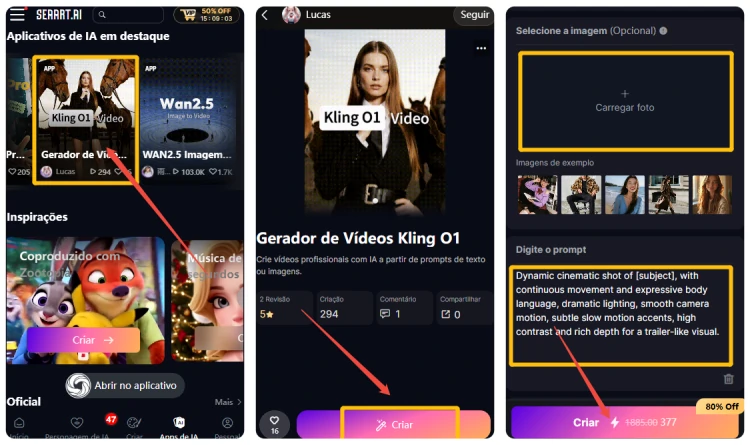
Step 1: Access
Go to the "AI Apps" tab on SeaArt and choose the Kling O1 video generator app.
Step 2: Configure
Upload up to two images and enter your Kling 2.6 prompts (or let SeaArt suggest text automatically). Choose the duration (5 or 10 seconds).
Step 3: Generate
Click "Create". In just a few minutes, your video will be perfectly generated.
Path B: Model Studio (Full Control)
For professionals who need fine-tuning.
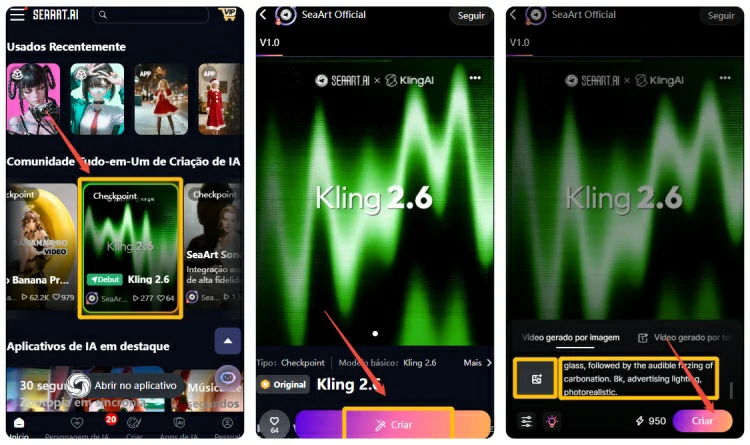
Step 1: Select
Go to the "Home" tab on SeaArt, access the Kling 2.6 model and click "Create".
Step 2: Customize
Upload an image or use text prompts only. Adjust parameters such as Sound (for sound effects or BGM) and aspect ratio. Click "Create".
Step 3: Download
After generation, you can download the video for free and without watermark to share!
🎦 Practical Examples on SeaArt: What You Can Create?
To inspire your first creation, here are 4 real examples of videos generated on SeaArt using Kling 2.6, with their respective prompts.
1. Historical Talking Portrait (Education)
Bring historical figures to life for classes or documentaries.
Prompt: [Ratio: 16:9] A realistic oil painting of Napoleon Bonaparte coming to life in a study room.Audio: [Speaker, French accent, authoritative]: "Victory belongs to the most persevering."Background: Subtle crackling of fireplace and distant cannon fire.
SeaArt Tip: Use Image-to-Video mode and upload a classic painting to maintain visual consistency.
2. Sci-Fi Trailer (Entertainment)
Create dense and futuristic atmospheres.
Prompt: Cyberpunk city street at night, neon rain, flying cars passing by. [Camera: Drone shot, panning down].Audio: Futuristic synthesizer music rising in tension, mechanical whirring of engines, and a robotic voice saying "System initialized."
SeaArt Tip: In Model Studio, increase "Motion Strength" to 0.7 to give more dynamism to flying cars.
3. Customer Testimonial (Marketing)
Generate social proof for products without filming real people.
Prompt: Medium shot of a friendly middle-aged woman in a bright kitchen, holding a juice bottle.Audio: [Speaker, American accent, enthusiastic]: "I never thought staying healthy could taste this good! It's amazing."Background: Morning birds chirping and breakfast preparation sounds.
SeaArt Tip: Use the [Eye Contact] tag in the visual prompt to ensure the character looks at the camera.
4. Guided Meditation (Wellness)
Combine relaxing visuals with soft voices.
Prompt: Serene mountain lake at sunrise, mist rolling over the water, 4k realism.Audio: [Speaker, soft whisper, calming]: "Breathe in deeply... and let go of all your stress."Background: Gentle water lapping and wind through pine trees.
SeaArt Tip: Select 10s duration to allow for slow, paused speech.
Pro Tip: Exporting Separate Audio
Many creators ask: "Can I use the generated audio in another editor?"
Yes! Although Kling 2.6 generates a single video file (.mp4), on SeaArt you can use AI audio tools or simply extract the audio track using any online converter, since the sound quality is generated in high fidelity.
Common Questions About Advanced Kling 2.6
❓ Best keywords for realistic audio in Kling 2.6
To get high-fidelity results, use terms like: high fidelity, crystal clear audio, immersive soundscape, binaural recording, studio quality. Avoid generic terms like "loud sound".
❓ How to ensure perfect lip-sync in Kling 2.6
The secret lies in three pillars: 1) Visible face: Use full face visible in the visual prompt. 2) Language: Write the dialogue in English. 3) Duration: Use 10s mode for sentences with more than 5 words.
❓ When to use 5s vs 10s in Kling 2.6
- Use 5s for: Quick sound effects (explosions, passing cars), short facial reactions, memes.
- Use 10s for: Complete dialogues, music, complex narratives, environmental scenes that need to "breathe".
Frequently Asked Questions
1. How to write a prompt for the character to "look at the camera" while speaking?
Add explicit visual instructions at the beginning of the prompt, like [Camera: Eye level, looking at viewer] or Front facing view. This helps the model align the face for more precise lip-sync.
2. Why is my audio prompt ignored and the video comes out silent?
Check two points on SeaArt: 1) The "Sound" button must be ACTIVATED. 2) Your audio prompt must be separated or clearly marked (ex: Audio: "..."). If you mix visual and sound description without separation, the AI can get confused.
3. What keywords work best for realistic sound effects?
Use onomatopoeia and texture descriptions. Instead of just "car noise", try: Audio: Engine revving, tires screeching on asphalt, distant honking. The more specific the adjective (ex: "muffled", "loud", "distant"), the better the result.
4. Can I use prompts in Portuguese to generate dialogues?
Kling 2.6 understands English and Chinese better. If you write the dialogue in Portuguese (ex: Audio: "Hello world"), it may generate with a foreign accent. Recommendation: Write the structure prompt in English and, if you need Portuguese, accept that it may require several attempts (reroll) to sound natural.
5. How to prevent background music from covering the narrator's voice?
In the audio prompt, specify the sound hierarchy. Use: Audio: Clear narration in foreground, soft ambient music in background. Words like "soft", "low volume" or "distant" help push the music behind the voice.
6. Is there a "negative prompt" for audio?
Yes! In SeaArt's Negative Prompt field, you can add unwanted audio terms, like: static noise, background chatter, robotic voice, distorted audio, bad music. This cleans up the sound generation.
Conclusion: The Future is Now
Kling 2.6 isn't just a tool; it's an invitation to tell complete stories. The barrier between "imagining" and "creating" has never been lower.
Whether you're a content creator, a marketing professional, or just a tech enthusiast, the power to create videos with cinematic quality and synchronized audio is now at your fingertips.
Related Articles
Kling 2.6 vs Sora 2: Production Reality vs. The Hype
Kling 2.6 vs Veo 3.1: Full Comparison for Creators
Kling 2.6 vs Kling 2.5 Turbo Review: Performance & Value Compared
Gemini 3: A Complete Beginner-Friendly Guide to Google's Latest AI Model

Gemini 3 vs ChatGPT: Features, Pricing & How to Choose
Nano Banana 2 (Pro) vs. Nano Banana 1: The New Upgrades