








Kling 2.6 vs Sora 2: Production Reality vs. The Hype
The industry anxiously awaits Sora 2 and its promise of native audio, but viral demos don't meet deadlines. There's a critical gap between future expectations and the need for an AI video generator ready for immediate production.
While OpenAI limits access, Kling 2.6 already delivers the engineering tools the market demands. This analysis focuses on reality: for those who need to deliver projects today, the stability and availability of Kling 2.6 beats the hype.
Quick Comparison: What Really Matters?
Before diving into technical details, we've prepared this visual guide to help you decide which tool meets your immediate needs. We focus on what everyday users and professionals need to know:
| What do you want to know? | Kling 2.6 | Sora 2 |
|---|---|---|
| Availability | ✅ Immediate (SeaArt/API) | Restricted (Red Teaming/SeaArt Sora 2) |
| Video Duration | 5s / 10s (Native) | Up to 60s (Promise) |
| Aspect Ratio | 16:9, 9:16, 1:1 (Flexible) | Flexible (Promised) |
| Native Audio | ★★★★☆ (Synchronized) | Awaiting Benchmarks |
| Resolution | 1080p (Pro Mode) | 1080p+ (Promised) |
| Action Physics | ★★★★☆ (Fluid and Stable) | ★★★★★ (World Simulation) |
Note: Comparison based on publicly available information as of December 2025. Ratings reflect internal performance tests (Kling) and analysis of official demos (Sora). Actual results may vary.
Sora 2: The Sleeping Giant (Potential and Expectation)
It's impossible to ignore Sora's impact. Sora 2 is widely considered one of the most advanced models ever publicly demonstrated. The fluidity of movements, the understanding of complex physics, and more recently, the demonstrated ability to generate audio synchronized with video, have established the quality "ceiling" for the entire industry.
What Makes Sora 2 Unique?
Unlike traditional generators, Sora 2 operates as a "World Simulator". According to technical reports, it doesn't just "draw" pixels, but simulates the physics of objects in 3D. This suggests revolutionary potential for areas like architecture, climate simulation, and highly complex visual effects, where physical accuracy is more important than artistic aesthetics.
The Reality Check
However, for the pragmatic professional, potential doesn't pay the bills. There are real barriers preventing Sora 2 adoption in commercial workflows today:
- Limited access: The model remains under rigorous Red Teaming (a process where experts intentionally try to break the system to find vulnerabilities). Most creators only watch the videos; they don't create them.
- Pending public validation: Unlike tools tested by millions of daily users, Sora 2's maturity under real server load and diverse usage hasn't been publicly validated at scale.
- Commercial uncertainty: Without a public pricing table or defined SLA (Service Level Agreement), companies can't plan budgets based on its API.
Kling 2.6: The Engineering of Availability
While the debate about Sora continues, Kling 2.6 has positioned itself as the engineering answer to market demand. The philosophy here is clear: deliver "state-of-the-art" features in a production-ready package, immediately accessible via creative hubs like SeaArt AI.
1. Native Audio in Production (No Waiting)
The big promise of 2025 was AI-generated video with sound. Kling 2.6 already offers this functionality in a stable and accessible way for real production.
🚩 Deep Dive: How Does Synchronization Work?
Kling 2.6 uses a latent alignment approach. Unlike adding sound in post-production, the model generates audio and video data simultaneously in the same vector space. This ensures that when a glass falls, the "crash" sound occurs exactly at the impact frame. With the "See the Sound, Hear the Visual" feature, the model goes beyond simple ambient sound. Creators are already using Kling 2.6 for:
- Complex narratives: From dramatic monologues to multi-character dialogue (Multi-turn dialogue).
- Musical performance: The model supports generating characters Singing or Rapping with precise lip-sync.
- Diegetic sound design: Sounds that belong to the action (footsteps, breaking glass, car engines) generated in harmony with the scene's physics.
💡 In Practice: Real Use Cases
- Marketing: Small studios are already producing 10s commercials with native sound effects (Sound FX), eliminating hours of audio editing.
- Education: Course creators use lip-sync for explanatory avatars (native support for English and Chinese), scaling content production.
2. Documented and Transparent Control
Trust comes from predictability. Unlike a "black box", Kling 2.6 operates with clear API documentation, allowing developers and studios to integrate the tool into their pipelines.
- Professional mode: Ensures maximum visual fidelity at 1080p (requiring more computational power for superior results), with improved temporal coherence that drastically reduces flickering artifacts in complex scenes.
- Extended duration: Native support for generating 10-second clips, essential for longer narratives.
- Flexible formats: Full control over aspect_ratio (16:9, 9:16, 1:1) for multi-platform adaptation.
⚠️ Point of attention: While robust, Kling 2.6 may occasionally present "hallucinations" in scenes with extremely complex physics (like turbulent liquids), where Sora 2 would theoretically have an advantage. It's a production tool, not a perfect physics simulator.
Quick Verdict: Who Is Each Model For?
- Sora 2: For research labs, futurists, and those seeking "state-of-the-art" physics simulation (in no rush).
- Kling 2.6: For content creators, marketing studios, and producers with real delivery deadlines (today).
This table doesn't say that Kling is technologically "better" in the abstract, but affirms that it's infinitely more useful for those with a delivery deadline this Friday.
How to Integrate Kling 2.6 Into Your Workflow (via SeaArt)
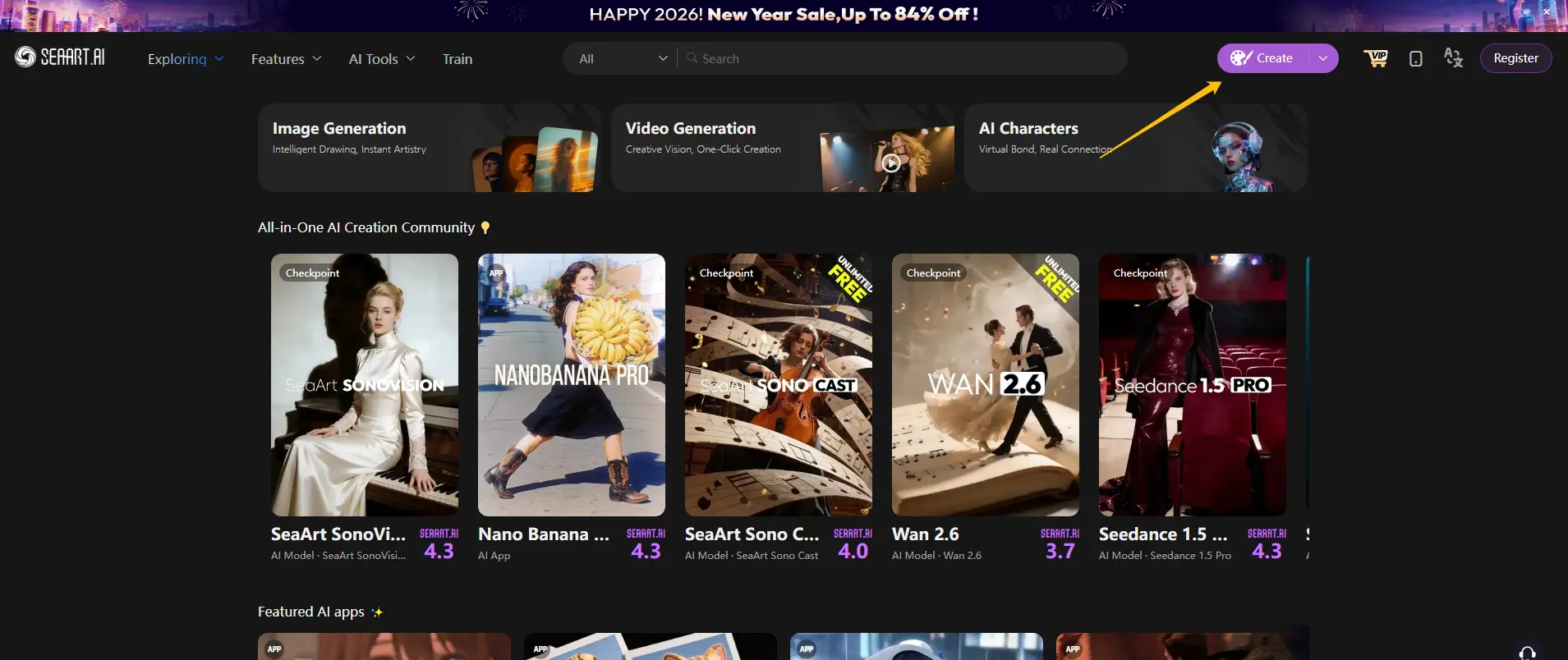
Explore Unique Styles with Community Models
One of the great advantages of using Kling 2.6 on SeaArt is access to a vast library of trained Kling models. Instead of starting from scratch, you can choose fine-tuned models (LoRAs) for specific styles, like anime, claymation, vintage photorealism, or cybertech. This accelerates the creative process and ensures a consistent aesthetic for your brand or project.
🎦 The "Aesthetic + Movement" Workflow
A common limitation of "Text-to-Video" generators is aesthetic randomness. To overcome this and achieve cinematic quality, we recommend the following pipeline based on the official prompt formula:
1. SeaArt Image Generation:
Use models like SeaArt Film v2.0 or SeaArt Infinity (within the SeaArt ecosystem) to create the perfect initial image (lighting and composition control).
2. Controlled Animation (Kling o1 Image-to-Video):
● Structured prompt: [Scene: Sunset cafe] + [Subject: Woman smiling] + [Movement: Smooth dolly-out camera] + [Audio: Light laughter and jazz background]
● Pro tip: Use quotation marks "" to delimit specific speech (ex: "Good morning!").
3. Result:
A high-definition video with the exact aesthetic you planned and synchronized audio.
Practical Guide: Running on SeaArt
- Access the studio: Enter SeaArt's Video Generation tool.
- Custom configuration: Type your prompt or upload an image. In the left sidebar, freely adjust the aspect ratio, duration, and add voiceover or audio. Click "Create".
- Download and edit: Download the result immediately for free and without watermark, or continue editing until satisfied.
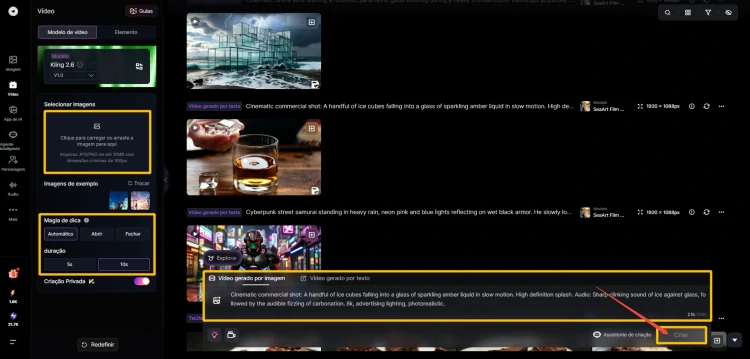
Pro Tip: Don't waste time setting up complex local environments. SeaArt has already pre-configured Kling 2.6 for maximum performance.
Frequently Asked Questions
1. Is Kling 2.6 free?
SeaArt offers free daily credits that allow you to test Kling 2.6. For high-definition generations without watermarks, there are affordable subscription plans.
2. Does Kling 2.6 work with external images?
Yes. You can upload any image (created in Midjourney, FLUX, or real photos) to animate it using the Image-to-Video function.
3. What types of video and audio can I create?
Kling 2.6 is multimodal: it generates everything from monologues and complex dialogues to musical performances (Singing/Rap) and scenes with precise sound effects (breaking glass, cars). Supports 5s or 10s videos.
4. What languages are supported for speech?
Currently, native voice generation best supports English and Chinese. Other languages can be automatically translated or inserted via external lip-sync, but native accuracy is optimized for these two languages.
5. Can I generate videos without sound?
Absolutely. Audio is optional. You can turn off the audio switch to generate only the "silent" video (and save credits).
6. Is audio separated from video?
In native generation, they come in the same MP4 file. However, any simple video editor can separate the audio track for post-production adjustments.
Conclusion: The Logical Choice for Today
Sora 2 is an undeniable research milestone, but creators live by publishing. Kling 2.6 transforms the promise of synchronized audio into a stable and accessible tool today.
Don't wait on waiting lists when production demands results now. The logical choice is to create, not to wait.
Related Articles
Nano Banana 2 (Pro) vs. Nano Banana 1: The New Upgrades
Gemini 3: A Complete Beginner-Friendly Guide to Google's Latest AI Model
Gemini 3 vs ChatGPT: Features, Pricing & How to Choose
Kling 2.6 vs Veo 3.1: Full Comparison for Creators
Kling 2.6 vs Kling 2.5 Turbo Review: Performance & Value Compared
