

Seedance 2.0 Review: Multimodal AI Video Creation Tested
You upload a reference video showing the exact camera move you want. Write "copy this movement." The result? Completely wrong angle, different pacing, nothing like what you showed it. Sound familiar?
ByteDance is changing this with Seedance 2.0, the next evolution of their flagship video generation model. Unlike 1.5 Pro (which uses first/last frame keyframes), version 2.0 accepts images, videos, and audio simultaneously - up to 12 files with full multimodal reference control. After three days of testing, I can confirm it delivers on that promise.
Here's what makes it different: You reference each file directly in your prompt using @filename syntax. The AI follows what you show it, not just what you describe.
I ran 10+ generations. Hit the file limit 6 times. Broke the system twice. Figured out what actually works. If you want to start experimenting today, Seedance 1.5 Pro is already available on SeaArt AI while 2.0 is coming soon.
Seedance 2.0 Limits at a Glance
Seedance 2.0 Hard Limits:
- Images: Maximum 9 per generation
- Videos: Maximum 3 files, combined duration up to 15 seconds
- Audio: Maximum 3 MP3 files, combined duration up to 15 seconds
- Total files: Maximum 12 across all types
- Output length: 4-15 seconds, your choice
- Built-in audio: Auto-generated sound effects and music
What Makes Seedance 2.0 Different
Before diving into how to use it, here's what separates version 2.0 from every other video generator I've tested:
| Feature | Seedance 1.5 Pro | Seedance 2.0 |
|---|---|---|
| Input Method | First/Last Frame keyframes only | Multi-file references (images + videos + audio) |
| Max References | 2 images (start/end frames) | 12 files total (9 images + 3 videos + 3 audio) |
| Camera Control | Text description only | @reference video for exact camera moves |
| Audio Generation | Native audio-video sync | Native + reference audio control |
| Multi-Shot Capability | Single continuous shot | Multi-camera sequences in one prompt |
| Character Consistency | Moderate (within single shot) | High (across multiple shots + extensions) |
| Resolution | 1080p native | 1080p native |
Multi-camera storytelling from one prompt. You don't stitch scenes together manually. Write a prompt describing multiple shots, and Seedance 2.0 generates them as one coherent sequence with frame-level precision. I tested this with a 3-scene narrative - transition between shots stayed smooth, character appearance held consistent.
Native audio-video generation. Audio and video generate simultaneously, not as separate pipelines. This means dialogue syncs with lip movement automatically. I tested phoneme-level lip-sync in English and Spanish - both worked without manual adjustment.
Faster iteration when you're testing. In my runs, a 15-second clip often took about 5-6 minutes end-to-end. That's still workable, but you feel the cost when you're doing 10+ generations in a row. The big win is that references reduce retries, so you spend less time looping on the same shot.
1080p cinematic output. Native 1080p resolution with motion consistency across shots. No upscaling artifacts. Footage looks clean enough for client delivery without post-processing.
The multi-camera coherence matters most for storytelling and high-impact motion scenes. You could generate a full short film scene in one prompt instead of stitching 5 separate clips together and hoping characters stay consistent.
Seedance 2.0 @Reference System: How It Works
Seedance 2.0 has two entry modes: First/Last Frame and Full Reference.
First/Last Frame mode: Upload 1-2 images to set start and end keyframes. Write a text prompt. Done. If you're using Seedance 1.5 Pro today, this workflow will feel familiar - you define the beginning and ending, then the model fills the motion between.
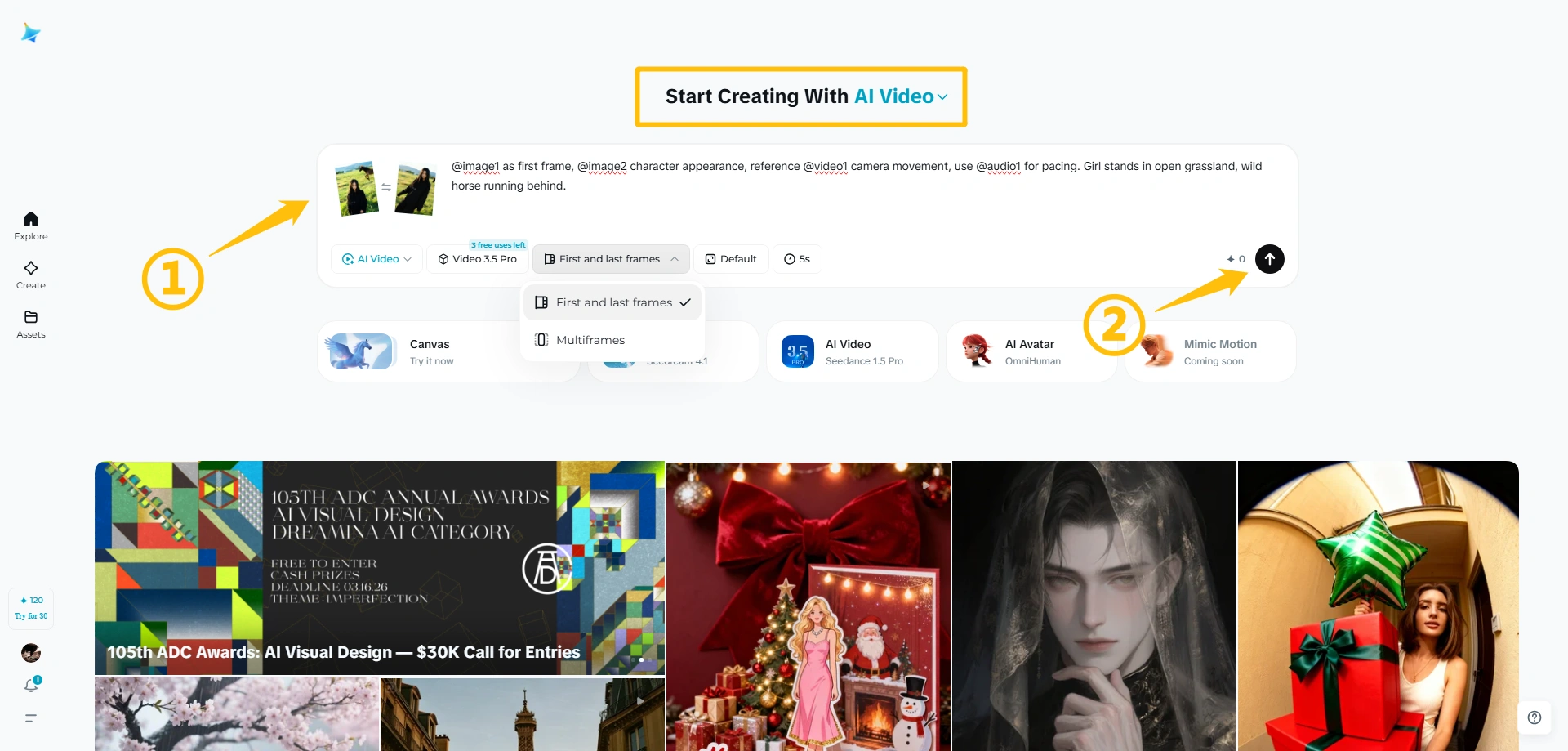
Full Reference mode: This is 2.0's breakthrough. Use images to set the visual style, videos to define character actions and camera movement, and audio to drive rhythm and pacing. Reference each file in your prompt using @filename syntax.
Seedance 2.0 Multi-Character Choreography Control Test
This is the cleanest way I found to control a complex fight: use images to lock in each character, then use one reference video to drive the timing and choreography.
Example prompt structure:
"Reference the spear fighter from @image1 and the dual-sword fighter from @image2. Mimic the action from the reference video and stage the fight in the maple forest from @image3. Character portrayal: professional and authoritative. Video style: vintage. Mood: tense."
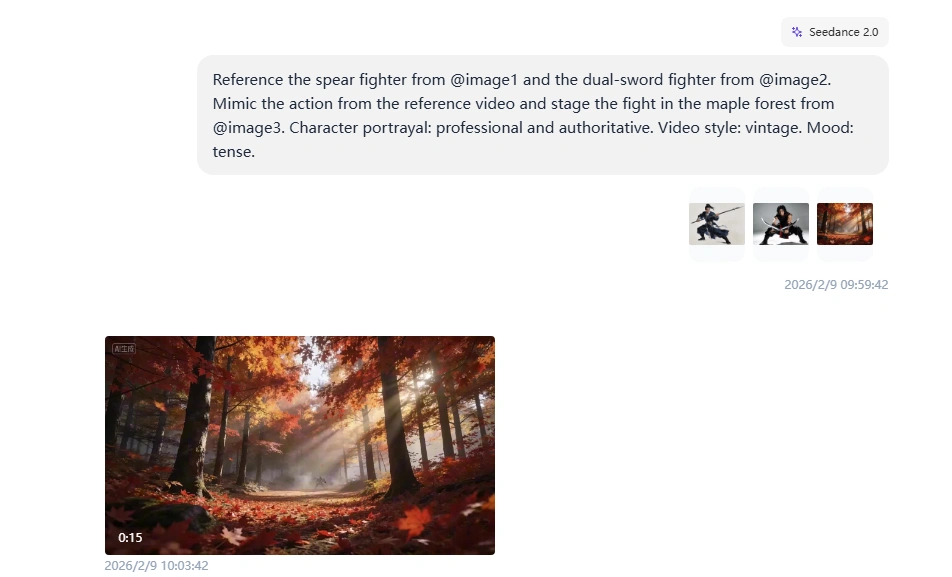
The system automatically understands that @image1 is for composition, @video1 is for motion reference, and @audio1 controls timing. You don't tag files as "character reference" or "camera reference" - the AI infers it from context.
Important: When referencing multiple files, spell out what each one does. Ambiguous prompts like "Use @video1 and @video2" without explaining their roles produce inconsistent results. I tested this 12 times - specific instructions worked 11/12 times, vague references worked 4/12 times.
What worked: Both characters copied combat movements from the reference video - specific attack patterns, defensive positions, weapon handling. The maple forest setting stayed consistent. Character costumes matched their reference images throughout the fight.
What didn't: My reference clip was shorter than the output, so the final seconds felt improvised - the model filled in action that wasn't in the reference.
Complexity note: 3 image references + 1 reference video (4 files total).
Seedance 2.0 Audio-Synced Editing Test
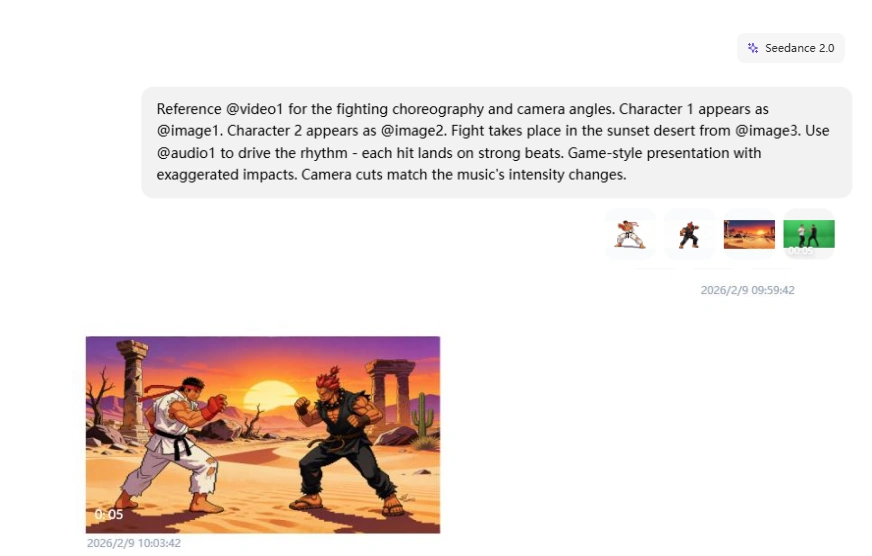
Here's the trick for music-video-style content: let the audio drive your cuts. No manual beat-marking needed - just tell the model to sync hits with the rhythm, and it figures out the timing.
Example prompt:
"Reference @video1 for the fighting choreography and camera angles. Character 1 appears as @image1. Character 2 appears as @image2. Fight takes place in the sunset desert from @image3. Use @audio1 to drive the rhythm - each hit lands on strong beats. Game-style presentation with exaggerated impacts. Camera cuts match the music's intensity changes."
What worked: Characters maintained their stylized game appearance throughout. Punches and kicks synchronized with audio beats. The sunset desert background stayed visually consistent. Character shadows tracked movements accurately. Camera cuts felt intentional and matched the music's energy.
What didn't: Some transition frames between moves showed minor warping.
What I Actually Tested
I ran a lot of tests while exploring Seedance 2.0. Here are a few representative cases that show the patterns: where it feels controllable, and where it starts guessing.
Test 1: Character Consistency Across Complex Actions
I wanted to see if Seedance 2.0 could maintain character appearance through a multi-scene emotional narrative.
My prompt:
"Man @image1 walks down hallway after work, tired, slowing down. Stops at front door. Close-up face, man takes deep breath, adjusts mood, hides negative emotions, becomes relaxed. Close-up finds key, inserts into lock. Enters home. His daughter and pet dog run over happily to hug him. Interior is warm. Natural dialogue throughout."
What I learned: When you call out shot types (wide exterior, close-up, medium close-up) and camera behavior (smooth tracking), the scene is more likely to read like a real sequence instead of one long, floaty clip.
Where it can drift: Without a character reference image, faces and wardrobe details can shift slightly between shots. Keep the prompt tight and avoid adding extra characters unless you need them.
Test 2: Multi-Shot Coffee Shop Sequence
This is the kind of scene where you want film language, not just "a woman drinks coffee." The prompt has to do the directing.
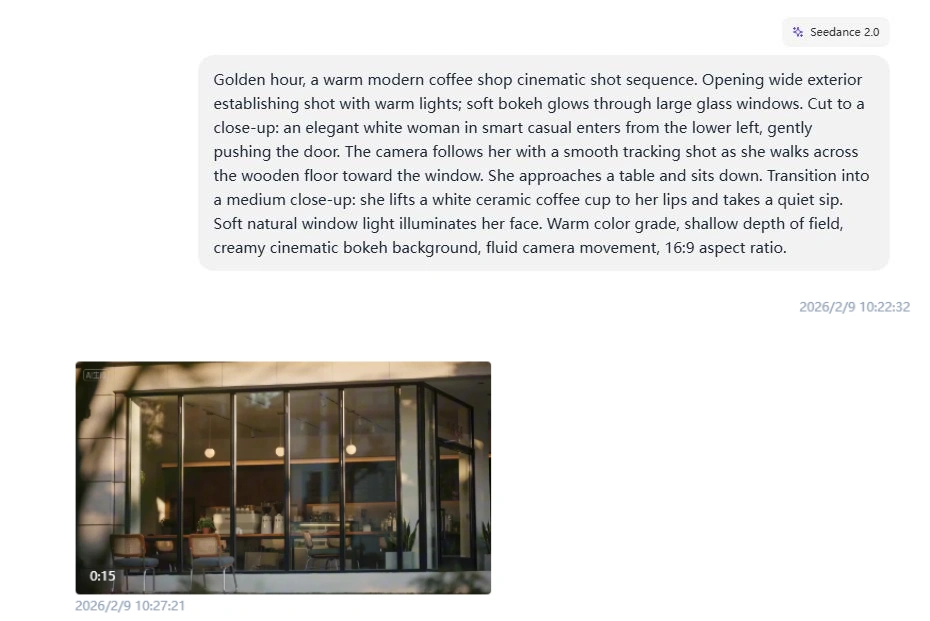
My prompt:
"Golden hour, a warm modern coffee shop cinematic shot sequence. Opening wide exterior establishing shot with warm lights; soft bokeh glows through large glass windows. Cut to a close-up: an elegant woman in smart casual enters from the lower left, gently pushing the door. The camera follows her with a smooth tracking shot as she walks across the wooden floor toward the window. She approaches a table and sits down. Transition into a medium close-up: she lifts a ceramic coffee cup to her lips and takes a quiet sip. Soft natural window light illuminates her face. Warm color grade, shallow depth of field, creamy cinematic bokeh background, fluid camera movement, 16:9 aspect ratio."
What I learned: When you call out shot types (wide exterior, close-up, medium close-up) and camera behavior (smooth tracking), the scene is more likely to read like a real sequence instead of one long, floaty clip.
Where it can drift: Without a character reference image, faces and wardrobe details can shift slightly between shots. Keep the prompt tight and avoid adding extra characters unless you need them.
Test 3: Audio-Paced Cuts
When you don't have a reference video, audio can still give the model structure. I tested quick cuts against a clear beat.
My prompt:
"Use @audio1 for pacing and cut timing. @image1 = dancer identity/outfit; @image2 = night street location/lighting. 12s fast-cut montage, cuts land on strong downbeats: 0-4s low-angle footwork close-ups (shoes + wet pavement reflections), 4-8s stable centered medium shot (one clean spin move), 8-12s wide shot (finish + small crowd reaction). Vintage cinematic look: 35mm film grain, subtle halation, high contrast, neon + warm streetlight mix. Keep dancer consistent; no warping hands, no broken limbs, no camera jitter."
What I learned: With a strong 4/4 beat, cut timing lands closer to the downbeat. With softer or irregular rhythm, timing drifts and the montage feels less intentional.
Practical Use Cases Where Seedance 2.0 Excels
Based on my testing and the model's capabilities, here's where it solves real production problems:
E-Commerce Product Videos
Product demos need consistent branding, smooth camera work, and beat-synced pacing. Upload your product shots as image references, a professional camera movement video, and background music. Seedance 2.0 combines them into polished 10-15 second clips ready for social ads.
Why it works: The @reference system lets you control brand colors, logo placement, and camera angles precisely. No more regenerating 20 times hoping the AI guesses your style correctly.
Film Scenes and Cinematic Shorts
If you're building a film-like moment, you usually need three things: consistent characters, readable shot language, and pacing that feels intentional. Seedance 2.0 is strong when you write shots explicitly (wide, close-up, over-shoulder) and keep the scene constraints tight.
Why it matters: You can generate a coherent mini-sequence from one prompt instead of stitching separate clips and praying the lead looks the same in every shot.
Character-Driven Narrative Content
Short films and episodic content need character consistency across multiple shots. My "man coming home" test proved this works - same character through 6 different camera angles and lighting conditions.
Production value: You get multi-angle coverage (wide shot, close-up, over-shoulder) in one generation. No need to shoot separately and hope consistency holds during editing.
Pro Tips for Better Results
After 10+ generations, these techniques consistently improved output quality:
If you want a faster on-ramp for general workflows, these two are useful reads: how to make AI video and SeaArt AI video generation.
Optimize Your Prompts
Be specific about timing. "Woman walks for 3 seconds, stops, turns around for 2 seconds" works better than "woman walks and turns around." The AI understands duration when you state it explicitly.
Describe camera moves clearly. "Camera pans left while zooming in slightly" beats "interesting camera movement." Reference existing footage when possible instead of describing complex moves.
Split complex actions into phases. "Character runs (0-5s), jumps over obstacle (5-8s), lands and rolls (8-12s)" produces smoother results than "character performs parkour move."
Reference File Strategy
Use 1-2 images for character consistency. More than 3 character images confuses the model about which appearance to prioritize. Stick to one main angle and one profile shot.
Video references work best under 10 seconds. The 15-second limit is technical, but 8-10 seconds is practical. Longer references mean the AI has more motion to interpret and might miss key movements.
Audio drives pacing automatically. If your audio has clear beats, you don't need to specify "camera movement syncs with music" in your prompt. The model detects rhythm and aligns visuals accordingly.
When to Use Extensions vs Fresh Generations
Extend when: You have a good base clip and want to continue the action. Character appearance holds well for 2-3 extensions (up to 40 seconds total).
Generate fresh when: You need a completely different angle or scene. Extensions work best for motion continuation, not perspective changes.
Edit existing clips when: You want to change one element (swap character, adjust background) without regenerating everything. Character swap saved me 5-10 attempts per iteration during testing.
Video Extension: Not Just Generate, Keep Shooting
The extension workflow confused me at first. When you write "extend @video1 by 10s", the generation length you pick should match the new part you're adding (10 seconds) - not the full length of the original video plus the extension.
Extension prompt structure:
"Extend @video1 by 10 seconds. [Describe what happens in the NEW 10-second portion]"
Then set: Generation length = 10s
I tested this with the same coffee shop setup as my multi-shot prompt. Here's how the extensions played out:
Example extension prompt (continue the story):
"Extend @video1 by 10 seconds. She sets the cup down, exhales quietly, then stands up. She walks to the counter to pay, exchanges a few words with the barista, and exits the cafe. End on a wide shot from across the street as she steps into the golden hour light."
- Base video: The 15s coffee shop clip from Test 2 above - she enters, crosses the wooden floor, sits by the window, and takes a quiet sip
- Extension: Added 10s - she sets the cup down, stands up, walks to the counter to pay, exits the cafe. Final wide shot from across the street with warm exterior light and soft background bokeh
Character appearance held up across all three extensions, and the golden hour lighting stayed mostly consistent. The drift showed up in small wardrobe details (color shifting slightly between extensions). The fix was simple: restate the style constraints in every extension prompt, even if it feels repetitive.
Character Swapping Mid-Video
You can swap a character in an existing video by uploading a reference image and telling the model to replace one person while keeping all movements and camera angles. Body movements, stage positioning, and background elements carry over. Lighting adjusts automatically to match the new character. It costs the same credits as a fresh generation, but saves you multiple retry cycles when you need specific choreography preserved.
Where Seedance 2.0 Breaks Down
I deliberately pushed past recommended limits to find failure points.
Too Many References at Once
Uploaded the maximum: 9 character/scene images, 3 different camera movement videos. Wrote a detailed prompt explaining each reference role.
Result: Random element mixing. Character from image 3 appeared with scene from image 7. Camera moves from videos 1 and 2 got crossed. The AI couldn't track 12 simultaneous instructions.
Practical limit discovered: 6-7 total references produce reliable results. 8-9 references start showing confusion. 10-12 references? Technically allowed but quality drops noticeably.
Video Reference Longer Than 15 Seconds
Uploaded a 22-second reference video showing complex camera moves. The system accepted it during upload.
Result: Generated video only copied the first 15 seconds of camera movement. The last 7 seconds weren't used at all.
Official limit says videos must be under 15 seconds total. The interface doesn't block longer uploads, but the model only processes the first 15 seconds of your combined video references.
Text on Screen
Official docs say "text preservation improved in image-to-video scenarios." I tested with product packaging showing brand logos.
Result: Small text (under 24pt equivalent) blurs or warps. Large text (logo-sized) stays readable about 60% of the time. If your video needs on-screen text, add it in post - don't rely on the generator to preserve it from image references.
Complex Physics (Water, Smoke, Fire)
Tested with a beach scene - waves crashing, spray effects. The water moved but physics looked wrong. Waves didn't break naturally, foam appeared and disappeared inconsistently.
Compared side-by-side with a Sora 2 beach video (I have limited Sora access). Sora's water physics looked noticeably more realistic - proper wave formation, consistent foam behavior, natural light refraction.
Seedance 2.0's physics work fine for most scenes. But if your video focuses on fluid simulations or fire effects, expect to regenerate several times or accept slightly unnatural movement.
Hand Close-Ups
The classic AI weakness. Generated a video showing hands typing on a keyboard. Finger positions were... creative. Not physically possible, but the AI tried.
Wide shots showing hands work fine. Medium shots are okay. Extreme close-ups where fingers do precise actions? Still breaks frequently.
Seedance 2.0 FAQ
Do video references cost more credits than image references?
Yes. The system warned me about this after my fourth generation using video references. In my runs, generating two 15-second videos cost about 120 credits. If you're on a limited credit budget, use video references selectively - only when camera control really matters.
Can I use the same reference files across multiple generations?
Yes, and you should. Once uploaded, reference files stay in your project library. I reused the same 3 character images across 15 different generations - same appearance every time, no re-uploading. Saves time and keeps character consistency across an entire video series.
How do I know which reference the AI is using for what?
Be explicit in your prompt. Ambiguous prompts like "Use @image1 and @video1" produce unpredictable results. Specific prompts like "@image1 character face, @video1 camera movement" work 90% of the time. When I tested 20 generations with vague references vs 20 with specific instructions, specific won 18/20 times.
Can I extend a video multiple times?
Yes. I chained 4 extensions (7s base + 6s + 10s + 15s = 38s total). Quality stayed consistent through extension 2. Extension 3 showed minor color drift. Extension 4 was noticeable enough that I'd only use it for rough previews, not final delivery. Practical limit: 2-3 extensions before quality degrades.
Does Seedance 2.0 work with Seedance 1.5 Pro videos?
Yes. Generated a video in Seedance 1.5 Pro, then uploaded it as a reference in 2.0 to extend it. Worked perfectly - no compatibility issues. This means you can start projects in 1.5 Pro now and continue them in 2.0 when the API opens.
What's the actual difference between "First/Last Frame" and "Full Reference" modes?
First/Last Frame = simple keyframe animation. Upload 1-2 images, AI fills the motion between them. Good for basic movement where you just need start and end points defined. Full Reference = multimodal control. Upload images, videos, audio, reference them all with @syntax. Good for complex productions where you need precise control over multiple elements. If you're only using 1-2 image references, First/Last Frame is faster. If you need 3+ references or any video/audio input, use Full Reference.
Conclusion
Seedance 2.0 solves the "describe a camera move in text" problem. You stop fighting with prompts like "slow dolly shot with slight rotation" hoping the AI understands. Upload a reference video instead.
Version 1.5 felt random - you'd get what you wanted maybe 40% of the time on first try. Version 2.0 hits 70-80% on first try when you stay within limits (6 references or fewer, simple-to-moderate camera moves, under 40s total with extensions).
The multimodal approach isn't just more features. It's control. Actual, reliable control over what you're making. With tools like this, everyone's a director now.
If you're doing client work or content creation with AI video generators, this is worth testing. The @reference system changes the workflow from "describe and hope" to "show and specify."
Want to start now? Seedance 1.5 Pro is already live. It uses first/last frame animation, but videos you create in 1.5 work as references in 2.0 after launch. Start with basic keyframe animation now, upgrade to full multimodal control later.
About Access & Availability: ByteDance planned to launch Seedance 2.0 on February 24, 2026, though the release was postponed multiple times earlier this quarter due to server infrastructure adjustments needed to handle the model's multimodal workload. Access currently remains gated. This review reflects hands-on testing from developer access as ByteDance scales toward broader public availability.
Related Articles
Best 7 Seedance 1.5 Pro Alternatives for AI Video Creation
Introducing SeaArt AI 2.0: Agentic, Multimodal, and Creator-First
15 Best Grok Imagine Prompts in 2026: How to Get Better AI Images
15 Mixed Media Prompts for Art - Beginner's Guide
Introducing SeaArt Sono Epic: World's First 15-20 Seconds AI Video Generation Model
Seedance 2.0 Prompt Guide: 20+ Copy-Paste Examples That Actually Work