
30+ Best GPT Image 2 Prompts You Can Copy and Paste in 2026
OpenAI shipped GPT Image 2 on April 21, 2026, and every creator on X was sharing portraits, posters, and screenshot mockups that looked alarmingly close to studio work. But scroll further and the gap shows up fast: half the outputs still look generic. Why? The model isn't the problem. The prompt is.
I spent the first weekend of release running the model through portraits, panoramas, product shots, app mockups, and a few surreal experiments. This GPT Image 2 prompting guide gives you the formula that worked, 30+ ready-to-test prompts you can copy and paste right now, and the workflow I use to refine them.
GPT Image 2 Prompts (Tested & Ready to Copy)
GPT Image 2's three biggest upgrades: native 2K resolution, >95% multi-script text rendering, and reasoning that holds 5–8 named elements per frame. Here are 34 GPT Image 2 use cases and prompts, each one is ready to paste, and built to push exactly what the older model couldn't do. Swap the variables to make them yours.
Character Sheet
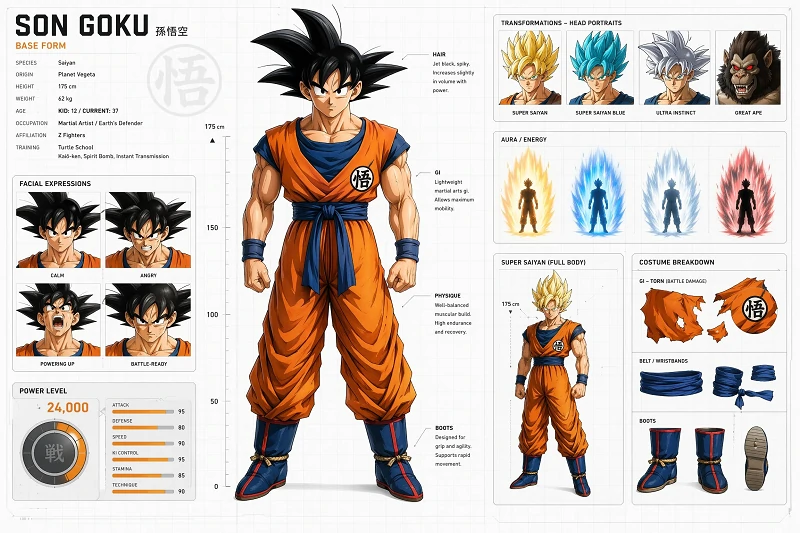
- Goku of Dragon Ball
A hyper-detailed professional character design sheet of Son Goku from Dragon Ball, presented as a modern AAA game concept art board. The sheet shows multiple forms including base form, Super Saiyan, Super Saiyan Blue, and Ultra Instinct, each displayed in full-body front, side, and back views. The layout includes facial expression variations such as calm, angry, powering up, and battle-ready. Costume breakdown sections show torn gi details, aura effects, and energy glow annotations. A power-level UI panel is included with dynamic stats visualization. The background is clean white with subtle technical design grid overlays. Ultra sharp anime realism, highly polished presentation, no watermark.
- Mikasa Ackerman from Attack on Titan
A hyper-detailed character design sheet of Mikasa Ackerman from Attack on Titan, presented as a Studio MAPPA-style production board. The sheet shows three outfits — Survey Corps uniform with ODM gear, casual training outfit, and final-arc black coat with red scarf — each in full-body front, side, and back views. Facial expression panel: stoic, determined, grief-stricken, mid-battle scream. Equipment breakdown of the ODM harness, twin blade handles, gas canisters, and worn boots, with annotated leather creases. Side panel features anatomical motion studies of an aerial blade strike. Clean off-white background, grid overlay. Cinematic anime realism, sharp ink lines, no watermark.
- Tony Stark / Iron Man across the MCU
A hyper-detailed professional character design sheet of Tony Stark and his Iron Man armors, presented as a Marvel Studios concept art board. The sheet shows the armor evolution — Mark I cave-built suit, Mark III red-and-gold classic, Mark 50 nanotech, Mark 85 Endgame suit — each in full-body front, side, and back views with helmet on/off variants. A separate panel shows Tony Stark in his casual Black Sabbath tee and goggles. Component breakdown of repulsor gauntlets, arc reactor chest piece, and hex-panel nanotech transitions, with engineering callouts. Clean white background with blueprint grid overlay. Photorealistic film concept art, polished, no watermark.
Livestream Screenshot
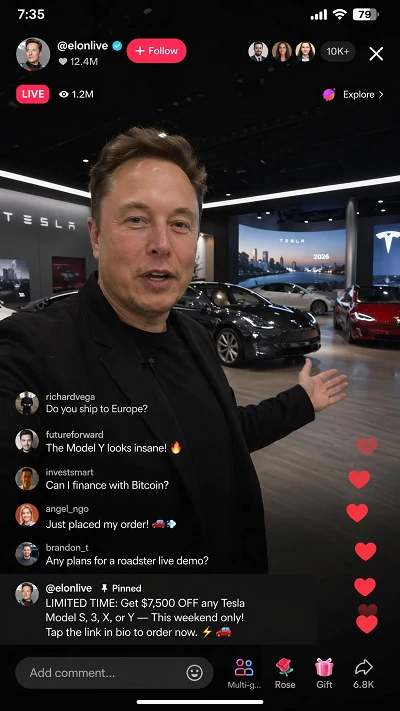
- Tesla Sales Livestream
A fictional TikTok LIVE broadcast showing Elon Musk hosting a live stream selling Tesla cars in 2026. The vertical interface displays a live video feed of a man resembling Elon Musk standing in a futuristic Tesla showroom with multiple electric vehicles behind him. The top of the screen shows a “LIVE” badge, username @elonlive, and a viewer count of 1.2M. On the right side, fast-scrolling live comments react with emojis, questions, and purchase reactions. Floating heart animations rise from the bottom. A pinned comment highlights a limited-time Tesla discount offer. The iOS status bar is visible with time, signal, and battery indicators. The lighting is cinematic and realistic, with studio reflections on the cars. Ultra-realistic mobile UI, 9:16 aspect ratio, dark mode interface, highly believable social media livestream screenshot.
- Twitch Gaming Stream
A photoreal screenshot of a Twitch gaming livestream of a tactical FPS, aspect ratio 16:9. Main view: a first-person shooter scene, player aiming a rifle down a neon-lit alley, mid-firefight. Bottom-left circular facecam shows a young male streamer with headphones and an LED-lit gaming setup behind him, wearing a black hoodie. Top-left overlay: live red "● LIVE" badge, viewer count "12,438 watching", stream title "Ranked grind to Radiant — !drops on". Right side: vertical Twitch chat panel with scrolling messages "GG ez", "POGGERS", "@Nova_TV gifted 5 subs!", a purple Bits cheer "Cheer1000 amazing aim!". Bottom: webcam alert banner "NEW FOLLOWER — kaitoplays". Crisp UI, no watermark, no real-brand logos.
- YouTube Cooking Livestream
A photoreal screenshot of a YouTube cooking livestream, aspect ratio 16:9. Main view: a warmly lit modern kitchen, a smiling middle-aged female chef in a navy apron rolls fresh pasta dough on a wooden island, ingredients arranged neatly around her. Top-left overlay: red "● LIVE" pill, viewer count "6,742 watching", stream title "Sunday Pasta Class — Hand-Rolled Tagliatelle from Scratch". Bottom: YouTube progress bar in red, like and share icons, channel name "Sofia's Kitchen — 2.1M subscribers". Right side: live-chat panel with messages "Looks delicious!", "What flour are you using?", a green Super Chat highlighted "$10 — Recipe please!". Lower-third banner: "RECIPE LINK IN DESCRIPTION". Crisp UI overlay, no real-brand logos beyond YouTube layout, no watermark.
Ad Campaign Banner
- Lifestyle Sports Ad
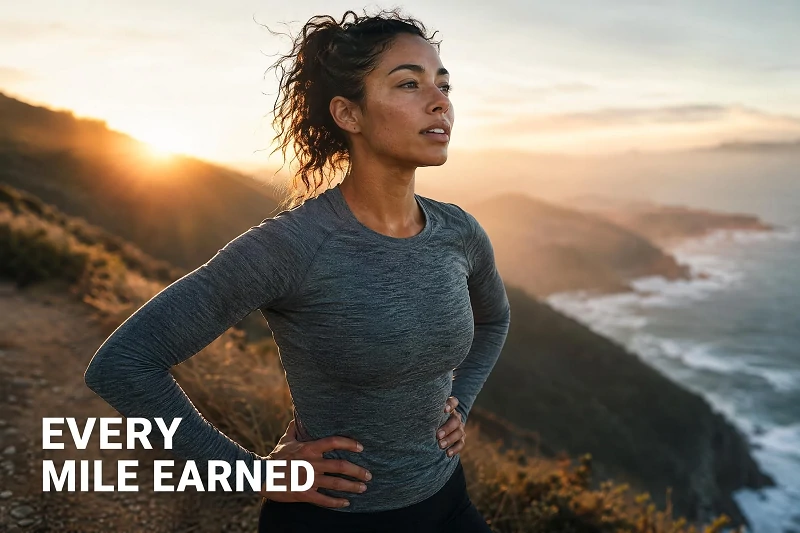
A cinematic lifestyle ad photograph for a premium athletic brand, shot on a 50mm prime at f/2.0, golden-hour backlight rim-lighting the subject. A 28-year-old athletic woman of mixed heritage pauses mid-stride on a misty coastal cliff trail at sunrise, hands resting on her hips, chest rising from exertion. She wears a fitted heather-grey performance long-sleeve, black running tights, and minimalist trail shoes. Hyper-realistic skin texture with visible pores, light sweat sheen on her temples, fine flyaway hair, natural eyebrows, calm focused gaze toward the horizon. Soft warm sun flare over her left shoulder, ocean and rolling cliffs blurred behind her. Bold clean white sans-serif tagline anchored bottom-left: "EVERY MILE EARNED". Color-graded warm and contrasty, magazine-grade commercial photography. Aspect ratio 4:5. No logos, no watermark.
- EV Launch Campaign
A cinematic automotive ad photograph for a premium electric SUV, shot on a Sony A1 with a 24-70mm f/2.8 lens, long-exposure style at blue hour. A matte-pearl-white EV is parked on a wet rooftop helipad above a glittering downtown skyline, headlights and underglow casting a soft cyan halo on the puddles. A confident 40-year-old man in a tailored charcoal coat stands beside the open driver door, one hand on the frame, looking out at the city. Hyper-realistic skin and fabric texture, real reflections in the car paint, subtle rain on the windshield. Bold clean white sans-serif tagline anchored bottom-left: "DRIVE THE SILENCE". 16:9 cinematic crop. No real-brand logos, no watermark.
Menu Poster
- Drink Shop
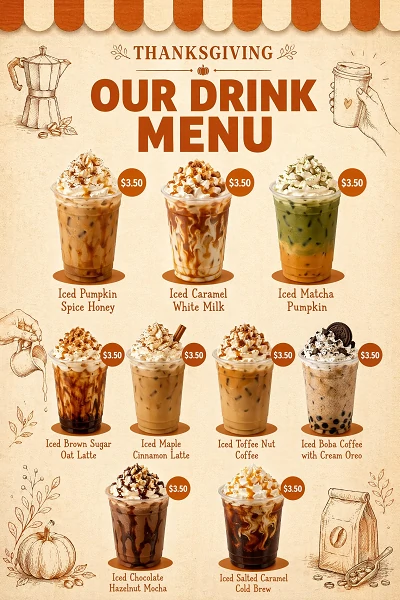
A vertical printed café drink menu poster in a cozy artisan coffee shop style with a Thanksgiving theme, designed as a clean graphic layout (not a 3D scene). Background: textured cream-beige craft paper. Top edge features a scalloped awning border in burnt-orange and cream stripes.
Header: small uppercase “THANKSGIVING” in burnt-orange serif, centered; below it, “OUR DRINK MENU” in bold dark-orange display sans-serif, stacked and centered.
Main layout: nine photoreal iced coffee drinks arranged in 3 rows (3–4–2). Each drink is a cut-out plastic cup with whipped cream, syrup drizzle, ice, and toppings, placed on a flat burnt-orange shadow. A circular burnt-orange price badge with white text (e.g. “$3.50”) sits beside each. Below each drink is a two-line name in a handwritten-style burnt-orange serif.
Decorations: thin hand-drawn line illustrations in burnt-orange placed around the layout (moka pot top-left, takeaway cup top-right, pouring milk mid-left, coffee bag bottom-right). Balanced composition with generous white space, A4 portrait ratio. Color palette: cream-beige, burnt-orange, rich browns, white highlights. Style: modern premium café menu, warm and cozy autumn mood. Crisp readable text, no watermark, no logos.
- Japanese Ramen Shop
A vertical Japanese ramen shop menu poster, aspect ratio 2:3, designed in a traditional izakaya style. Aged dark-charcoal washi paper background with subtle grain, a single bold vermilion-red brush stroke running down the right edge as a decorative spine. Top: large hand-brushed kanji "麺" with the English headline "TANUKI RAMEN BAR" in white slab serif beneath. Three sections in white serif type with hand-drawn ingredient sketches beside each: "SIGNATURE BOWLS — Tonkotsu ¥1,200 · Spicy Miso ¥1,250 · Shoyu Black Garlic ¥1,180", "SIDES — Gyoza ¥480 · Karaage ¥520 · Soft Egg ¥150", "DRAFT BEER — Asahi ¥600 · Sapporo ¥620". Footer brush stamp with phone number. Clean, every character crisp. No real-brand logos, no watermark.
- Cocktail Bar
A vertical cocktail bar menu poster, aspect ratio 2:3, designed in a moody art-deco style. Deep emerald-green textured background with brushed-gold geometric border, a faint marble veining throughout. Top: thin gold serif headline "THE GILDED OWL — COCKTAIL LIST" with a small gold owl emblem above it. Two sections in cream serif type with thin gold dividers: "SIGNATURES — Smoked Old Fashioned $18 · Velvet Negroni $16 · Midnight Garden Martini $17 · Honey Paloma $15 · Black Pearl Daiquiri $16", "CLASSICS — Manhattan $14 · Aviation $14 · Espresso Martini $15". Tiny illustrated garnish icons beside each drink (orange peel, olive, mint sprig). Subtle gold foil shimmer on accents. Crisp legible type. No real-brand logos, no watermark.
Merchandise Poster
- One Piece Merchandise Poster
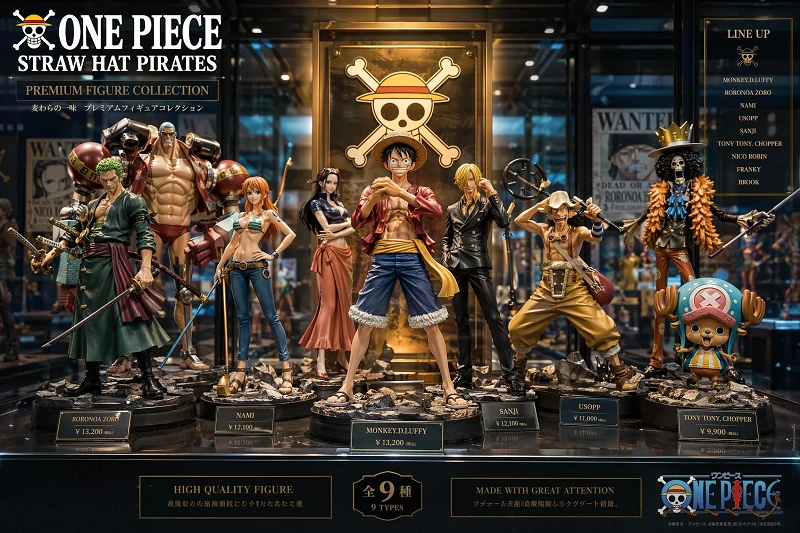
A vibrant cinematic merchandise poster featuring the Straw Hat Pirates from One Piece displayed as collectible figurines on a premium retail showcase shelf. Each character is posed dynamically with detailed outfits and signature weapons. Luffy stands in the center with glowing spotlight, surrounded by Zoro, Nami, Sanji, and others. The background resembles a high-end anime exhibition store with glass reflections and soft neon lighting. Product labels and pricing tags are subtly visible. Ultra-detailed toy realism, collectible display aesthetic, highly polished marketing poster style.
UI & Screenshot
- Instagram Profile
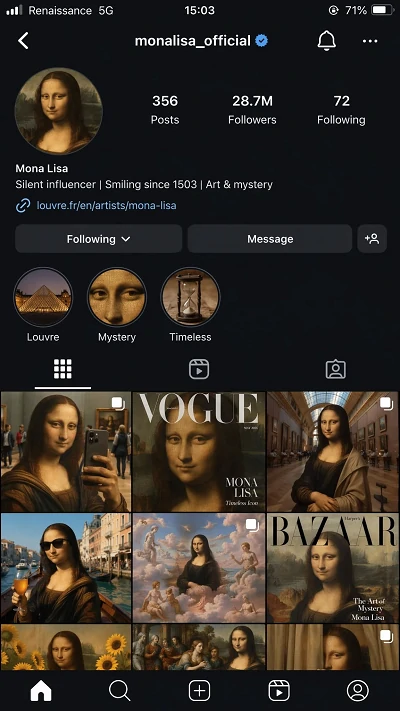
A hyper-realistic iPhone screenshot of a fictional Instagram profile page for the Mona Lisa as a modern influencer in 2026. Username @monalisa_official, profile photo is the classic painting slightly enhanced with subtle lighting and realism. Bio reads: “Silent influencer | Smiling since 1503 | Art & mystery”. The grid shows posts including modern selfies taken in museums, fashion magazine covers featuring her portrait, and surreal lifestyle reinterpretations of Renaissance art. Follower count: 28.7M. Story highlights labeled “Louvre”, “Mystery”, and “Timeless”. Full iOS interface with dark mode UI and status bar showing “Renaissance 5G”, photorealistic smartphone screenshot, 9:16 aspect ratio.
- Weather Forecast UI
A hyper-realistic iPhone screenshot of the Apple iOS Weather app interface. The screen displays a clean and minimal weather forecast for a specific city, using Apple’s signature design language. The top section shows the current temperature in large San Francisco font, with location name, weather condition (e.g. “Partly Cloudy”), and high/low temperatures beneath it. The background features a soft, dynamic sky gradient that reflects the current weather condition, with subtle clouds and natural lighting. Below, a horizontally scrolling hourly forecast bar shows temperature changes with simple Apple-style weather icons. A 10-day forecast list is displayed further down with clean separators and consistent spacing. Additional modules include humidity, wind speed, UV index, and air quality, each in rounded cards with frosted glass (blurred translucency) effect. The interface uses iOS dark mode with smooth gradients and soft shadows. The iOS status bar is visible at the top with time, signal, and battery. Photorealistic UI accuracy, perfectly aligned layout, no distortion, 9:16 aspect ratio.
Street Food Realism
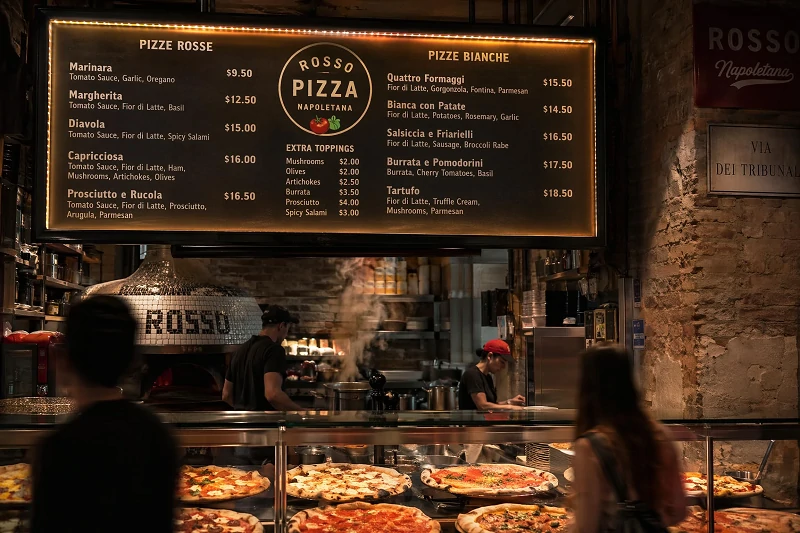
- Pizza Restaurant
A hyper-realistic photograph of a pizza restaurant interior showing a hanging illuminated menu board above the counter. The menu displays various pizza types with prices in a warm glowing LED font. Below it, freshly baked pizzas are visible behind glass display warmers. The environment feels cozy and slightly rustic with Italian street restaurant aesthetics. Steam rises from ovens in the background. Customers are slightly blurred in motion. Cinematic food photography style, shallow depth of field, ultra-realistic textures.
- Hong Kong Cha Chaan Teng at Night
A hyper-realistic photograph of a busy Hong Kong street corner at night, dominated by a vertical stack of glowing neon signs hanging above a corner cha chaan teng. The signs display Cantonese characters and English in saturated red, cyan, and yellow tube light: "金記茶餐廳 · KAM KEE CAFÉ — Milk Tea · Pineapple Bun · Wonton Noodle". Through the steamed-up window, a chef tosses noodles in a wok, customers in booths slightly motion-blurred. Wet asphalt reflects the neon, scooter passing in the foreground streaks light trails. Shot on a Sony A7 IV, 35mm f/1.8, ISO 3200. Cinematic street-photography color grade, no watermark.
Photorealistic Images
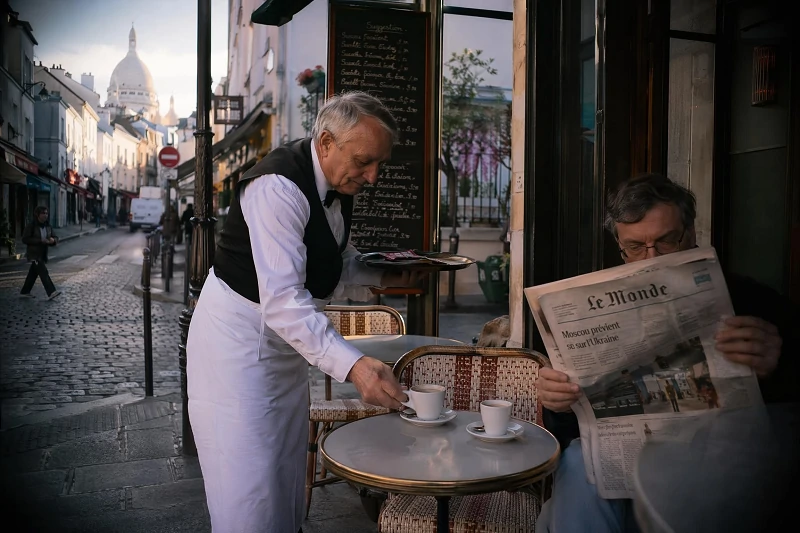
- Paris Morning Café
A candid street scene outside a small Parisian café at 8 AM, warm morning sun raking across the cobblestones. An older waiter in a white apron sets down two espressos on a tiny round table while a regular customer reads a folded newspaper. Shot on a Leica Q3 with a fixed 28mm f/1.7 lens. Slight lens vignette, natural skin tones, true-to-life colors, no posing. Subtle steam rising from the cups. Film-like dynamic range, classic 35mm reportage feel.
- Outdoor Portrait
A relaxed three-quarter portrait of a 55-year-old fisherman with weathered tan skin and salt-grey hair, standing by a wooden harbor railing at overcast noon. Shot on a Fujifilm X-T5 with a 56mm f/1.2 lens. Even soft daylight, no harsh shadow, every wrinkle and pore sharply rendered. He half-smiles toward the camera, knit sweater stretched and pilled from real wear. Background fishing boats softly out of focus. Documentary color grading, slight film-like halation around highlights.
- Weekend Brunch at Home
An overhead lifestyle photo of a sunny weekend brunch on a cluttered linen-covered wooden table: half-eaten avocado toast, a French press, two mismatched ceramic mugs, a folded magazine, and one hand reaching in with a knife. Shot on a Nikon Z6 II with a 35mm f/1.8 lens, soft window light from the upper right, gentle shadows. Real crumbs on the table, coffee ring on the linen, slightly out-of-focus edges. Warm natural color grading, no over-styling, candid home feel.
Data Visualization Infographic
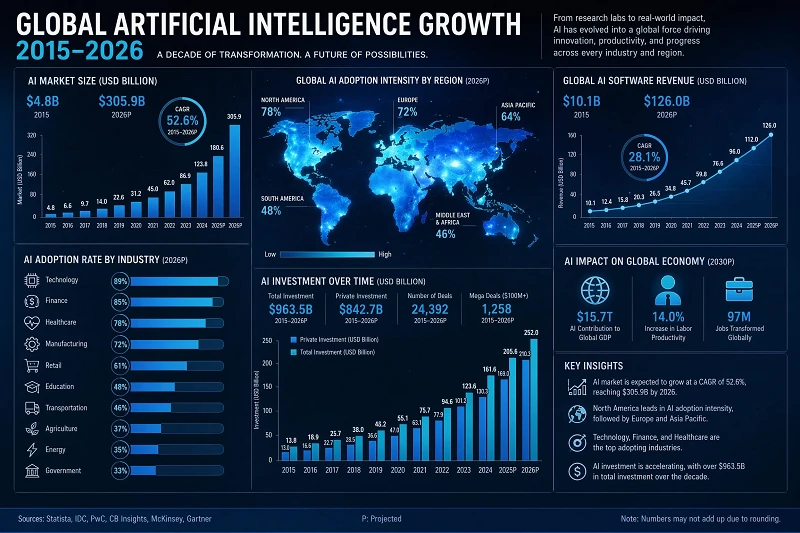
- Global AI Growth
A hyper-realistic editorial infographic poster visualizing global artificial intelligence growth from 2015 to 2026, designed as a modern data journalism layout. The composition includes clean bar charts, line graphs, and circular progress diagrams showing adoption rates across industries. The center features a glowing world map with heatmap overlays indicating AI usage intensity by region. Each section is labeled with precise typographic hierarchy, minimalist sans-serif fonts, and subtle grid alignment. Color palette uses blue, cyan, and white for a corporate-tech aesthetic. Highly polished financial report style, studio lighting, print-ready design quality, no watermark.
- Climate Change Editorial Infographic
A vertical editorial-style data visualization infographic, aspect ratio 9:16, on a deep midnight-navy background with thin warm-orange accent rules. Top headline in bold off-white serif: "THE WARMING DECADE — Global Surface Temperature, 2014–2024". Subhead in light grey sans-serif: "10 hottest years on record have all occurred in the past decade." Below it: a large smooth line chart with a glowing orange trend line rising from +0.74°C to +1.54°C anomaly, dotted "1.5°C threshold" line crossed in 2023, X-axis years labeled, Y-axis "°C above pre-industrial." Three KPI cards in a row: "+1.54°C 2024 anomaly", "37% rise in CO₂ since 1980", "9 of 10 hottest years post-2014". Footer: "Source: NASA GISS, 2024". Magazine-grade typography, no watermark.
- Consumer Fitness Dashboard
A clean horizontal data visualization infographic, aspect ratio 16:9, on a soft off-white background with rounded card modules. Top headline in dark teal sans-serif: "YOUR YEAR IN MOVEMENT — 2025 Activity Summary". Four large KPI tiles across the top: "1,842 km RUN · +18% YoY", "287 hrs ACTIVE", "412,650 STEPS / mo avg", "92 PERSONAL BESTS". Below: a teal area chart "Monthly Active Minutes" peaking in June at 1,820, a coral donut chart "Workout Mix — Run 42% · Strength 28% · Cycle 18% · Yoga 12%", and a horizontal bar chart "Top 5 Routes by Distance" with named trails. Friendly rounded sans-serif type, soft drop shadows, every number crisp. Footer: "Tracked via your wearable · Jan–Dec 2025". No watermark.
Logo Design Presentation
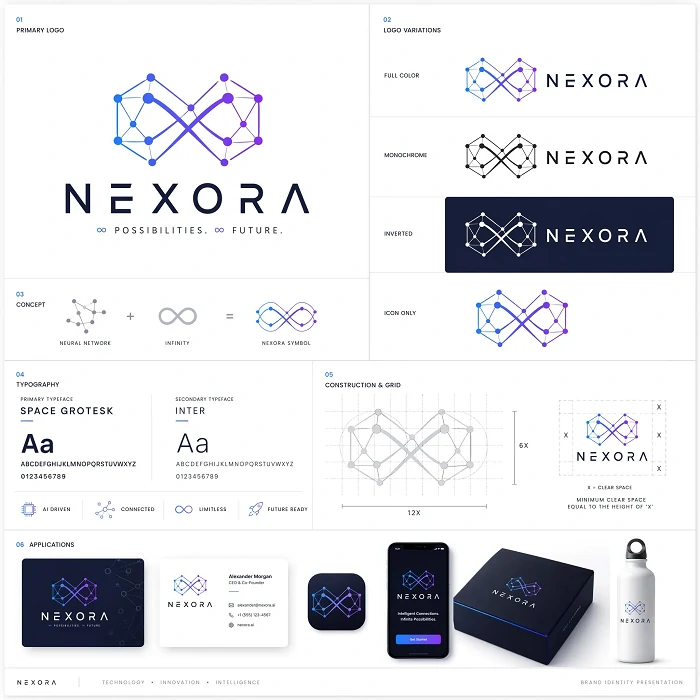
- Tech Startup
A professional logo design presentation board for a tech startup called “NEXORA”, shown on a clean white studio background. The main logo is a geometric abstract symbol combining a neural network and infinity loop. Multiple variations are displayed including monochrome, inverted, and icon-only versions. The layout includes typography exploration, grid alignment guides, and spacing annotations. Subtle shadows and soft lighting emphasize premium design aesthetics. Modern branding agency presentation style, ultra-clean composition, high-resolution vector look.
- Indie Coffee Brand
A clean professional logo design presentation board for a specialty coffee brand, aspect ratio 16:9, on a warm cream background with subtle paper grain. Top-left: the primary lockup — a hand-drawn coffee-cherry-and-leaf emblem above the wordmark "ROOT & GRIND COFFEE ROASTERS — Est. 2018", in a refined dark-brown serif. Top-right: monogram variant "R&G" in a circle stamp. Middle row: three color variants labeled "FULL COLOR · MONO BLACK · REVERSED ON ESPRESSO". Lower row: real-world mockups — a kraft coffee bag with the logo, a ceramic latte cup top-down, and a wooden shop sign. Color swatches at the bottom: "Espresso #2B1A12 · Cream #F4ECDC · Sage #6E7E5C". Crisp typography, every label legible. No watermark.
Comic Book Storyboard
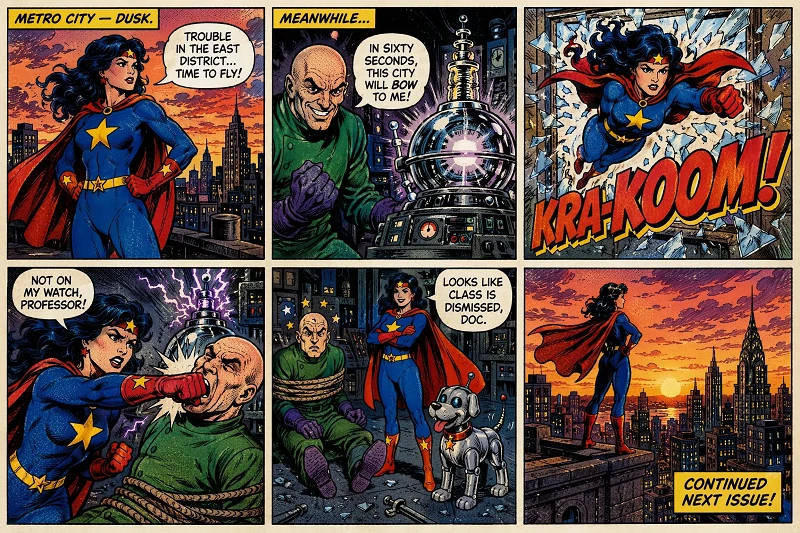
- Hero Awakening Scene
A 6-panel retro American superhero comic page in a 2×3 grid, drawn in 1980s Marvel/DC style: bold black outlines, flat primary colors (red, blue, yellow), Ben-Day halftone shading, slight aged paper texture, thin black panel borders with white gutters.
Panel 1 (rooftop at dusk): female hero STARDUST in red cape and blue suit with yellow star stands heroically. Caption: “METRO CITY — DUSK.” Speech: “Trouble in the East District… time to fly!”
Panel 2 (lab): villain PROFESSOR GRIM (bald, green coat) beside a glowing doomsday device. Caption: “MEANWHILE…” Speech: “In sixty seconds, this city will BOW to me!”
Panel 3 (action): Stardust bursts through a window. Large SFX text: “KRA-KOOM!”
Panel 4 (fight): Stardust punches the villain, impact effect visible. Speech: “Not on my watch, Professor!”
Panel 5 (aftermath): villain tied up, small robot dog beside Stardust. Speech: “Looks like class is dismissed, Doc.”
Panel 6 (city sunset): Stardust stands on a skyscraper overlooking the city. Caption: “CONTINUED NEXT ISSUE!”
Consistent character design, classic all-caps comic lettering, vibrant inks, clean composition. Aspect ratio 16:9. No watermark.
Educational Material
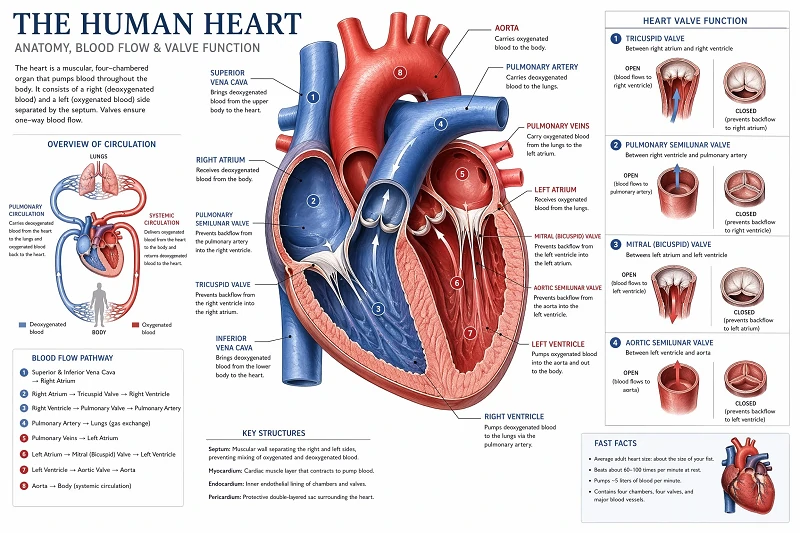
- Heart Cross-section Diagram Educational Material
A highly detailed educational textbook-style illustration of human heart anatomy, presented as a clean medical diagram page. The composition features a large, anatomically accurate cross-section of the human heart centered on the page, showing internal structures such as the left and right atria, left and right ventricles, aorta, pulmonary artery, pulmonary veins, and major valves. Each part is precisely labeled with fine leader lines pointing to the correct anatomical locations. The illustration uses realistic medical coloring with soft reds, blues, and neutral tones to distinguish oxygenated and deoxygenated blood flow. Surrounding the main diagram are smaller inset diagrams showing simplified blood circulation pathways and valve function. The layout follows a professional textbook design with clear typographic hierarchy, section titles, and short explanatory labels. The background is clean white with subtle grid alignment. The overall style is similar to a modern medical textbook or biology education poster, highly legible, scientifically accurate, and visually balanced. No watermark, no clutter, print-quality resolution.
- Children's Picture Book Spread
A two-page picture-book spread for ages 4–6, aspect ratio 16:9, illustrated in soft watercolor and colored-pencil style with a warm cream paper background. Title at the top in friendly hand-lettered red: "WHERE DOES THE RAIN COME FROM?". Left page: a smiling cartoon sun shines on a blue lake, labeled arrows in playful sans-serif read "1. EVAPORATION — water rises as vapor". Right page: fluffy clouds form over rolling green hills with raindrops falling, labeled "2. CONDENSATION — vapor cools into clouds" and "3. PRECIPITATION — rain falls back down". A cheerful frog character points at each label. Page numbers "8" and "9" at the bottom. Cozy, every word legible. No watermark.
- Academic Conference Poster
A professional university research conference poster, vertical format aspect ratio 2:3, on a clean white background with deep maroon header and footer bands. Header reads "MIT Computational Biology Symposium 2026". Title in large dark navy serif: "Predicting Protein Folding Pathways via Hybrid Diffusion Models". Authors line below: "L. Chen · R. Patel · S. Yamamoto · Lab of Computational Biophysics". Three-column layout: left column "Background & Hypothesis" with body text and a small molecule diagram; center column shows two figures — a labeled neural-network architecture flowchart and a comparative bar chart "Accuracy by Model — Baseline 71% · Ours 89%"; right column "Methods · Results · Conclusions" with bullet points. Footer: QR code, email, lab logo placeholder. Crisp academic typography, no watermark.
Product Packaging Design Mockup
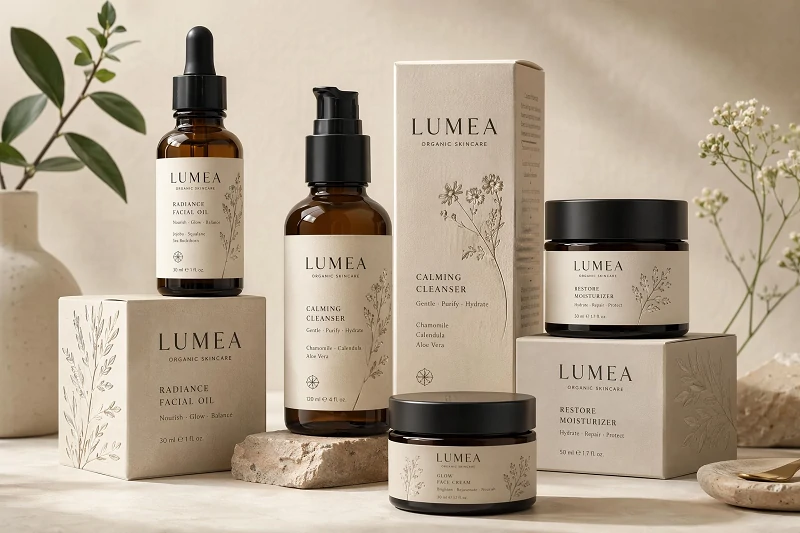
- Skincare Brand Packaging Design
A professional product packaging mockup for an organic skincare brand called “LUMEA”, displayed on a soft beige studio surface. The set includes glass bottles, cream jars, and cardboard boxes with minimalist typography and botanical illustrations. Natural shadows, soft diffused lighting, and neutral tones emphasize sustainability and elegance. The packaging design is clean, modern, and eco-luxury oriented, with subtle embossed textures visible on labels.
- Craft Beer Can Trio
A photoreal product packaging mockup of three 330ml craft beer cans standing in a row on a wet concrete bar top, dramatic side-lit studio lighting, aspect ratio 16:9. Each slim aluminum can shares a brand block "NORTHWAVE BREWING CO." across the top, with distinct illustrated labels: left can — turquoise wave artwork "HAZY IPA · 6.2% ABV", center can — coral sunset "PASSIONFRUIT SOUR · 4.8% ABV", right can — deep navy with lightning "DOUBLE OATMEAL STOUT · 8.1% ABV". Real condensation droplets on the brushed aluminum, subtle reflections of warm bar lights. Crisp printed type, tactile ink feel. Premium craft-brand commercial photography style. No real-brand logos beyond the fictional one, no watermark.
UI Dashboard
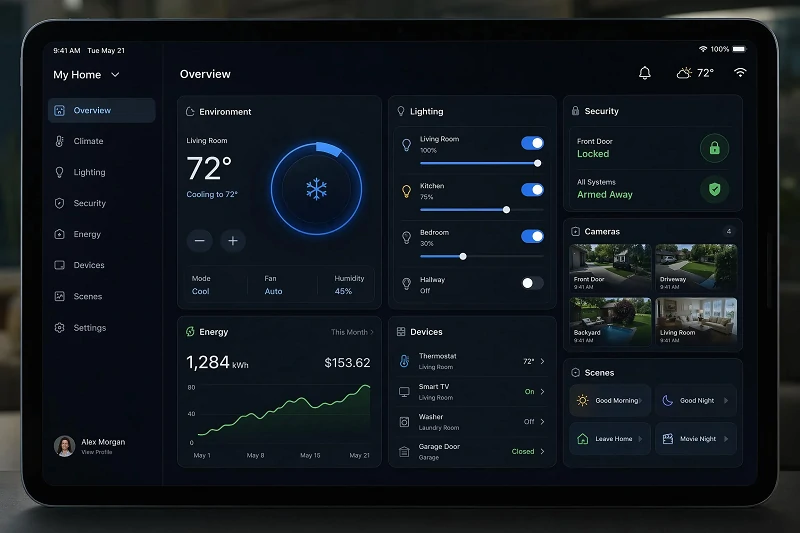
- Smart Home Control System UI Design
A hyper-realistic smart home control dashboard interface displayed on a large tablet screen. The UI shows temperature control, lighting adjustments, security camera feeds, and energy usage statistics in a clean grid layout. Interactive cards glow subtly with blue and green accents. The interface is minimal, modern, and highly functional with realistic touch interactions implied. Dark mode futuristic design, crisp typography, high-tech product UI aesthetic.
Game Screen
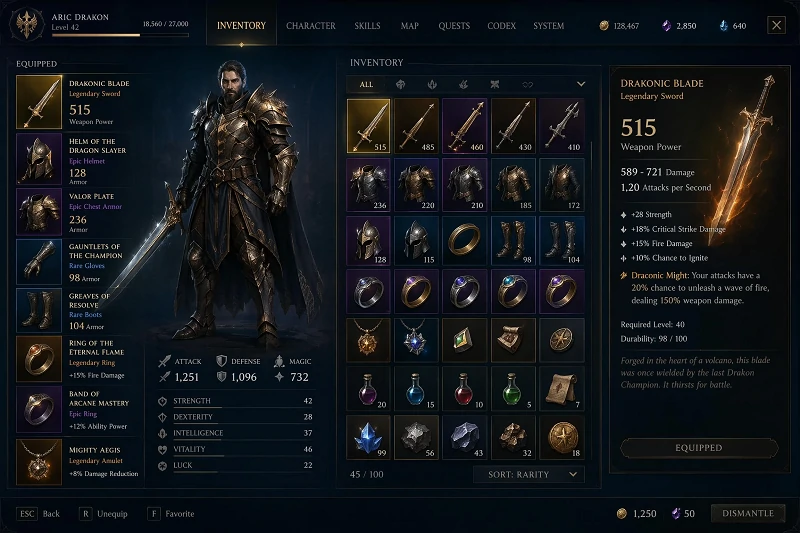
- Fantasy RPG Inventory Screen
A hyper-realistic fantasy RPG game inventory interface displayed on a glowing holographic screen. The UI shows a character equipment panel with swords, armor, rings, and magical artifacts arranged in slots. Each item has detailed icons, rarity colors, and stat descriptions. The interface uses a dark fantasy theme with gold and blue highlights. Clean, modern game UI design with high readability and immersive fantasy styling.
- Racing Game
A photorealistic racing-game screenshot from a chase camera behind a matte-black hypercar drifting through a rainy mountain hairpin at dusk, sparks flying from the rear bumper, taillight streaks. HUD: speedometer "247 km/h" bottom-right with rpm dial, gear "5", lap counter "Lap 2/3" top-left, position "1st of 12", mini-map of the circuit top-right, three rival headlights closing in the rear-view mirror inset. Wet asphalt reflections, cinematic motion blur. 21:9 ultrawide.
- City-builder Sim
An isometric city-builder game screenshot, a stylized small coastal town with red-roofed cottages, a town square with a fountain, fishing docks, a small windmill on a hill, tiny animated citizens walking the streets. Soft sunny daylight, gentle drop shadows, low-poly painterly style. HUD: resource bar top — "Gold 12,480 · Wood 320 · Food 87 · Population 214 / 250", build menu icons bottom-left, mini-map bottom-right, notification "New citizen has arrived!". 16:9.
How to Use GPT Image 2 Prompts Step-by-Step
Copying prompts gets you started. Knowing how to refine them is what makes you fast. Here's the workflow that works for me.
Step 1: Open GPT Image 2 in ChatGPT
Choose the "Create an Image" tab on the ChatGPT homepage.
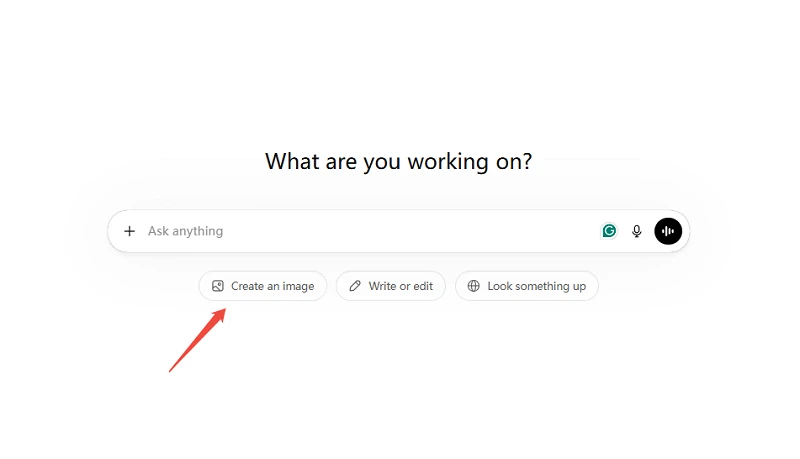
GPT Image 2 is available through ChatGPT (free and Plus tiers) and via the OpenAI API.
Free users get roughly 6 image generations per day. ChatGPT Plus subscribers ($20/month) get unlimited generations with faster processing.
For pay-per-image API access, SeaArt AI and a few other platforms offer wrappers around the same model. Pick whichever matches how you work.
01Step 2: Paste the Prompt and Generate
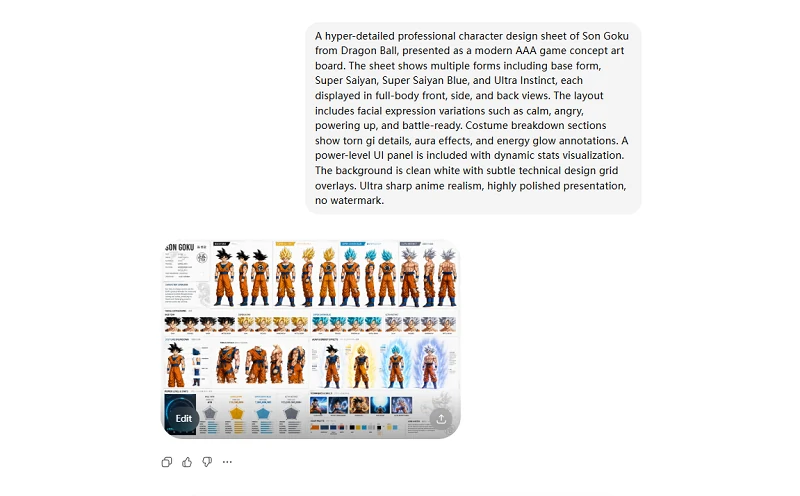
Copy any prompt from the list above, paste it into the chat box, and hit send. First generation usually takes 30–60 seconds. Treat that first output as a baseline, not a finished asset. Read what came back, then decide what to fix.
Step 3: Edit Conversationally Instead of Restarting
This is the part most prompt guides skip. GPT Image 2 remembers the previous generation in the same conversation, so you can refine with short follow-up messages: "warm up the sky", "move the cup to the left third", "make her expression more relaxed". The model applies a targeted change instead of starting from scratch.
The trick is to repeat your invariants every turn. "Same character, same outfit, same lighting, only change the background to a snowy street." Without that explicit list, the model will quietly redesign things you wanted to keep.
Common GPT Image 2 Prompting Mistakes to Avoid
I've made every one of these. Catch them in your own prompts and your hit rate goes up immediately.
Mistake 1: Stacking Adjectives Instead of Visual Facts
❌ "Stunning cinematic 8K masterpiece"
✅ "Shot at 50mm, soft window light from camera-left, slight film grain"
Decoration words don't render. The model needs facts it can draw.
Mistake 2: Forgetting Composition Cues
❌ "A chef in a kitchen"
✅ "Overhead flat-lay of a chef plating a dish, hands and forearms in frame, marble countertop"
A close-up and a wide shot of the same subject are completely different images. Tell the model which one you want.
Mistake 3: Treating In-Image Text as Decoration
❌ "A poster with some text"
✅ 'Headline reads "LATE BLOOMERS" in bold serif, centered, verbatim, perfectly legible'
Text rendering is the model's strongest feature. Use it deliberately or skip it.
Mistake 4: Skipping Constraints
Without a "no watermark, no extra people, no logo drift" line at the end of your prompt, the model improvises in directions you don't want. Always close with what must NOT appear.
Mistake 5: Letting Invariants Drift Across Edits
When you refine across multiple turns, restate identity each turn: "same face, same outfit, same lighting — only change the background." The model doesn't remember what mattered to you two iterations ago. You have to keep telling it.
From Image to Video: Animate Your GPT Image 2 Outputs on SeaArt
Got a stunning GPT Image 2 output? Don't let it sit still.
SeaArt AI brings together the models you already know, such as GPT Image 2.0, Seedance 2.0, Kling, Seedream 5.0, and etc., all in one workspace.
If ChatGPT hits your daily limit or locks a feature behind a paywall, you can jump to SeaArt and keep working. Every logged-in user gets free daily stamina, so you're not stuck waiting or paying just to test an idea.
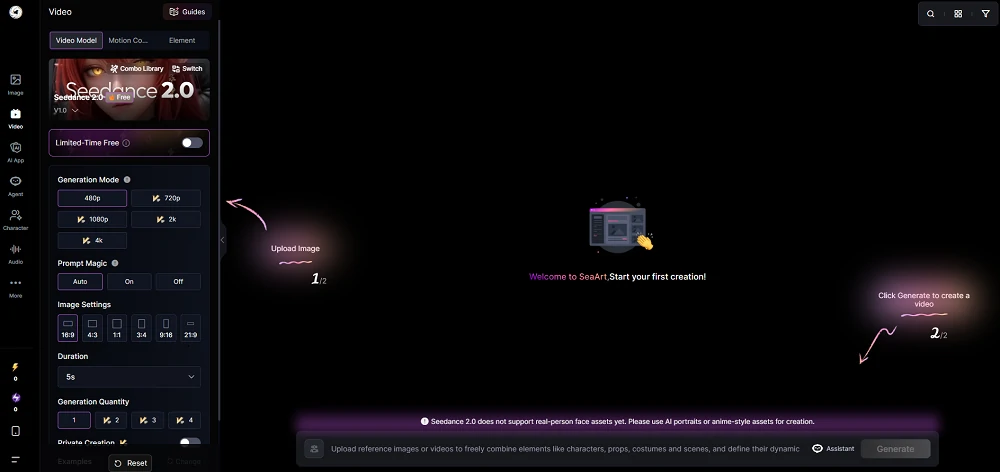
But here's where it gets interesting: SeaArt's image-to-video generator lets you take any static image, including the ones you just made with GPT Image 2, and animate it. Upload your backstage violinist, your neon noodle stall, your floating sneaker, and watch them move. The tool handles camera motion, subtle character animation, and atmospheric effects without forcing you into a new workflow or re-uploading across platforms.
If you've been treating image generation and video generation as separate tasks, this is the bridge. One platform, multiple models, free daily credits to experiment. Generate your image with GPT Image 2 (or any other model SeaArt supports), refine it if needed, then animate it, all without leaving the workspace.
FAQs
How is GPT Image 2 different from GPT Image 1.5?
GPT Image 2 generates at native 2K resolution (versus 1K in 1.5), supports aspect ratios from 3:1 to 1:3, and renders in-image text with above 95% accuracy across Latin and Asian scripts. The biggest upgrade is reasoning: the model can interpret layered prompts and conversational edits instead of pure pattern matching, which makes it much better at multi-element compositions and posters with readable typography.
Does GPT Image 2 work better with short or long prompts?
Both work, but for different jobs. Short prompts (under 30 words) are great when you have a clear, specific concept and want to let the model fill creative gaps, see the stained glass jellyfish prompt above. Long structured prompts (the 6-slot formula) win when you need exact composition, named lighting, or precise typography. Match the length to the complexity of what you're asking for.
How do I get GPT Image 2 to render text accurately?
Wrap the exact copy in quotes, write proper-noun words in CAPS, and specify font style ("bold serif", "thin sans-serif"). Add a closing constraint like "verbatim, perfectly legible, no extra text, no duplicate text" to prevent the model from adding decorative letterforms. For very small text on curved UI like watch faces, keep the copy short, under 15 characters works best.
Final Words
The best GPT Image 2 prompts aren't the longest or the most clever. They're the ones that fill all six slots without padding. The 34 prompts in this guide are starting points. Swap in your own subjects, change the lighting direction, push the surreal cases further. The model rewards specificity, and your second iteration will always beat your first. Pick a prompt above, paste it, and see what comes back.
Related Articles
Is GPT Image 2 the End of AI Artifacts or the Start of a New Art Movement?
20 Best Photo Prompts for ChatGPT You Can Copy and Paste (2026)
How to Create AI Animated Stories with ChatGPT: A Step-by-Step Guide
Midjourney vs. ChatGPT: Which AI Image Generator Wins in 2026?
45 Grok Imagine Trending Prompts You Can Copy & Paste
25 Gemini Caricature Prompts: Create Free Viral AI Avatars
15 Gemini Couple Photo Prompts: Create Romantic Images with AI