

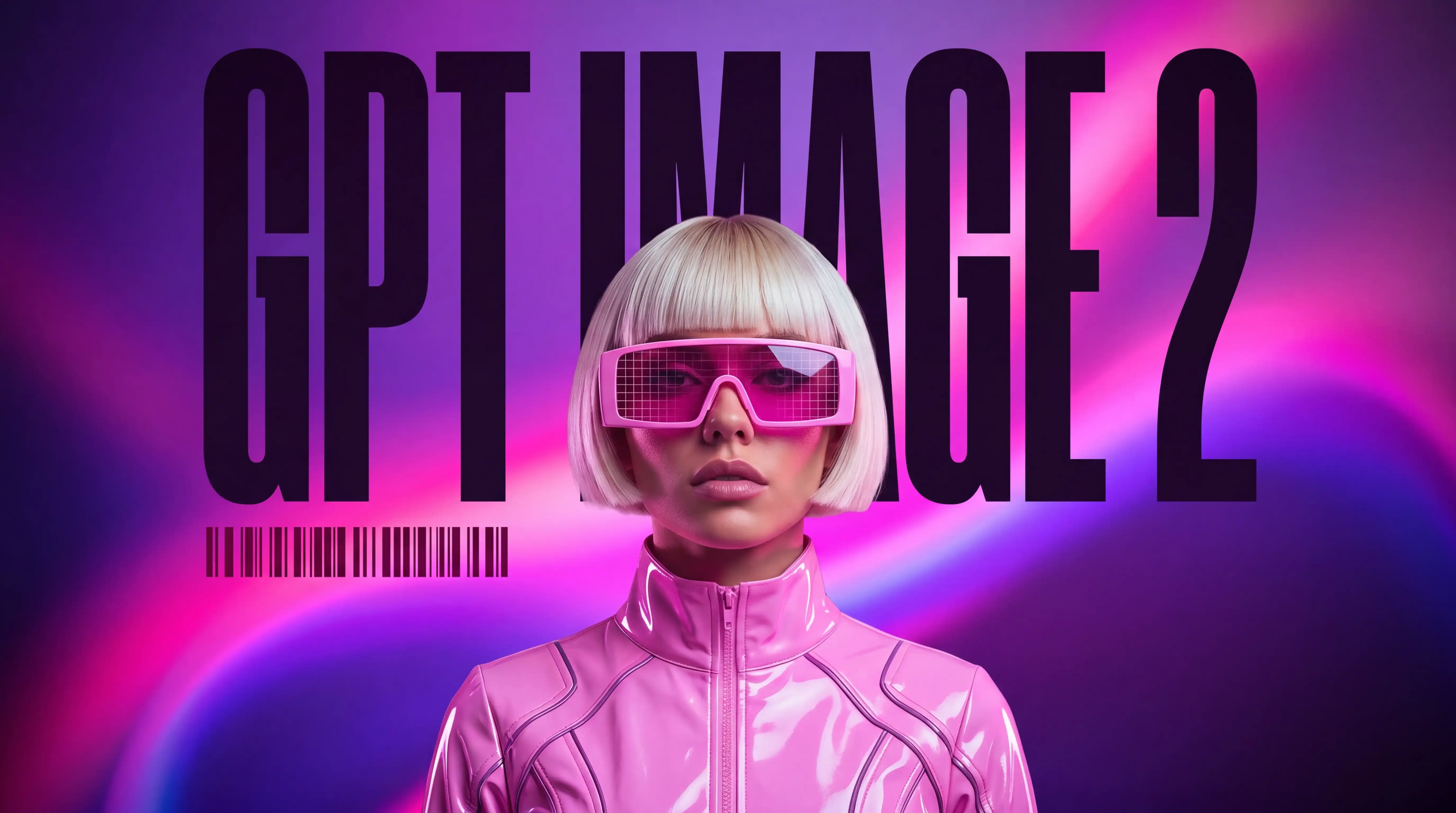
Is GPT Image 2 the End of AI Artifacts or the Start of a New Art Movement?
A creative director I've worked with for six years sent a Slack message at 4:00 AM: "Ran the same product shot prompt through GPT Image 2 twelve times. Twelve usable outputs. No melted text. I don't know what to do with this information."
Sam Altman had gone live three hours earlier with no advance notice. One line stuck: "This is the leap from GPT-3 to GPT-5." Within 48 hours, GPT Image 2 took #1 across every Image Arena category with a +241 point lead over second place. Not a close race - a clean sweep.
After 200+ test generations across client mockups, social assets, and UI concepts, here's what the rankings mean for production workflows - and where GPT Image 2 still breaks under real-world pressure. [Side-by-side comparison: GPT Image 2 vs. Nano Banana Pro with identical prompts at end.]
Why Image Arena Called This the Biggest Lead Ever Recorded
Image Arena is the most credible public benchmark for text-to-image right now: real users, blind head-to-heads, no vendor control over votes. GPT Image 2 didn't squeak ahead - it ran the board.
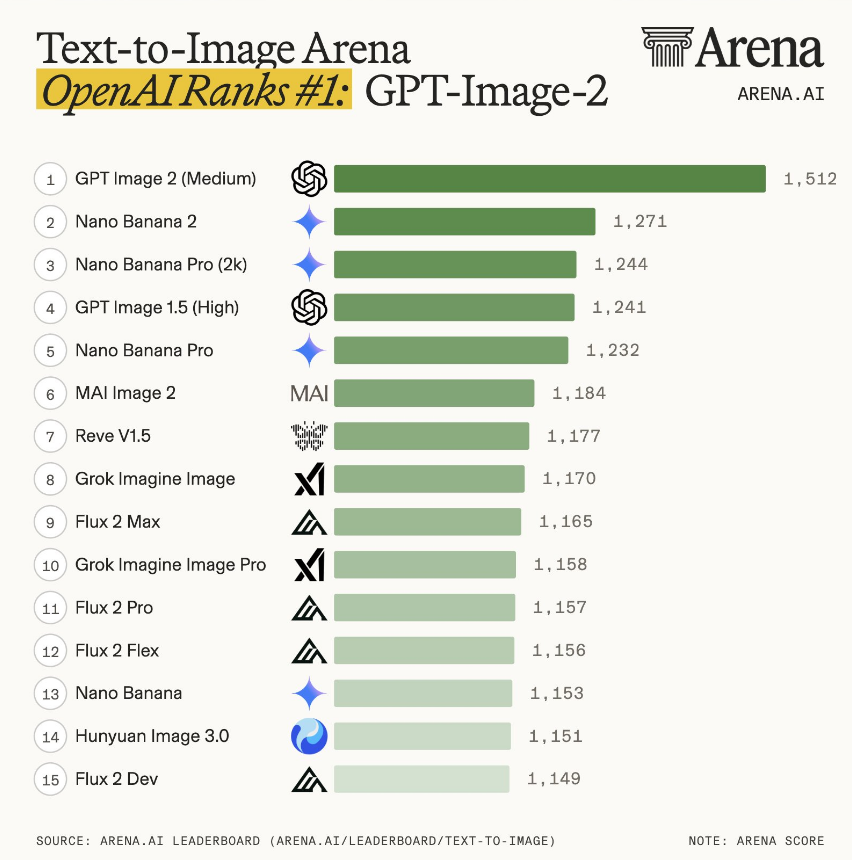
That margin means evaluators weren't splitting hairs - they kept picking one side in blind head-to-heads until the scoreboard looked lopsided.
What drove the sweep: photorealism cues older models fumbled. Film grain that reads stock-specific instead of digital mush. Lens flare that usually respects where you said the light is. Native aspect ratios from 3:1 to 1:3 - banners, portraits, widescreen - without the "generate square then crop" workaround.
Where It Actually Wins: I Broke It Down Into 4 Points
Output quality that holds up on second review.
1. Typography and layout
Text rendering was the bottleneck that blocked AI-generated assets from reaching clients. Every generator had the same failure: fonts warped under scrutiny, spacing collapsed, letters merged into shapes that looked like type but weren't readable.
GPT Image 2 handles font hierarchy. Tested on marketing banners with three text layers - headline, subhead, CTA button - the model maintained weight relationships and optical spacing across all three without manual correction.
What now works reliably:
- Multi-line layouts: Headlines stacked over body copy without collision or drift
- Font pairing: Sans-serif headlines with serif body text, contrast maintained
- Kerning: Letter spacing reads as intentional rather than algorithmic
- UI text precision: Button labels, nav items, form fields - readable at 12–14pt
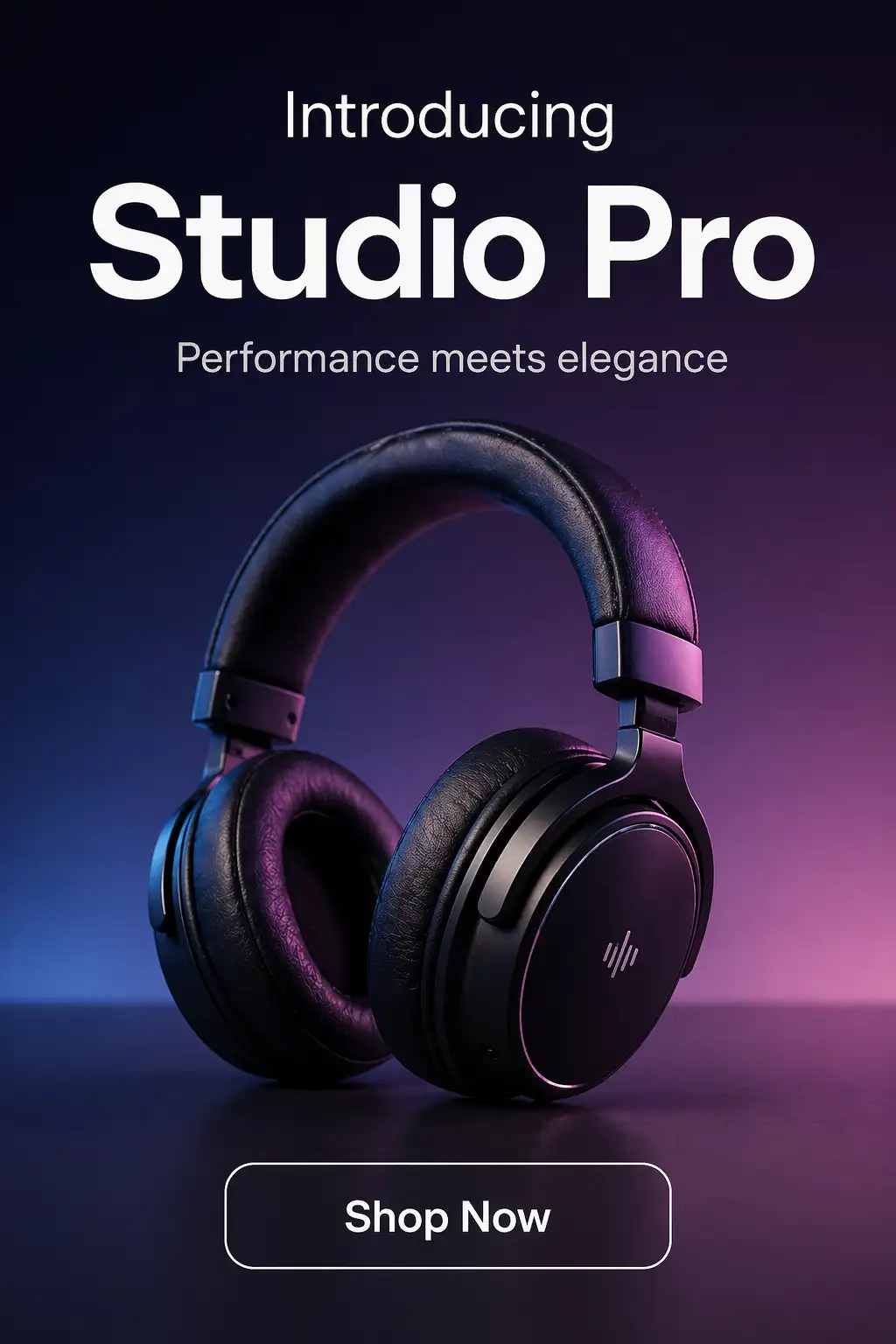
Specific test: a product launch banner with "Introducing Studio Pro" as the headline. Prior models returned melted letters or random glyphs. GPT Image 2 delivered clean Helvetica with proper tracking on the first pass.
Text Rendering: Production-Ready Across Languages
GPT Image 2 delivers exceptional text rendering across virtually all major writing systems, achieving roughly 95–99% accuracy in real-world tests. It generates clean, readable body copy, UI strings, headlines, and dense typography - a major leap from previous models that often produced garbled or mushy characters.
Reviewers call it a breakthrough: for the first time, you can create images with integrated text without needing post-generation overlays or heavy fixes. The model maintains proper stroke structure, consistent density, and legibility even at smaller sizes and in complex layouts.For global agencies and brands, this unlocks truly professional workflows. You can now generate:
- Bilingual and multilingual ad layouts
- Localized product packaging with native copy
- Marketing visuals and UI/UX mockups with authentic navigation text and mixed-language elements
Practical benefits: Information-dense designs like educational posters, e-commerce product pages (with tables, pricing, and CTAs), menus, and infographics come out with clear hierarchy - structured enough to iterate on directly rather than starting from scratch.Note on limitations: Extremely complex or stylized scripts (such as certain cursive forms or very dense characters) may still show occasional minor inaccuracies, but overall quality far exceeds prior models and is production-ready for most professional use cases.Recent tests and community feedback confirm this multilingual strength as one of GPT Image 2’s biggest advantages, transforming text from a longstanding weakness into a reliable asset for international design work.
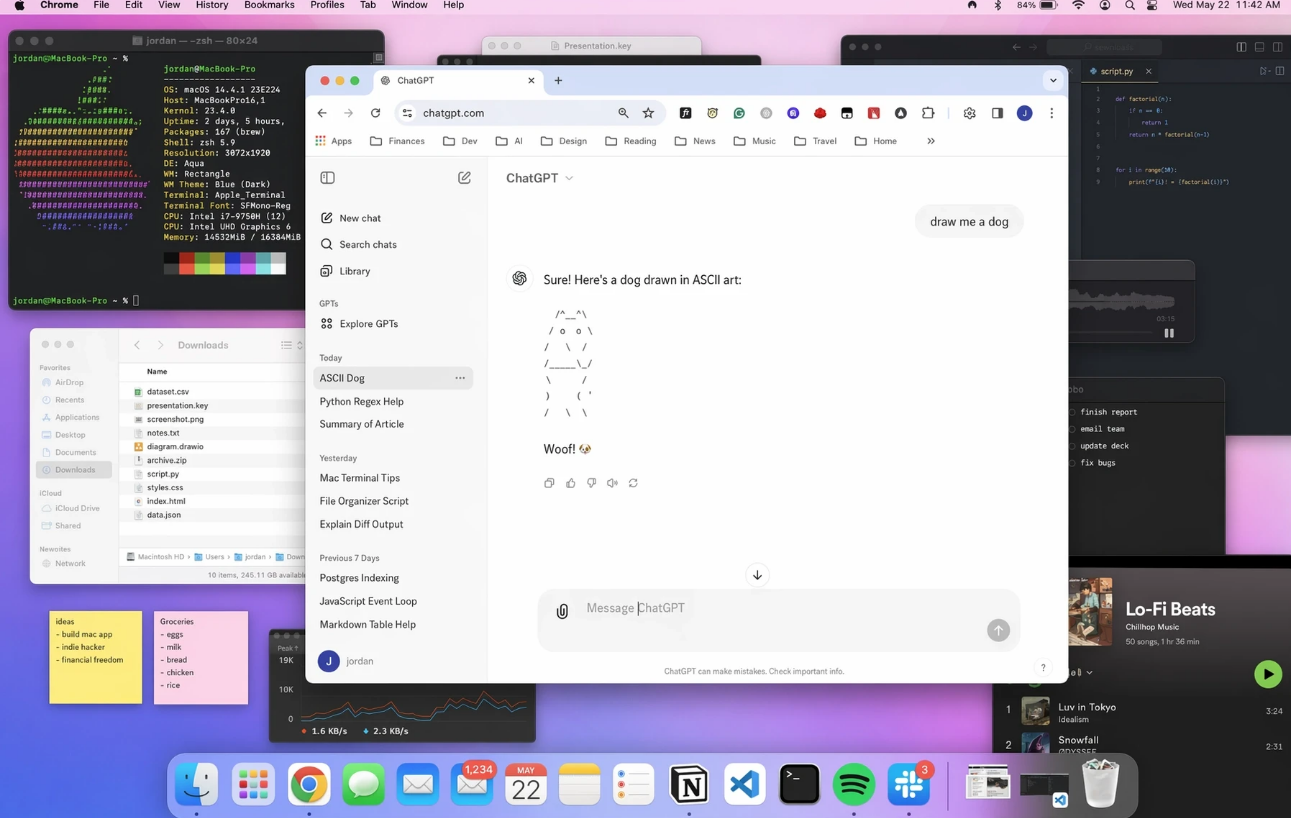
2. World knowledge: brand-accurate UI
UI screenshots
UI screenshots were the strongest category in my runs: feeds, livestream chrome, WeChat-style timelines - layouts, weights, and spacing close enough to pass at thumbnail distance. Prompts like "Instagram feed with Stories bar and grid posts" or "Twitch livestream interface with chat sidebar and viewer count" read as plausible captures, not generic "app-looking" wallpaper.
Use case: faster mockups and spec decks where stakeholders react to structure, not pixel law.
I ran four brand-specific prompts with no reference images and no style guides - plain language only. Results:
| Input | Output |
| IKEA product page layoutKallax shelf unit, blue and yellow color scheme, 'Add to Cart' button, clean sans-serif typography, e-commerce product page | 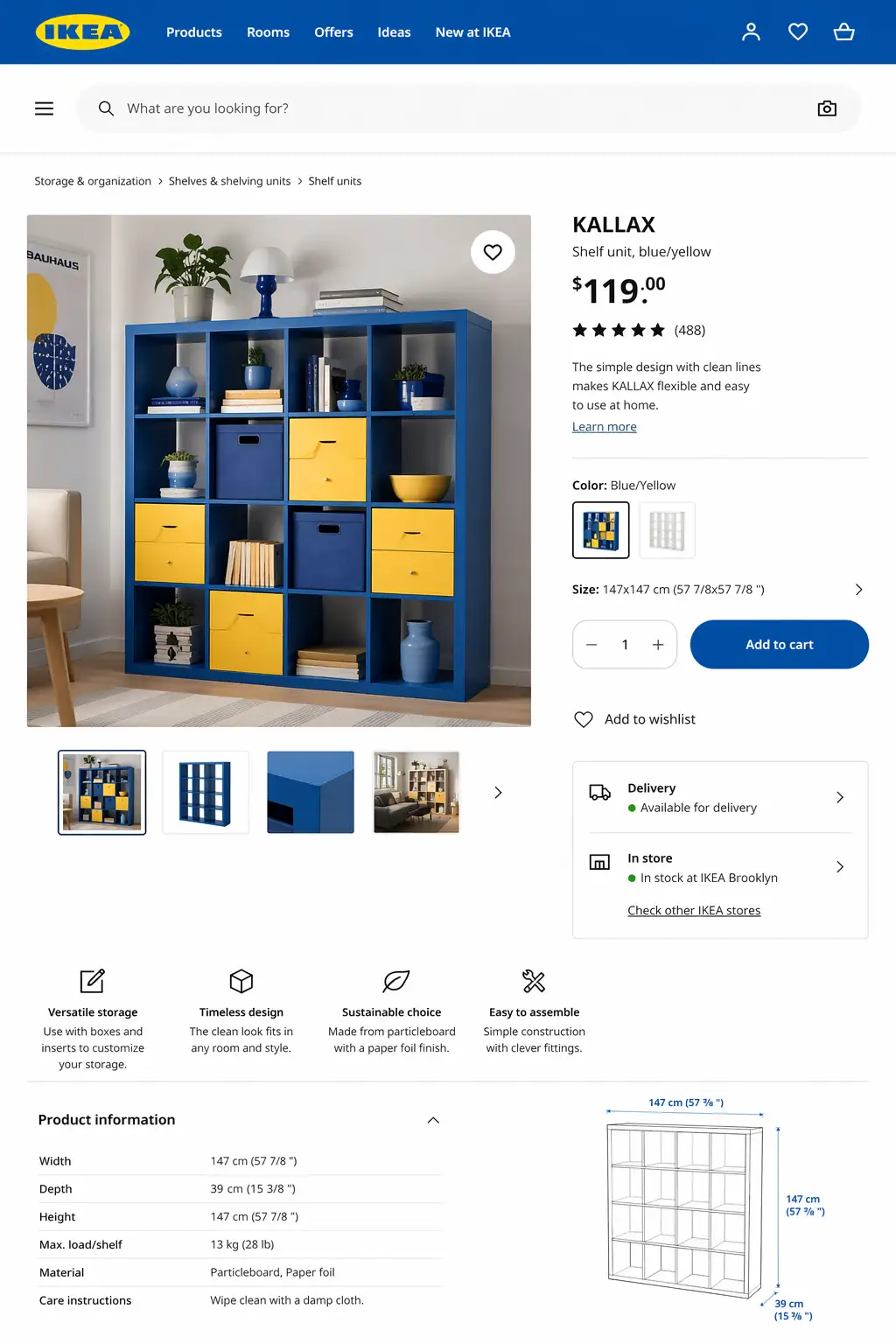 |
| YouTube video player interfaceDark mode, red play button, video thumbnail grid, sidebar with recommended videos, search bar at top | 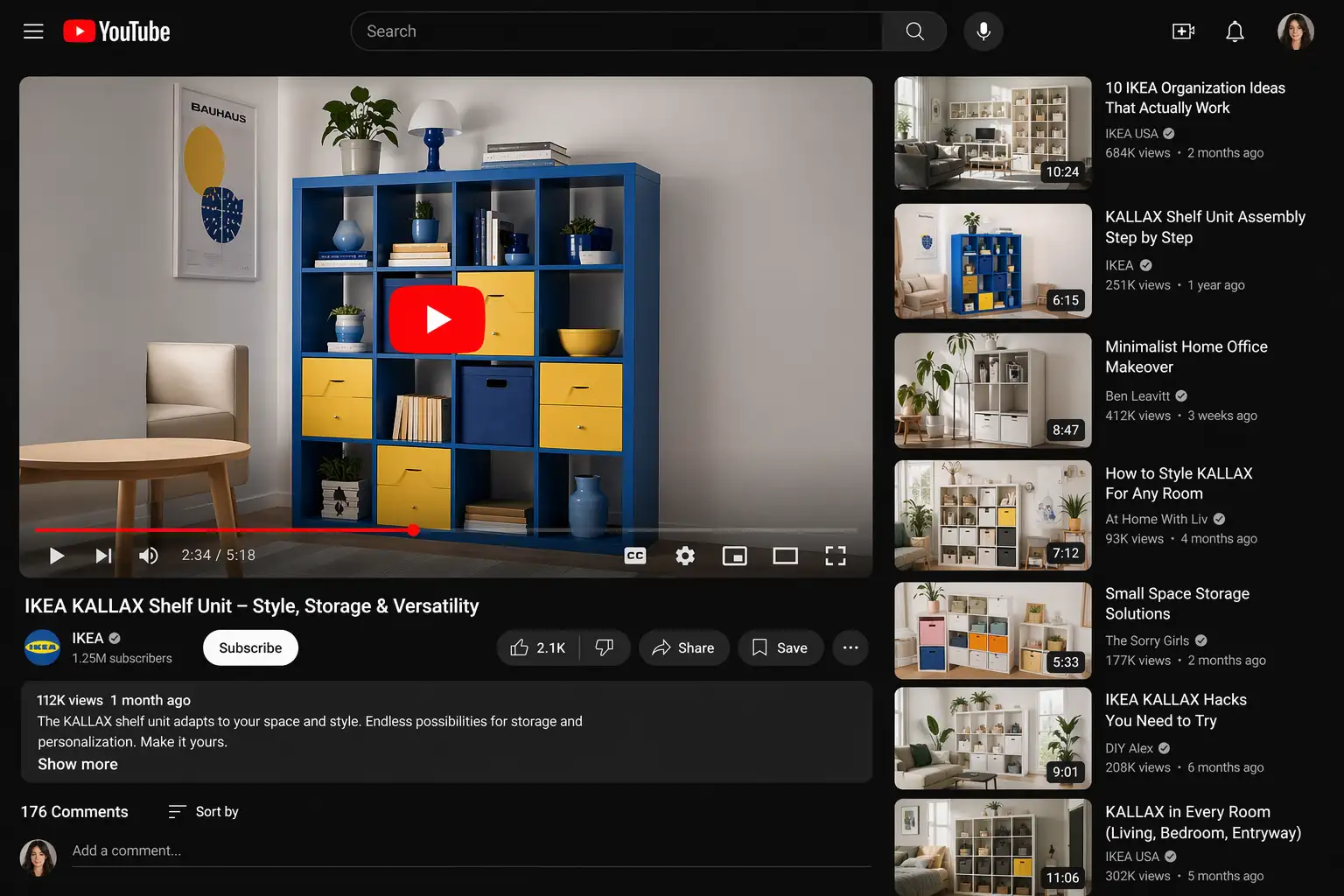 |
| Tesla dashboard interfaceMinimalist center screen, map visualization, climate controls, speedometer display, dark UI theme | 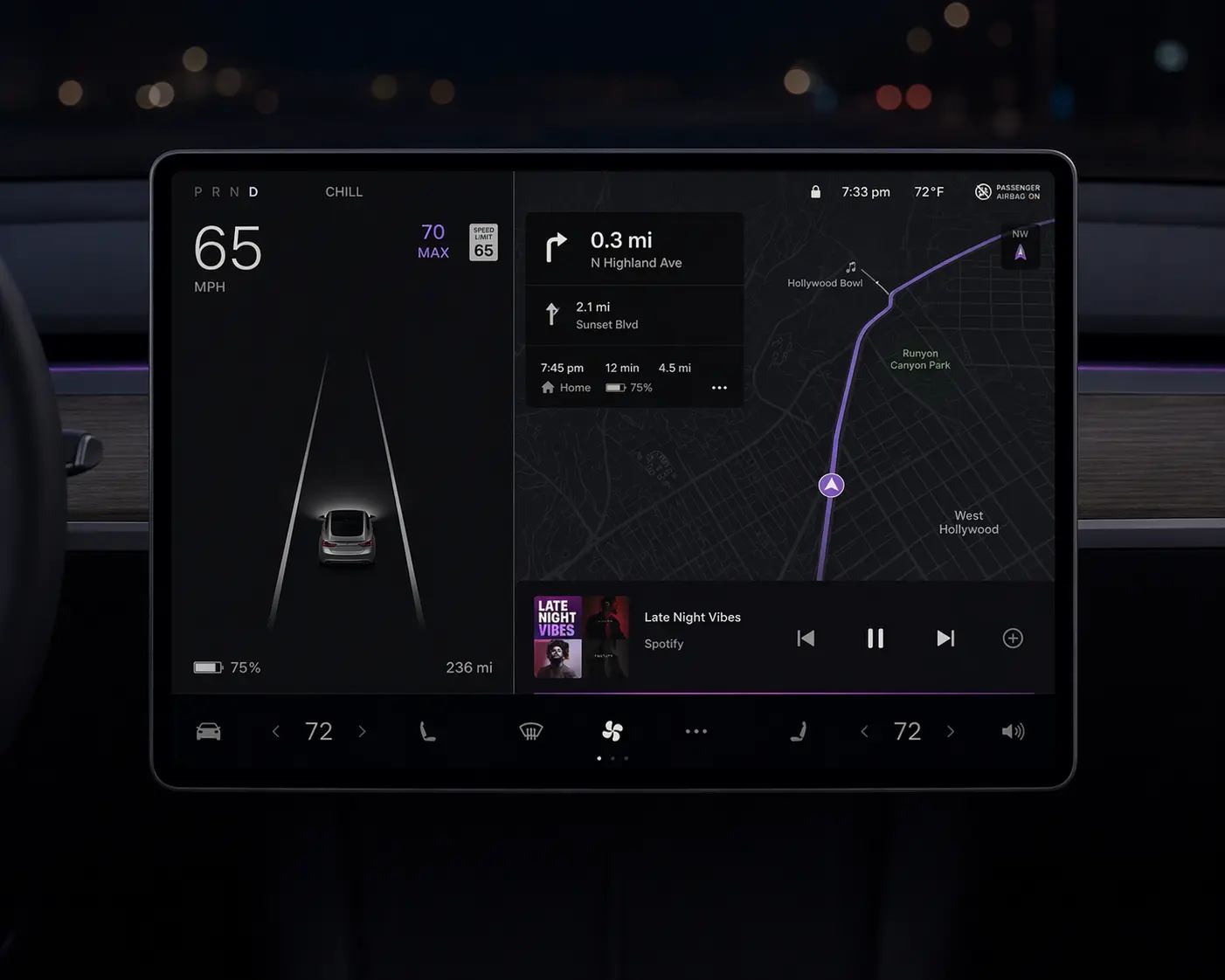 |
| Spotify playlist coverSquare format, gradient background, album art grid, playlist title in bold sans-serif, dark theme | 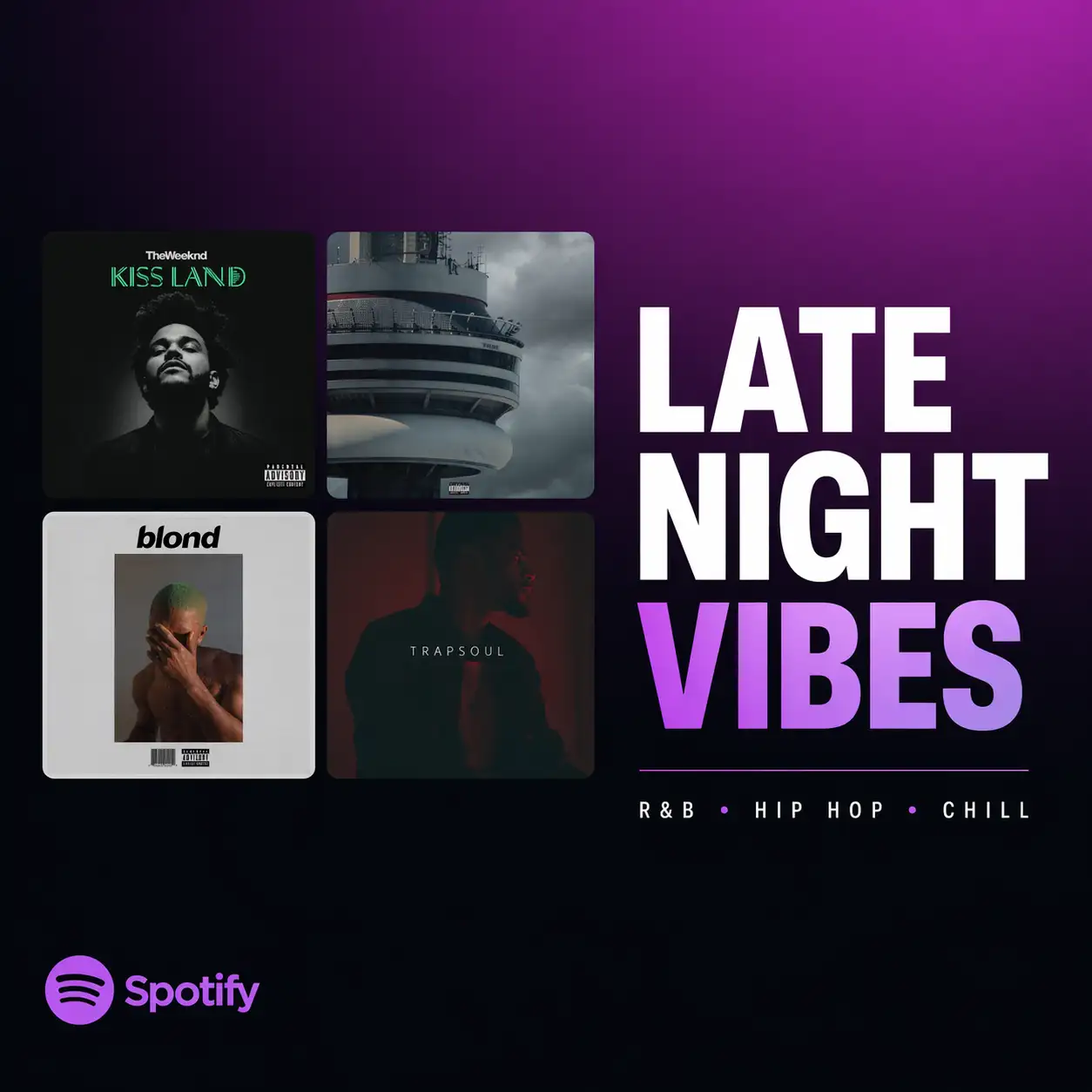 |
The Tesla result is worth noting: the model didn't just reproduce the logo. It understood the design philosophy - sparse UI, large touch targets, map-first layout. That's contextual authenticity, not pattern matching.
For your production workflow, this eliminates the style-guide-hunting phase. Prompt "Airbnb listing card" and get something that looks like it belongs in their product - then iterate from there.
3. Hands, skin, faces: fewer deal-breakers
Yellow-tinted skin, wrong finger counts, slightly-off faces, anatomy that collapses at 100% - the usual failure signatures.
GPT Image 2 still isn't perfect, but the worst offenders showed up far less often in my runs.
Skin texture (50-portrait test): Across varied lighting - harsh studio, soft window light, outdoor overcast - no yellow or orange tint appeared. Skin read as skin: pore-level texture, natural color variation, no waxy smoothness. Zero color correction passes needed before client delivery.
Hand anatomy (3 specific tests): "Person holding smartphone," "hand reaching for coffee cup," "typing on laptop keyboard." Five fingers every time. Correct joint positions. Natural grip poses. The spatial reasoning upgrade here is real - GPT Image 2 understands how fingers connect to palms, not just what hands look like in training data.
Photorealism: film grain and lens flare
Beyond anatomy, GPT Image 2 pushed photographic cues that older models faked badly.
Film grain: When you prompt for "35mm film aesthetic" or "Kodak Portra 400 look," GPT Image 2 generates grain structure that matches the specified film stock. Not a generic noise overlay - actual grain patterns that vary by ISO rating and film type. Photographers testing the output noted the grain distribution matched real film scans, not digital approximations.
Lens flare: Plausible relative to the light source. Older models parked flare in the center or at random. Here, a prompt like "backlit portrait, sun at 45°" tended to put bloom where you'd expect given the stated angle - not perfect physics, but fewer "decorative" flares.
Style diversity without quality collapse
The model jumps between radically different looks - 35mm film, 16-bit pixel art, traditional ink wash (水墨画), neon cyberpunk - without collapsing into a single "house style." Technique-specific cues read intentional, not like a filter stack.
Representative prompts:
- 35mm film portrait: Natural grain, accurate depth of field, film-stock-specific color rendering (Kodak Portra warmth vs. Fujifilm cooler tones)
- 16-bit pixel art: Correct pixel grid alignment, limited color palettes matching retro console constraints, dithering patterns consistent with classic game aesthetics
- Traditional ink wash painting: Brush stroke variation, ink density gradients, rice paper texture, composition principles from Chinese landscape painting
- Cyberpunk aesthetic: Neon color bleed, atmospheric haze, high-contrast lighting, urban density with layered depth
Switching from "portrait of a woman, 35mm film" to "same subject, 16-bit pixel art" usually kept composition and intent; the failure mode shifted to craft details, not random re-rolls of the whole scene.
4. Edits that don't reset the whole frame
The biggest workflow shift is iterative editing.
Previous models treated every edit command as a full regeneration trigger. Say "make it darker" and you'd get a new image - different composition, different angle, different product position - just darker overall. Iteration meant starting over, not refining.
GPT Image 2 changes that contract. Test case: product shot, "wireless headphones on marble surface," flat lighting. Edit command: "Add dramatic side lighting from the left." Result: the composition stayed - same headphone angle, same marble texture, same crop. Only the lighting shifted.
Edit commands that held the composition:
- "Make the background darker"
- "Shift the color palette to warm tones"
- "Add depth of field blur to the background"
- "Rotate the product 45 degrees"
- "Change the surface to wood instead of marble"
This is the shift from prompt roulette to production iteration. You generate once, then refine with targeted edits instead of writing 10 prompt variations and hoping one lands.
Production workflow that shipped:
Base prompt (product + scene + composition) → Generate → Targeted plain-language edits (lighting, color, surface, angle) → Native 2K–4K export → Direct to client deck. No upscaling. No color correction.
On resolution: previous generators capped at 1024x1024. Getting to print or presentation quality required a separate upscaling step that introduced its own artifacts. GPT Image 2 generates natively at higher resolutions. A 3840x2160 product render went directly into a client presentation deck - no intermediate processing, no quality degradation.
GPT Image 2 vs Nano Banana 2: Who Is the 2026 Image Generation King?
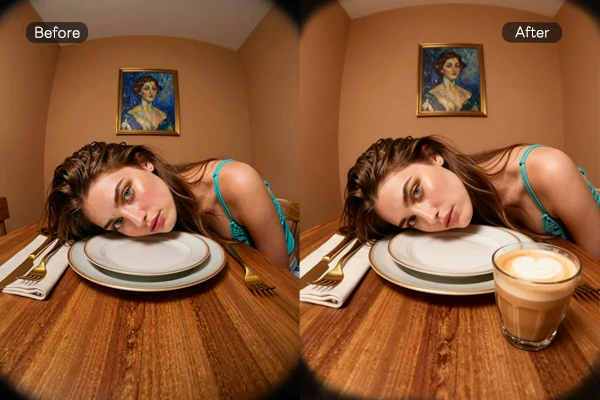
Same prompt per row: Nano Banana Pro (left) vs. GPT Image 2 (right)
Here’s a detailed side-by-side comparison based on real-world testing:
Text Rendering: GPT Image 2 wins decisively. It can generate crisp, readable text, including scannable barcodes and realistic restaurant menus - areas where most AI image models still struggle.
Speed: Nano Banana 2 is significantly faster, delivering images in just 3–5 seconds, compared to GPT Image 2’s 30–60 seconds for complex prompts.
Artistic Creativity: Nano Banana 2 shines here. It produces more imaginative, artistic, and stylistically diverse results. GPT Image 2, on the other hand, leans strongly toward photorealism and commercial-grade usability.
Editing Capabilities: GPT Image 2 takes the crown again. Its natural language multi-turn editing is incredibly intuitive - you can simply chat with the model to refine or modify images, making iteration smooth and efficient.
Final Verdict:
If you’re doing commercial design, branding, marketing materials, or need precise and reliable output, GPT Image 2 is the clear winner.
If you prioritize speed and want more creative, artistic exploration, Nano Banana is the better choice.
6 GPT Image 2 Real-World Test Cases (Prompts Included)
Trending prompts you can copy and past.
1. K-pop mini-album cover - ECLIPSE
Generate a cover for a K-pop girl group's first mini-album, ECLIPSE. Six members in black sequined fashion looks stand in a dark, metallic-toned photo studio. Centered, symmetrical composition; dramatic top light. The album title ECLIPSE appears across the top in large serif type; the subtitle BEYOND THE LIGHT WE SHINE sits in the upper right. At the bottom, include the release date 2024.05.20 and the group logo. Overall mood: dark, premium, fashion-forward—reference the photography and typography of real K-pop album covers. Square format.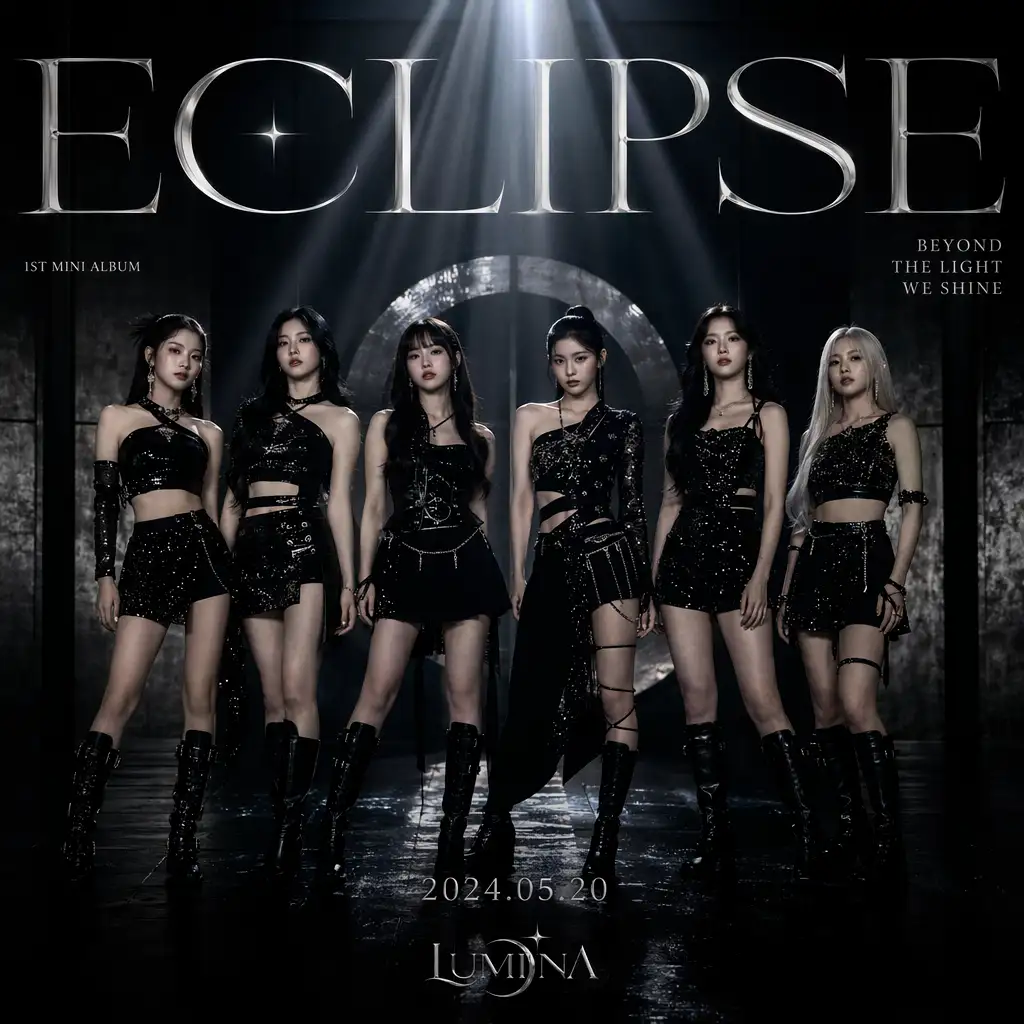
2. Live-stream UI screenshot
Vertical 4:3 smartphone screenshot of a live stream. Center frame: a pretty 21 year old mixed girl on Twitch Live with headphones on; medium-close shot, seated in a gaming chair. Lighting: strong purple and magenta neon rim light from behind and side, soft fill on face; background with a glowing pink/purple cursive neon sign reading "good vibes", white shelving with assorted items, bed with purple bedding visible. Full live-stream UI overlay: top-left circular avatar,username "mayaonair", red LIVE badge, stream title "chill vibes & games ♡", category "Just Chatting", viewer count "1.2K viewers"; left side vertical scrolling chat with varied usernames and short messages; bottom-left "Sub Goal" progress bar "128 / 200 Total Subs"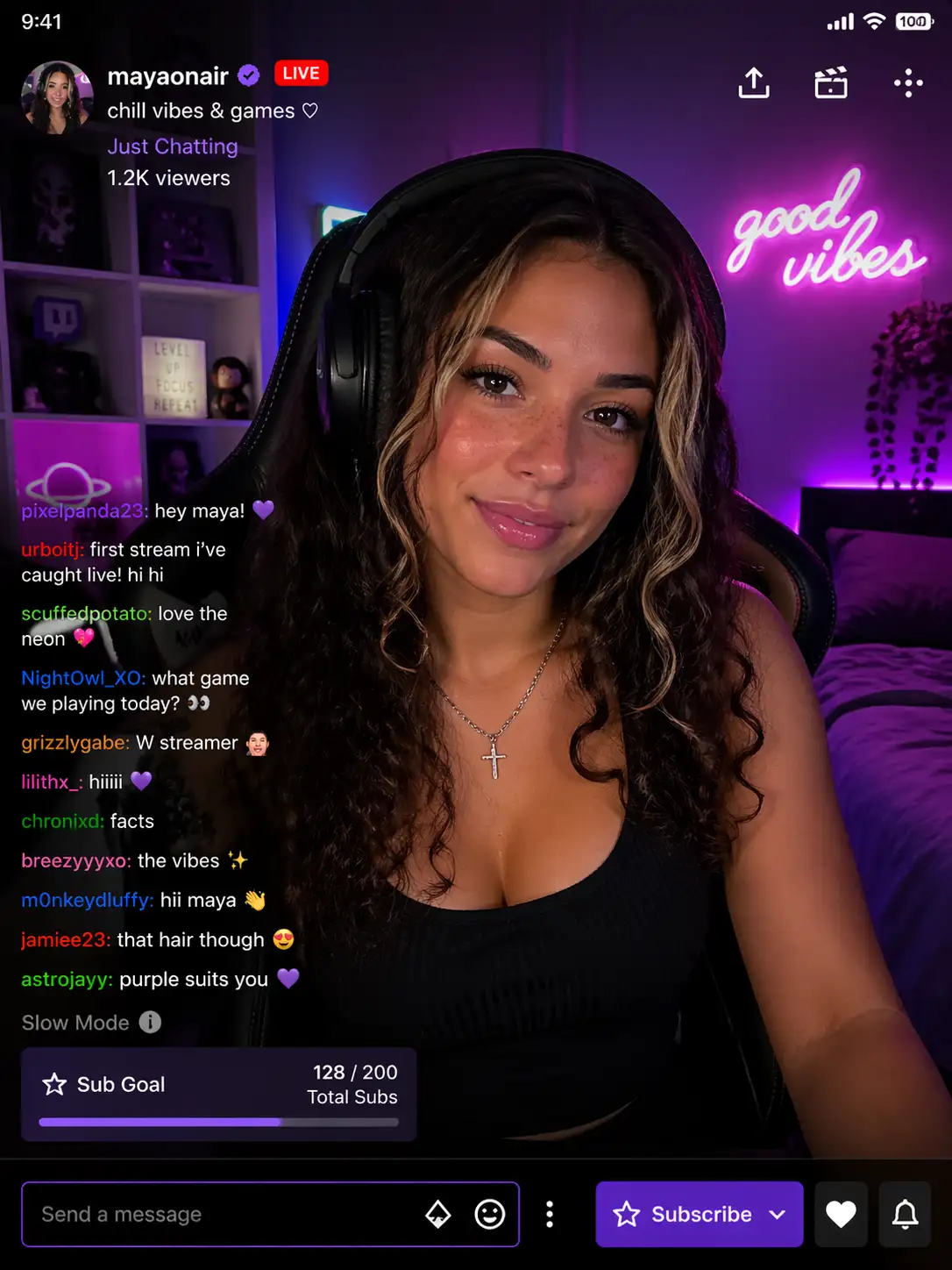
3. Late-night konbini influencer portrait
A 22-year-old East Asian woman with a round, youthful face, large bright doe eyes with natural lashes, rosy cheeks, soft pink lip gloss, and twin braids with loose strands. She wears a light purple oversized hoodie. Background: the interior of a Japanese convenience store at night (bokeh), with neon reflections forming colorful light spots. Expression playful, lively, genuinely happy. Aesthetic: Douyin/TikTok influencer portrait, light beauty-filter texture, warm skin tones, natural light.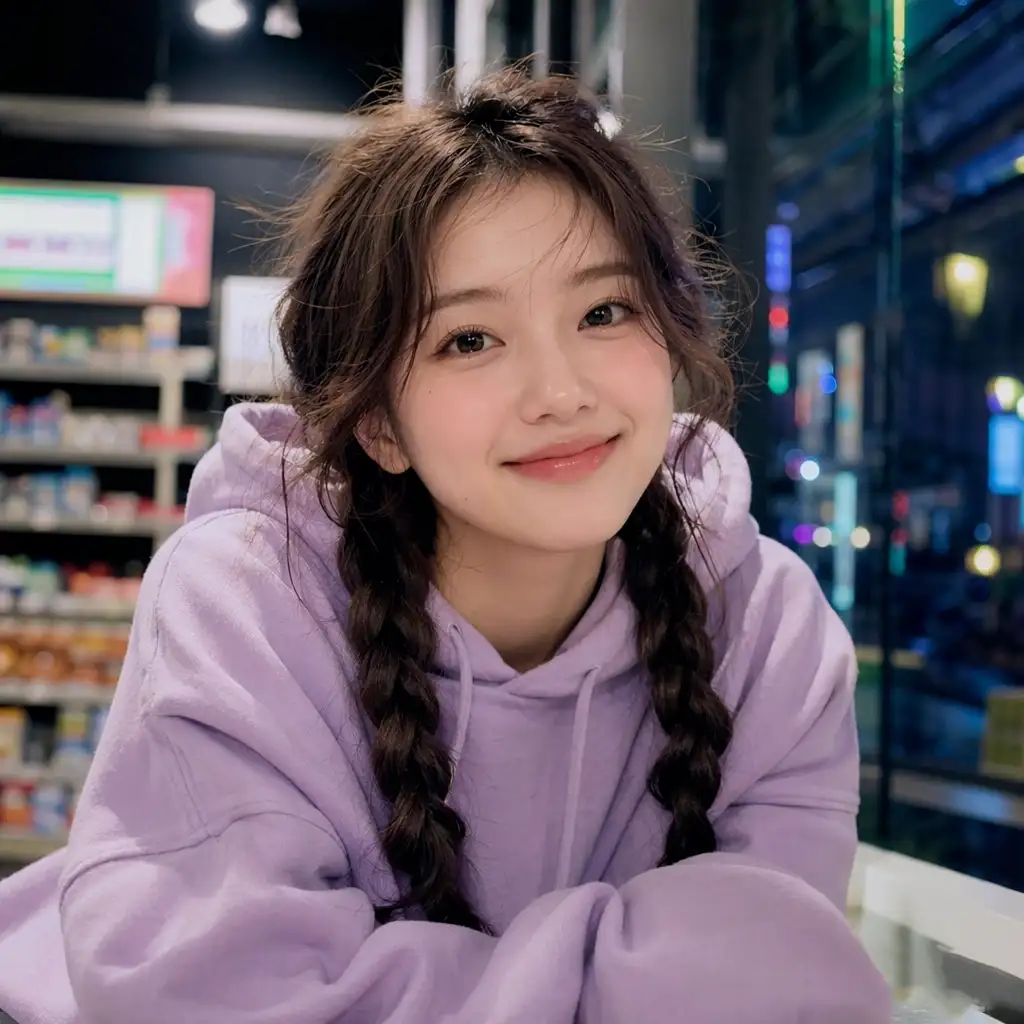
4. Six-panel school-rooftop romance storyboard
Generate a complete school-romance anime storyboard: six panels arranged in a 2×3 grid. Story setup: school romance; protagonist Sakura, 16, pink twin tails, JK uniform, shy but brave; setting the school rooftop at dusk as the sun sets; plot—Sakura confesses to the boy she likes on the rooftop, and he says yes. The six panels: ① Sakura alone on the rooftop watching the sunset (wide shot) ② The boy opens the door and steps onto the rooftop (medium shot) ③ Sakura nervously turns to face the boy (close-up on expression) ④ Sakura gathers her courage to confess (side two-shot) ⑤ The boy smiles and nods (frontal close-up) ⑥ The two stand side by side watching the sunset (wide silhouette). Japanese anime style, warm sunset palette, simple panel numbers in each frame.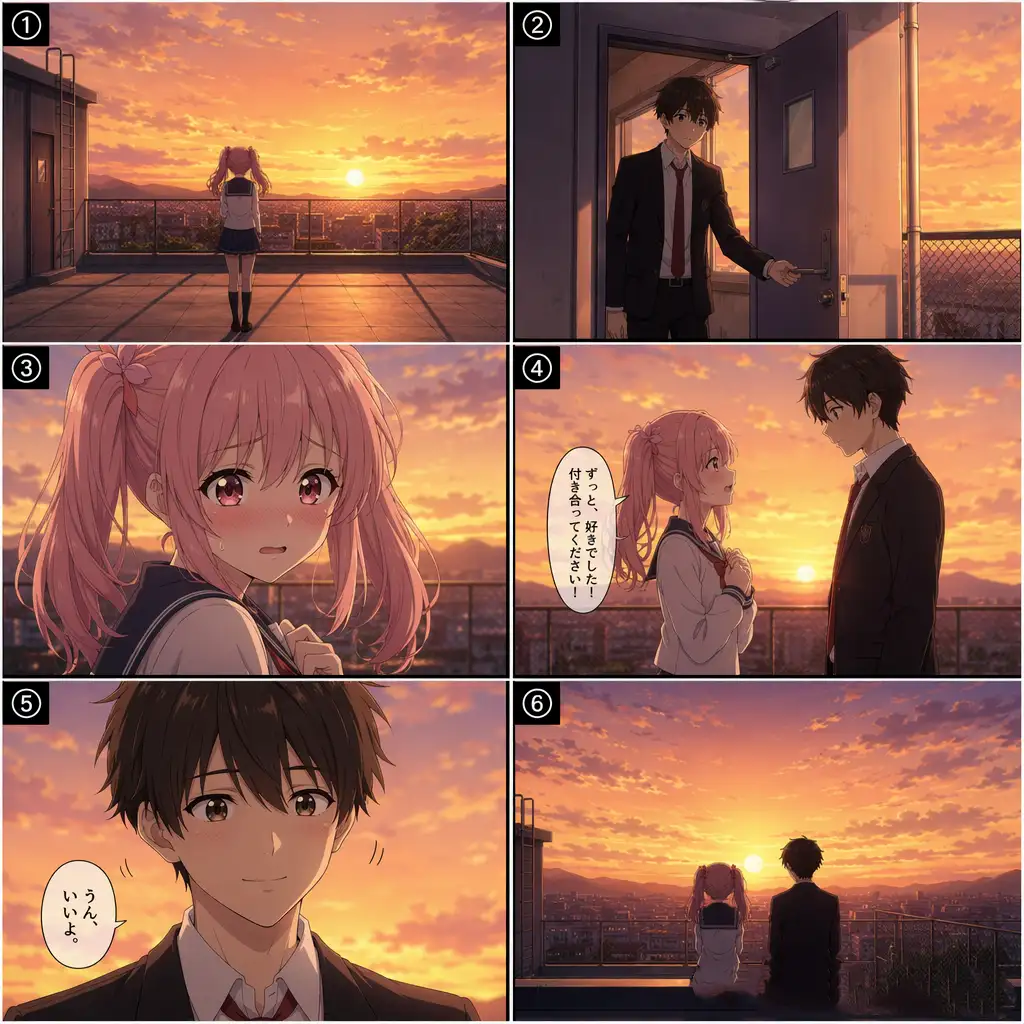
5. West Lake boutique hotel - archviz
Architectural visualization render. A modern Chinese boutique hotel on the shore of Hangzhou's West Lake. White walls, gray-tile pitched roofs combined with large glass curtain walls; a still reflecting pool in front mirrors the building. The garden includes Taihu rocks, bamboo, and red maple. At dusk, warm interior light glows through the glass; the sky is a gradient of orange and purple. Photorealistic archviz with believable materials (concrete, wood, stone), 8K quality.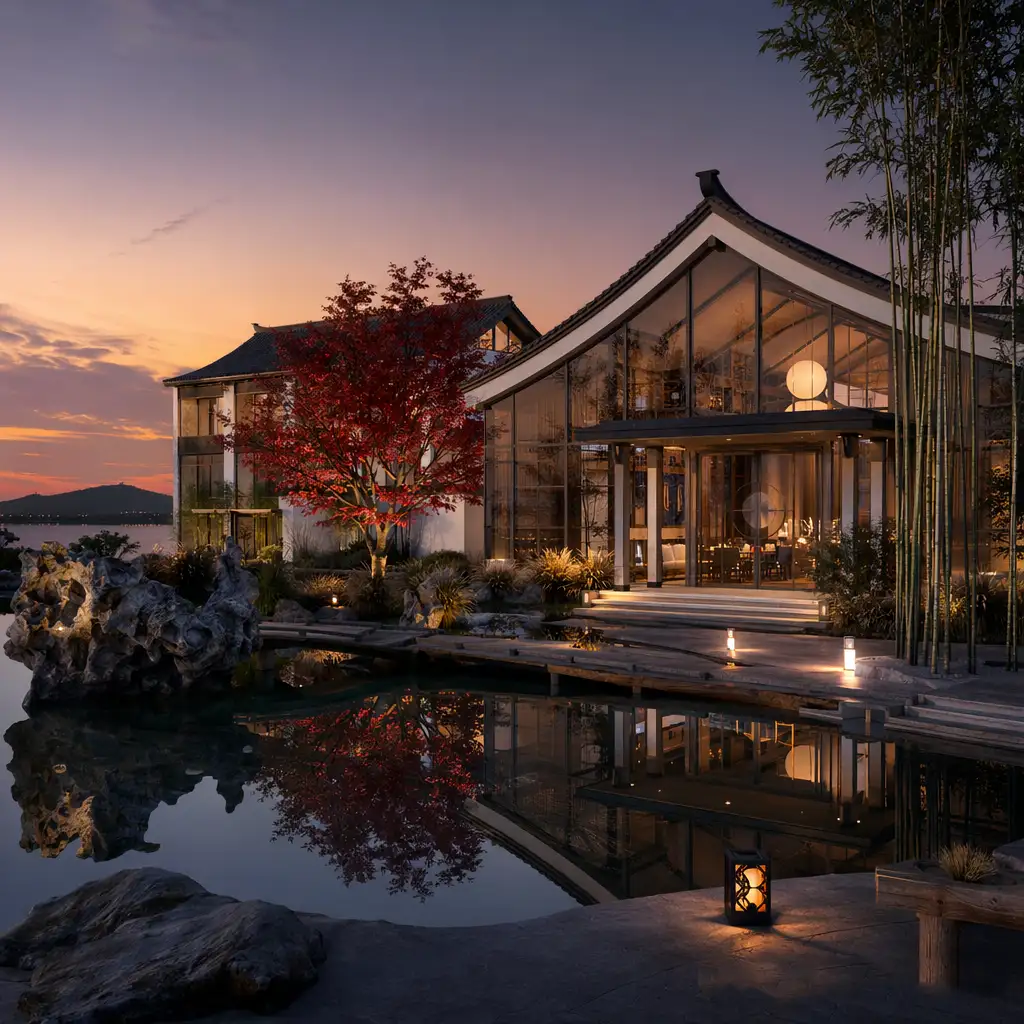
6. Tibetan antelope migration - documentary wide shot
BBC-level natural-history documentary imagery. Tibetan antelope herd migration on the Qinghai–Tibet Plateau. Ultra-wide shot: hundreds and thousands of Tibetan antelopes galloping across golden grassland, kicking up low dust. Background: rolling snow-capped peaks under a deep blue sky with a few white clouds. A mother and lamb near the front of the herd. Lighting: early-morning golden sidelight; telephoto compression; shallow depth of field, with herds in the foreground and background softly out of focus. The scene feels vast yet serene, alive with motion.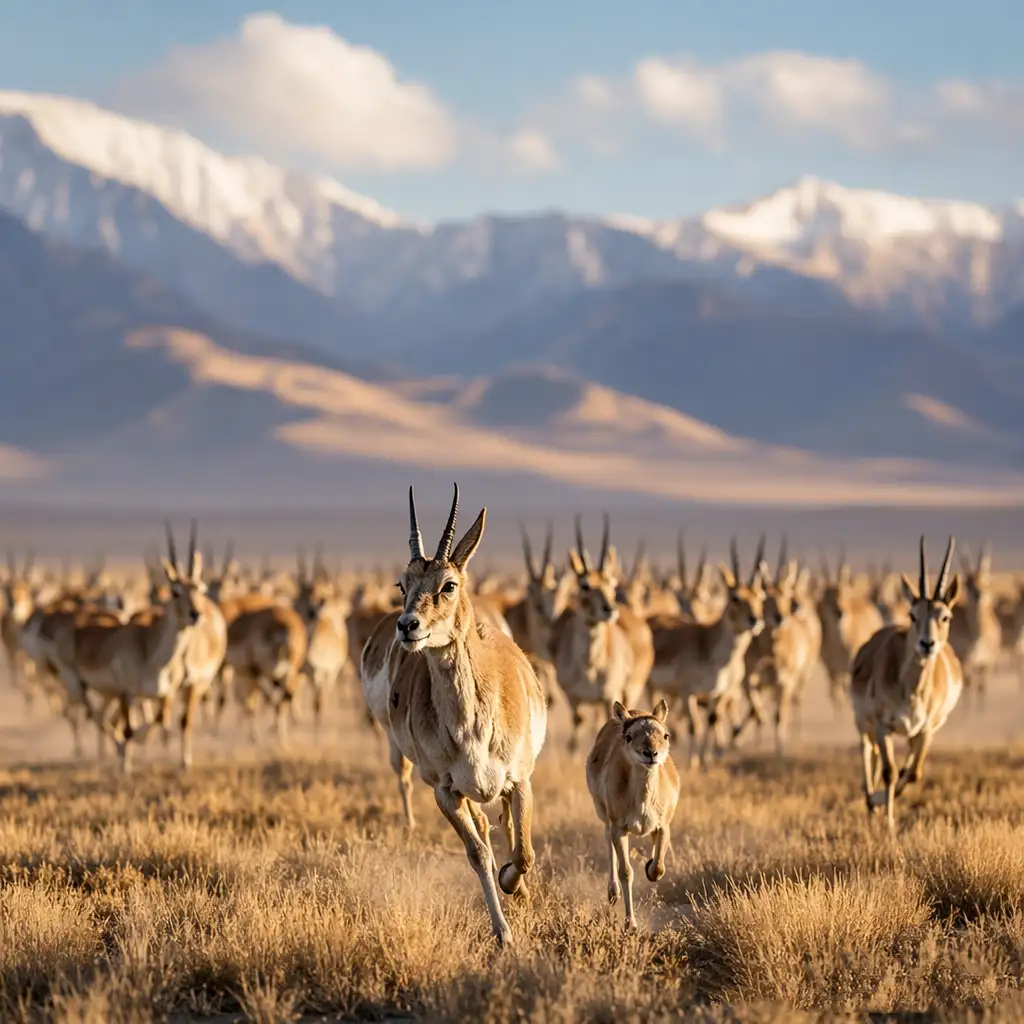
How Big Is the Impact on the Design Industry?
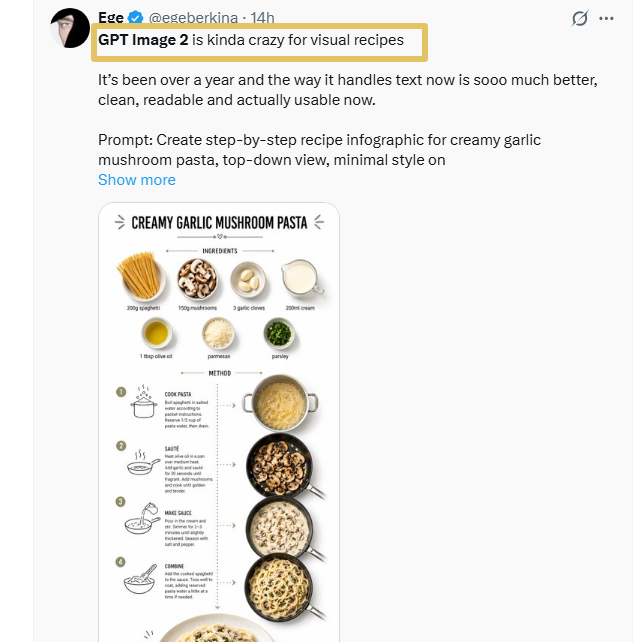
I scrolled through designer reactions on social media today and grabbed a few screenshots. "GPT Image 2 ended the competition." "This is absurdly strong." "The design industry is about to change." I've seen these kinds of statements before. Every time, they turned out to be hype. This time feels different.
The difference: previous AI image generators had obvious tells that professional designers spotted immediately - wrong lighting, deformed fingers, garbled text. Those flaws were the source of the "AI look." GPT Image 2 fixed them one by one. When AI's weaknesses get systematically eliminated, "everyone is a designer" stops being a slogan and becomes reality.
Who Gets the Most Out of GPT Image 2
Designers who need client-ready assets fast, without a full production pipeline behind them. Marketers shipping campaign visuals without a dedicated design team. Founders prototyping product concepts before the design hire.
GPT Image 2 is production infrastructure for teams that can't staff every creative need but have to ship anyway.
Highest-ROI use cases:
- Social media graphics (Instagram posts, LinkedIn banners, campaign headers)
- Product mockups for pitch decks and investor materials
- Website hero images and section backgrounds
- Marketing email headers and promotional banners
- App UI concept screens for early-stage product review
- E-commerce product staging at scale
GPT Image 2 won't replace photographers for hero product shots or illustrators building custom brand systems. What it replaces is the gap between "we need something" and "we have budget to hire someone" - which is most of the production calendar for most teams.
GPT Image 2 + SeaArt AI: The Full Production Pipeline
GPT Image 2 gets you to a believable frame fast - text, layout, first-pass realism. SeaArt AI is what we stack on top when the job has to survive a real production calendar: canvas and aspect control for each deliverable format, resolution passes, style lock across a set, and batch variants without living in prompt roulette.
| Workflow Stage | Tool | Why |
| Concept + Layout Draft | GPT Image 2 | Accurate text, spatial composition, zero-shot brand knowledge |
| Aspect ratio & canvas | SeaArt AI | Lock framing per format (social, deck, print) so upscales and batch exports stay on-spec without last-minute crops |
| Resolution Enhancement | SeaArt AI Upscaler | Push 2K exports to 4K for print and large-format delivery |
| Style Consistency | SeaArt AI Style Tools | Apply brand-specific aesthetics across a multi-asset campaign set |
| Batch Processing | SeaArt AI Workflow Stack | Scale creative sets across 4-8 variations without manual rework |
Recommended pipeline for client deliverables:
GPT Image 2 (concept + layout, native 2K–4K) → SeaArt AI (aspect ratio & canvas, then upscaler to 4K for print) → SeaArt AI batch tools (campaign consistency across assets) → Client delivery. Two tools, full pipeline.
GPT Image 2 wins on the creative decision layer. SeaArt AI handles the production scaling layer. Together they cover the full workflow from first concept to final multi-format delivery - without a third tool in the stack.
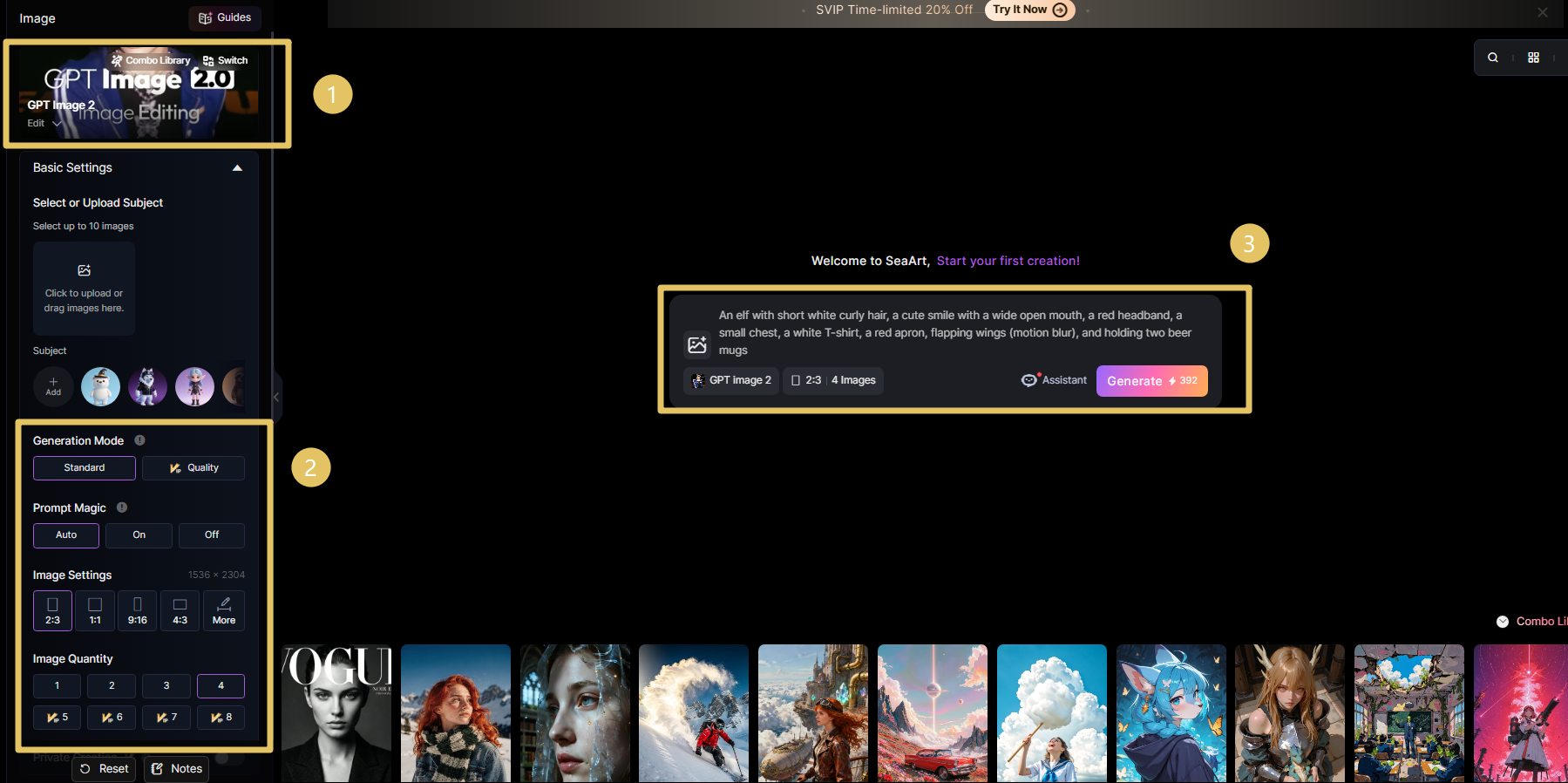
GPT Image 2 is live on SeaArt AI now. Open the model page or the image creator below and start generating.
Why SeaArt AI matters: the real advantage is multi-model orchestration, not a single-model demo. GPT Image 2 can handle text-heavy layouts and client mockups, while other models in the same SeaArt AI workspace can cover alternate visual directions (for example video-oriented stacks like Veo 3, Sora 2, Kling 2.6, Wan 2.6, or image-style switches such as Nano banana Pro and Midjourney workflows) without forcing your team to rebuild process on every platform change.
How to use GPT Image 2 on SeaArt AI
1. Model hub. Open the GPT Image 2 page on SeaArt AI for metadata, capability highlights, and the entry point to create.
2. Text-to-image flow. Jump straight into generation in the SeaArt AI image creator with this model selected - describe scene, lighting, style, and any wording that must appear in-frame (headlines, UI labels, packaging copy), then refine before you hand off to SeaArt AI upscaling or batch work.
123456789Quality: GPT Image 2 vs. Nano Banana Pro, Midjourney v6, DALL-E 3
Same prompts, ~50 generations per tool, scored for production readiness.
| Dimension | GPT Image 2 | Nano Banana Pro | Midjourney v6 | DALL-E 3 |
| Text Rendering | 9/10 - Multi-layer layouts hold | 8/10 - Strong but less flexible | 4/10 - Text often warps | 7/10 - Single-line text works |
| Anatomy Accuracy | 9/10 - Consistent 5 fingers | 8/10 - Improved hands | 6/10 - Hands still problematic | 7/10 - Improved but not perfect |
| Editing Flexibility | 9/10 - Plain-language edits work | 6/10 - Limited edit commands | 3/10 - Must regenerate fully | 5/10 - Limited edit commands |
| Native Resolution | 4K (3840x2160) | 2K (2048x2048) | 2K (2048x2048) | 1K (1024x1024) |
| Speed | 15–30 seconds | 20–35 seconds | 30–60 seconds | 10–20 seconds |
| Photorealism | 9/10 - Film grain, lens flare | 8/10 - Strong photorealism | 7/10 - Stylized aesthetic | 6/10 - Softer realism |
| Best For | Client deliverables, UI mockups, banners | Photorealistic scenes, Google ecosystem | Artistic concepts, stylized work | Quick iterations, social graphics |
Bottom line: GPT Image 2 wins on text, anatomy, and editing flexibility - the three failure modes that blocked production use before. Nano Banana Pro (Google) is the closest competitor on photorealism but lacks the iterative editing workflow. Midjourney wins on artistic style and aesthetic control. DALL-E 3 wins on speed for rapid iteration. Choose based on your primary constraint: if you're shipping to clients, GPT Image 2. If you're in the Google ecosystem and need photorealism without editing, Nano Banana Pro. If you're exploring artistic concepts, Midjourney. If you're testing variations fast, DALL-E 3.
API Pricing at Scale
ChatGPT Plus and Pro subscriptions cover interactive use. For developers integrating GPT Image 2 into apps or running automated pipelines, the API pricing structure is what matters.
| Quality Tier | Price per Image | Best For | Output Specs |
| Low Quality | ~$0.011 | Rapid iteration, concepting batches, A/B testing at scale | 512x512, fast generation |
| Medium Quality | ~$0.042 | Social media assets, email campaigns, standard marketing graphics | 1024x1024, balanced quality/speed |
| High Quality | ~$0.167 | Client deliverables, print campaigns, hero images, 4K output | Up to 4K, full photorealism features |
At High Quality tier, 1,000 images costs approximately $167. A full marketing campaign (100 hero images, 300 social variants, 200 email headers) runs around $100 in API costs - less than a day of a junior designer's time. The ROI math is straightforward for production teams.
For comparison: Midjourney's API equivalent prices hover around $0.08–0.15 per image with less editing flexibility. DALL-E 3 API is approximately $0.08–0.12 per image at 1024x1024. GPT Image 2's High Quality tier costs more per image but outputs at higher native resolution with full iterative editing support - making the per-asset cost competitive when you factor in the reduced revision cycles.
Where GPT Image 2 Still Breaks
What's rare: OpenAI proactively published the limitations this time. These aren't marketing disclaimers - they're accurate descriptions of real constraints I verified in testing.
❌ Origami step diagrams, Rubik's Cube solutions, and other physical-world modeling scenarios: Tasks requiring precise spatial reasoning about 3D object manipulation fail consistently. The model can't reliably generate "fold here" diagrams or step-by-step assembly instructions where physical accuracy matters.
❌ Sand-grain-level ultra-dense/repetitive visual details: Textures with thousands of identical micro-elements (gravel, fabric weave at extreme zoom, dense particle fields) break down into noise or pattern artifacts. The model handles macro-level repetition but not microscopic density.
❌ Precision annotation diagrams and engineering schematics (requires manual review): Technical diagrams with callout labels, dimension lines, and exact measurements need human verification. Text placement and numerical accuracy aren't reliable enough for engineering documentation without review.
❌ Results above 2K resolution may be unstable: While GPT Image 2 can generate up to 4K, outputs above 2048x2048 sometimes introduce artifacts or inconsistencies. For critical client deliverables, test at target resolution or plan for upscaling from 2K base.
❌ Complex prompts can take up to 2 minutes: Extended Thinking Mode with multi-layered requirements hits the upper latency limit. For bulk workflows or tight deadlines, this makes certain use cases impractical without overnight batch processing.
For 80% of commercial design work - social graphics, product mockups, presentation visuals, web hero images, campaign concepts - GPT Image 2 delivers production-ready output. The 20% where it breaks is predictable and plannable.
FAQ
Can I use GPT Image 2 on SeaArt AI for free?
Yes. SeaArt AI offers free daily Stamina, so you can test GPT Image 2 before paying. For most users, that is enough to validate prompt quality, text rendering, and style direction before moving to paid volume.
How long does one image usually take to generate?
Most images render in about 5-10 seconds, depending on resolution and prompt complexity. Higher-resolution or more complex prompts can take longer, so lock composition fast first, then upscale once direction is approved.
If I deliver GPT Image 2 assets and never say they are AI, who is liable when the client cares?
Contract and norms beat pixels. If the SOW implies original photography or human-only craft, silence can read like misrepresentation. If the brief was concept-only for internal review, the bar moves. Default: agree in writing whether deliverables may be synthetic, what disclosure you owe, and who eats revision cost if provenance blows up after sign-off.
Will stock sites, ad networks, and marketplaces accept these uploads next month?
Do not assume yes. Platforms change AI and synthetic policies on their own schedule; photorealism is not a compliance safe harbor. Before you batch-upload, read that vendor's current terms and rejection patterns, and keep a human gate for anything with legal or brand tail risk.
Your review sounds positive; my first ten runs looked mediocre. Why trust your workflow over my failures?
Separate model limits from prompt hygiene. Weak runs usually trace to vague briefs, wrong export canvas or aspect handled too late in the pipeline, or changing five variables per iteration. If failures cluster on one task type after tight prompts, that is a real ceiling; if they are random, fix process before blaming the model.
If everyone rents the same model, what is left of my edge as a designer?
Execution gets cheaper; judgment does not. Clients still pay for brand constraint, sequencing under deadlines, taste when outputs cluster, and who signs off when the model is wrong. The moat is process and responsibility - not secret access to an API anyone can buy.
Conclusion
That 4:00 AM Slack wasn't really about Helvetica. It was a creative director realizing the old comfort - I'll clock the fake because it will look fake - quietly stopped being a reliable rule. Twelve usable passes isn't a flex; it's a signal that the bottleneck moved from "can the model?" to "what do we do when the model usually can?"
A few years ago, a lot of people in this line of work still treated that confidence as obvious: AI pictures would stay visually loud, ethically loud, easy to dismiss. In still images, that era ended bluntly - not because everyone agreed on what's "real," but because the cost of being wrong on either side got too asymmetric to ignore.
Attention economics: five minutes of forensic zoom can buy you nothing - or proof of authenticity you still paid five minutes for. At hundreds of frames a week, "verify each one rationally" is not a strategy; it is theatre. The survivable default is batch-level skepticism about pixels, and "true vs. synthetic" only at choke points where liability actually lives.
What scales instead: plausible supply outruns weekly audit hours; time on provenance is time not on craft. When extra certainty costs more than it saves, teams shift spend from eyeballing every file to pipeline - who generated it, under what contract, what the client was told before sign-off. The frame behaves less like a self-proving fact and more like a deliverable with paperwork.
Sam Altman's "GPT-3 to GPT-5" line is still rhetoric; my claim is narrower: GPT Image 2 already sits where process quality beats aesthetics alone for production. Three client projects shipped; no one asked if the pictures were "real." Treat that silence as weather, not a trophy - the next fight is not melted type; it is which institutions still earn trust when default doubt is the cheap rational move.
Related Articles
How to Create AI Animated Stories with ChatGPT: A Step-by-Step Guide
How to Make AI Video with Claude: From Script to Final Cut in 2026
How to Create AI Animated Stories with Grok: A Step-by-Step Guide
How to Make Videos with Gemini: Step-by-Step Guide
The Grok Roleplay Prompt Guide for Actually Fun AI Conversations
30+ Best GPT Image 2 Prompts You Can Copy and Paste in 2026
HappyHorse AI Review: The Anonymous Model That Hit #1 on the Video Leaderboard