

Seedance 1.5 Pro VS Sora 2: Which AI Video Generator Wins?
Choosing between Seedance 1.5 Pro VS zSora 2 isn't about which one looks cooler in demos. It's about which technical specs match your actual production needs: resolution limits, video duration caps, generation methods, and whether audio sync actually works when you need it.
I've analyzed both tools' official documentation and technical reports to give you a clear breakdown of what each one claims and what you should verify before committing. This comparison focuses on the numbers that matter: resolution, duration, generation speed, and audio capabilities.
If you're exploring other AI video tools, SeaArt AI offers a comprehensive platform with multiple video generation options to compare.
Quick Technical Specs Comparison Table
| Technical Spec | Seedance Pro 1.5 | Sora 2 | Notes |
|---|---|---|---|
| Max Resolution | 1080p (also supports 480p, 720p) | 1080p (also supports 480p, 720p) | Both support multiple resolution options up to HD |
| Max Video Duration | 10 seconds | Up to 25 seconds (pro version) | Sora 2 offers longer clips |
| Generation Methods | Text-to-Video (T2V), Image-to-Video (I2V) | Text-to-Video (T2V), Image-to-Video (I2V) | Both support T2V and I2V |
| Audio-Video Sync | Native joint generation, multilingual lip-sync | Audio generation supported | Seedance claims explicit lip-sync |
| Multi-language Support | Multilingual and dialect support (claimed) | [Needs Verification] | Seedance explicitly mentions this |
| Generation Speed | ~41 seconds for 5s 1080p video | 60-90 seconds (varies by length/complexity) | Seedance claims faster inference |
| Pricing Model | ~$0.50 per 5s 1080p video | Credit-based (varies by platform) | Both use pay-per-use models |
| Personalized Avatars | Not available | Cameo feature (create digital avatars from face/voice) | Unique to Sora 2 |
Verification Status: Items marked "[Needs Verification]" require testing on actual platforms, as official documentation may not specify all details.
Comparison of Generation Methods & Output Quality
Both Seedance 1.5 Pro VS Sora 2 support text-to-video and image-to-video generation, but their approaches differ in ways that affect your workflow.
Seedance 1.5 Pro
Generation Method: Uses dual-branch Diffusion Transformer architecture with native joint audio-video generation. Audio and video are generated together in a single pass—no post-processing needed.
Key Features:
- Native audio-video sync (multilingual/dialect lip-sync support)
- Cinematic camera control (film-grade shot composition)
- Multiple resolution options: 480p, 720p, 1080p
Best For: Dialogue-heavy content, multilingual projects, cinematic framing. Use lower resolutions (480p/720p) for quick iterations, 1080p for final deliverables.
Sora 2
Generation Method: Emphasizes physics accuracy and world-state consistency. Audio can be generated separately or with video.
Key Features:
- Physics-accurate motion (realistic collisions, gravity)
- Multi-shot consistency (characters maintain state across camera angles)
- Multiple resolution options: 480p, 720p, 1080p
- Supports different aspect ratios (16:9, 9:16)
- Sora 2 Cameo feature: Create personalized digital avatars from your face and voice (requires 30-second video for identity capture)
Best For: Physics-heavy motion scenes, multi-shot sequences, longer clips, personalized content creation. Use lower resolutions (480p/720p) for faster iteration, 1080p for final deliverables.
Quick Comparison
| Feature | Seedance 1.5 Pro | Sora 2 |
| Audio Generation | Native joint (synchronized) | Separate or joint |
| Lip-Sync | Explicit multilingual support | Supported (multilingual not explicitly confirmed) |
| Camera Control | Cinematic framing | Physics-focused |
| Multi-Shot Consistency | Limited | Strong (world-state preservation) |
| Resolutions | 480p, 720p, 1080p | 480p, 720p, 1080p |
| Personalized Avatars | Not available | Cameo feature (create AI characters from face/voice) |
Workflow Tip: Both tools offer multiple resolution options. Use lower resolutions for rapid prototyping, 1080p for final deliverables. Verify resolution availability on your platform, as options may vary by subscription plan.
Audio-Video Sync: Which Tool Handles Lip-Sync Better?
Audio synchronization, especially lip-sync, is crucial for dialogue-heavy content. Here's how both tools compare.
Seedance 1.5 Pro Audio Capabilities
Native Joint Generation: Audio and video are generated together in a single pass, not added separately.
Lip-Sync Features:
- Multilingual lip-sync support (claimed)
- Dialect-specific synchronization
- Frame-level audio-video alignment
Audio Types Supported:
- Voice/dialogue
- Sound effects (SFX)
- Environmental audio
Why This Matters: If you're creating content in multiple languages or need precise lip-sync for dialogue, Seedance explicitly claims this capability. Verify with actual testing, especially for non-English languages.
Sora 2 Audio Capabilities
Audio Generation: Supports audio generation with video, including dialogue, SFX, and soundscapes.
Lip-Sync Status: Audio is synchronized with video, and dialogue matches lip movement. However, multilingual/dialect lip-sync support is not explicitly confirmed in official documentation.
Audio Types Supported:
- Dialogue
- Sound effects
- Soundscapes (ambient audio)
Why This Matters: Sora 2 supports audio-video synchronization and dialogue matches lip movement. However, multilingual/dialect lip-sync support is not explicitly confirmed, so you may need to test for non-English content.
Recommendation: If lip-sync is critical (dialogue-heavy content, multilingual projects), Seedance's explicit claims make it the safer choice—but verify with testing. If audio is secondary to visual quality, both tools can work, but Sora 2's longer duration may be more valuable.
Where to Access Both Models
Both Seedance 1.5 Pro VS Sora 2 are available through multiple platforms, making it easier to test and compare them based on your access preferences and regional availability.
Seedance 1.5 Pro is accessible through:
- Seedance 1.5 Pro video generator on SeaArt AI
- Volcano Engine (ByteDance's cloud platform)
- ByteDance platforms (verify regional availability)
Sora 2 is accessible through:
- Sora 2 AI video generator on SeaArt AI
- Sora iOS App (currently available in US and Canada, requires iOS 15.0+)
- Sora.com web platform (web version with enhanced controls, currently US and Canada)
- ChatGPT Pro subscription ($200/month) - access Sora 2 directly through ChatGPT interface
Real-World Scenarios: When to Use Seedance 1.5 Pro or Sora 2
Understanding how each tool performs in actual production scenarios helps you make the right choice for your specific needs.
Scenario 1: Social Media Content Creator
Your Need: Create short dialogue clips for Instagram Reels, TikTok, or YouTube Shorts in multiple languages.
Seedance 1.5 Pro:
- ✅ Native audio-video sync ensures lip movement matches speech
- ✅ Multilingual support handles different languages seamlessly
- ✅ 10-second limit fits most short-form platforms perfectly
- ✅ Faster generation (~41 seconds) allows quick iteration
Sora 2:
- ✅ Audio sync supported (dialogue synchronized with lip movement)
- ⚠️ Multilingual lip-sync not explicitly confirmed
- ✅ Longer duration (up to 25 seconds) for extended clips
- ❌ Slower generation (60-90 seconds) affects iteration speed
Verdict: Seedance 1.5 Pro is the safer choice for multilingual dialogue content. The explicit lip-sync claims and faster generation make it ideal for rapid social media content creation.
Scenario 2: Action Scene Creator
Your Need: Generate physics-heavy motion scenes with realistic collisions, gravity, and object interactions.
Seedance 1.5 Pro:
- ✅ Cinematic camera movement enhances visual appeal
- ⚠️ Physics accuracy not explicitly emphasized
- ❌ 10-second limit may cut action sequences short
- ✅ Faster generation for rapid testing
Sora 2:
- ✅ Physics-accurate motion (realistic bounce, collisions, gravity)
- ✅ Better world modeling maintains consistency
- ✅ Longer duration (up to 25 seconds) covers complete actions
- ⚠️ Slower generation affects workflow speed
Verdict: Sora 2's physics accuracy makes it better for action-heavy scenes. The longer duration also allows complete action sequences without cutting mid-motion.
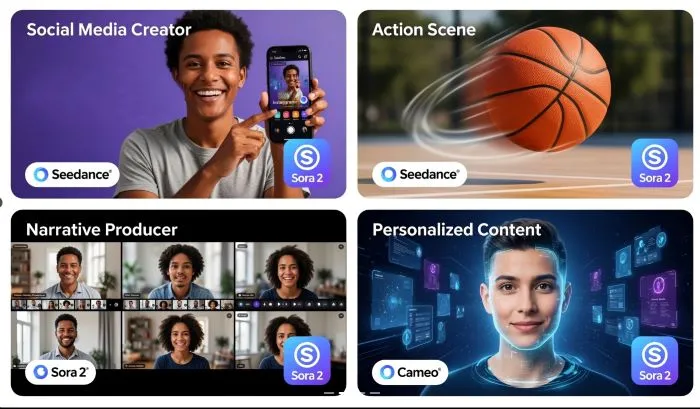
Scenario 3: Narrative Video Producer
Your Need: Create multi-shot sequences with consistent characters and world-state across different camera angles.
Seedance 1.5 Pro:
- ✅ Film-grade composition for individual shots
- ⚠️ Multi-shot consistency less robust
- ❌ Requires editing multiple 10-second clips together
- ✅ Faster generation per clip
Sora 2:
- ✅ Strong world-state preservation across shots
- ✅ Character consistency in sequences
- ✅ Up to 25 seconds reduces editing needs
- ⚠️ Slower generation per clip
Verdict: Sora 2's multi-shot consistency makes it better for narrative sequences. The longer duration and world-state preservation reduce post-production work.
Scenario 4: Personalized Content Creator
Your Need: Create videos featuring yourself as the main character in various virtual scenarios—educational content, personal branding, or creative storytelling.
Seedance 1.5 Pro:
- ❌ No personalized avatar feature
- ✅ Faster generation for quick content
- ✅ Cinematic framing enhances visual quality
- ⚠️ Limited to 10 seconds per clip
Sora 2:
- ✅ Cameo feature: Create digital avatars from your face and voice
- ✅ Record 30-second video to capture your identity
- ✅ Seamlessly embed your avatar into virtual scenes
- ✅ Longer duration (up to 25 seconds) for extended personal content
- ⚠️ Requires identity verification process
Verdict: Sora 2's Cameo feature is unique for personalized content creation. If you need videos featuring yourself as the main character, Sora 2's Cameo feature is the only option between these two tools.
Core Advantages: What Seedance 1.5 Pro and Sora 2 Excels At
Understanding each tool's core strengths helps you match them to your specific needs.
Seedance 1.5 Pro Core Strengths
1. Native Audio-Video Joint Generation: Audio and video generated together with frame-level synchronization
2. Multilingual/Dialect Lip-Sync: Explicit multilingual and dialect-specific synchronization support. Critical for international content and localization
3. Cinematic Camera Control: Film-grade shot composition with complex camera movements (pans, zooms, tracking)
4. Faster Generation Speed: ~41 seconds for 5-second 1080p video (claims "over 10×" acceleration). Better for rapid iteration
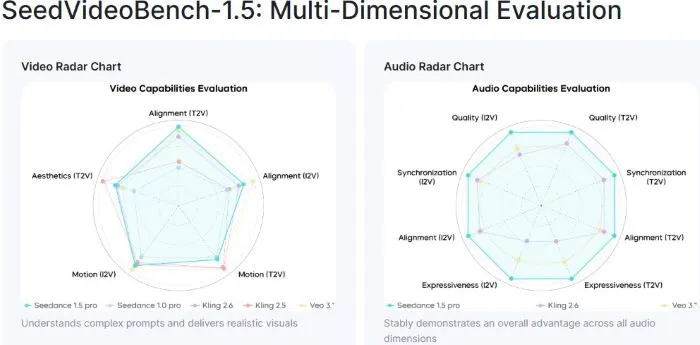
Best For: Seedance 1.5 Pro works well with Dialogue-heavy content, multilingual projects, cinematic framing, and rapid prototyping.
Sora 2 Core Strengths
1. Longer Video Duration: Up to 25 seconds (vs 10 seconds) for more complex storytelling
2. Physics Accurac: Realistic motion, collisions, and gravity—suitable for action-heavy scenes
3. Multi-Shot Consistency: World-state preservation and character consistency across shots
4. Improved Realism: Enhanced visual quality with better object permanence
5. Cameo Feature (Personalized Avatars): Create digital avatars from face and voice (30-second video capture, identity verification required).
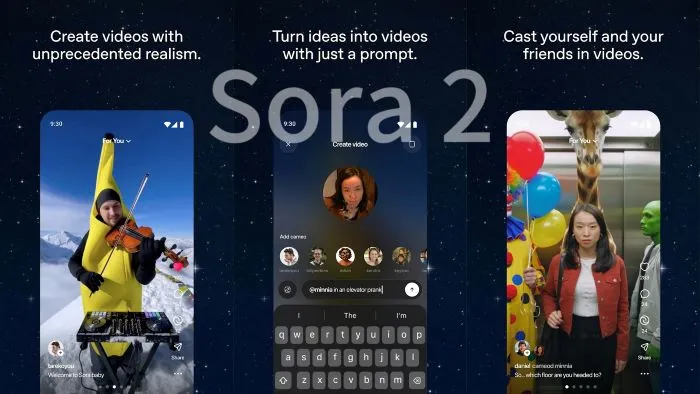
Best For: Sora 2 fits creators who need longer clips, physics-accurate motion, or multi-shot sequences. Also suitable for narrative content requiring extended scenes.
Which Tool Should You Choose? Decision Guide
Use this decision guide to match your needs with the right tool.
Choose Seedance 1.5 Pro if:
- ✅ You create dialogue-heavy content (lip-sync is critical)
- ✅ You need multilingual or dialect support
- ✅ You prioritize cinematic framing and camera control
- ✅ You work with short-form content (10 seconds is sufficient)
- ✅ You need faster iteration (speed matters)
- ✅ You want native audio-video generation (no post-processing)
Choose Sora 2 if:
- ✅ You need longer video clips (up to 25 seconds)
- ✅ You create physics-heavy motion scenes
- ✅ You need multi-shot sequences with consistency
- ✅ You prioritize visual realism and world modeling
- ✅ You create narrative content requiring extended scenes
- ✅ You can verify audio sync through testing
Hybrid Approach: Some creators use both tools—Seedance for dialogue scenes and Sora 2 for longer sequences or physics-heavy motion. This requires managing two platforms but maximizes each tool's strengths.
Quick Decision Matrix:
| Your Priority | Recommended Tool | Why |
| Lip-sync accuracy | Seedance 1.5 Pro | Explicit multilingual/dialect claims |
| Video duration >10s | Sora 2 | Up to 25 seconds vs 10 seconds |
| Generation speed | Seedance 1.5 Pro | ~41s vs 60-90s per clip |
| Physics accuracy | Sora 2 | Explicit physics modeling claims |
| Cinematic framing | Seedance 1.5 Pro | Film-grade camera control |
| Multi-shot consistency | Sora 2 | World-state preservation |
FAQ: Common Questions About Seedance 1.5 Pro VS Sora 2
Do I need to pay to use Seedance 1.5 Pro or Sora 2?
Both tools use pay-per-use pricing models. Seedance 1.5 Pro costs approximately $0.50 per 5-second 1080p video. Sora 2 pricing varies by platform (credit-based systems). Check current pricing on official platforms before committing.
Which tool is better for creating dialogue-heavy videos?
Seedance 1.5 Pro is better suited for dialogue-heavy content, especially multilingual projects, due to its explicit multilingual/dialect lip-sync claims and native joint audio-video generation. Sora 2 supports audio-video sync and dialogue matches lip movement, but multilingual/dialect support is not explicitly confirmed—test for your specific language needs.
Are there any region restrictions for accessing these tools?
Sora 2's iOS app initially rolled out in the US and Canada, with plans for broader availability. Seedance 1.5 Pro is accessible via Volcano Engine (verify regional availability). Check official platforms for current access information in your region.
Conclusion
When comparing Seedance 1.5 Pro VS Sora 2, the choice comes down to your specific production needs. Seedance 1.5 Pro excels at dialogue-heavy content with explicit lip-sync support, cinematic framing, and faster generation, making it ideal for short-form content and multilingual projects. Sora 2 offers longer video duration, physics accuracy, and multi-shot consistency—making it better for extended sequences and narrative content.
Both tools deliver 1080p quality and support text-to-video and image-to-video generation. The key differentiators are duration limits, audio sync capabilities, and generation speed. Test both tools with your actual use cases to verify claims, especially for lip-sync accuracy and regional availability.
For creators exploring additional AI video tools, SeaArt AI provides a comprehensive platform with multiple video generation options to compare and choose from.
Related Articles
Best 7 Seedance 1.5 Pro Alternatives for AI Video Creation
Seedance 1.5 Pro vs Veo 3.1: Which AI Video Model Wins?
Complete Sora 2 Tutorial: How to Use Sora 2 (Mobile & PC)