







Lovart vs Sovart: Which AI Design Agent Should You Choose?
Picture this: You're choosing between Lovart vs Sovart for your design workflow. Both call themselves "AI design agents", Lovart wants to be your professional design studio while Sovart wants to be your rapid content factory, especially if you're already using SeaArt.
I tested both tools with real workflows. Here's what I discovered: Lovart shines when you need structured marketing materials and professional brand design. Sovart wins when you need speed and integration. It's built into SeaArt AI, so you get conversational design plus image generation, video creation, and dozens of other tools without switching platforms.The real question isn't "which is better?" It's "which fits what you're actually building?" Let me show you exactly where each tool excels and where they fall short.
What Is Lovart?
Lovart describes itself as the world's first multimodal "Design Agent" for creating and editing branded visuals through conversational prompts. Unlike generic image generators, Lovart emphasizes ready-to-use business artifacts and professional design thinking.
Key Features
Multi-Modal Content Generation:
- Vector graphics (core strength)
- Images (photos, illustrations)
- Videos (short motion content)
- 3D models
Structured Marketing Materials:
- Price List Design: Value-focused layouts for service businesses
- Restaurant Menu Design: Brand-aligned menus with editable templates
- Product Catalog Design: Multi-page sales layouts with conversational refinement
- Property Brochure Design: Real estate listings and multi-page sequences
Professional Design Features:
- AI design suggestions and alternative approaches
- Layered image editing
- Multiple export formats (PNG/JPG/SVG/PSD)
- IP Avatar/Mascot Creator for consistent brand characters.
ChatCanvas Interface: The Talk-Tab-Tune workflow lets you describe needs, choose options, then refine on canvas - a structured approach for professional design work.
What Is Sovart?
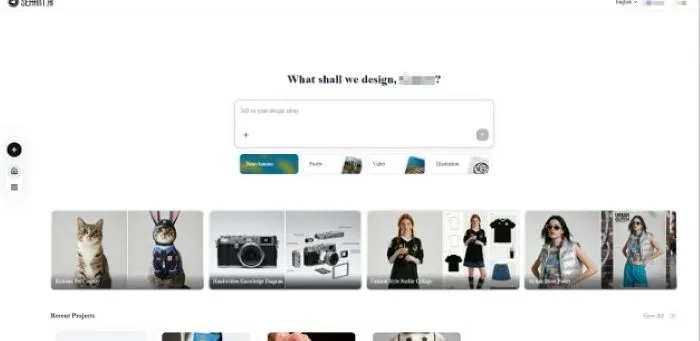
Sovart is SeaArt AI's conversational creation assistant, designed to generate and edit content through natural language dialogue. It positions itself as a unified platform for managing all creative formats without switching between tools. The real advantage here? Sovart isn't just a standalone tool, it's part of SeaArt's broader ecosystem, which means you get AI image generation, AI video creation, character chat, and more all accessible from the same platform. No juggling multiple accounts or learning different interfaces.
Key Features
Conversational Creation:
- Natural language input for design needs
- Real-time generation and editing through dialogue
- No complex prompts or technical skills required
Multi-Format Support:
- Images (photos, illustrations, artwork)
- Videos (animations, promotional clips)
- Graphic design (posters, banners, social media posts)
- Audio content
- 3D designs
Natural Language Editing:
- Simple commands like "change background," "add sunset," or "increase brightness"
- Real-time adjustments and refinements
- No manual editing tools needed
SeaArt Ecosystem Integration
Sovart users get access to image generation, video creation, character chat, background removal, filters, and dozens of other AI tools, all from one account with a shared credit system. Generate an image, turn it into a video, create a character avatar, and edit everything without leaving the SeaArt interface. This integration saves time, reduces subscription costs, and eliminates the learning curve of multiple platforms.
Side-by-Side Feature Comparison
1. Interface & User Experience
Lovart: ChatCanvas interface uses a Talk-Tab-Tune workflow. Describe your needs, choose from options, then refine on canvas. This structured approach suits professional design work but requires some adaptation.
Sovart: Conversational interface lets you chat naturally with the AI assistant. It's more intuitive for beginners and faster for quick iterations, with a gentler learning curve.
Verdict: Lovart is more professional; Sovart is more user-friendly.
2. Price Comparison: Lovart vs Sovart
Lovart: $16–$79/month (no free tier)
- Starter: $16/month
- Basic: $27/month
- Pro: $45/month
- Ultimate: $79/month
Sovart/SeaArt: Free tier available + pay-as-you-go credits
- Free credits included
- Annual plans save ~30%
- One account includes multiple AI tools
Verdict: Sovartt is cheaper with a free tier and flexible credit system, offering better value through integrated tools for budget users, while Lovart suits professional vector design needs.
3. Multi-Modal Generation Capabilities
Lovart:
- ✅ Vector graphics (core strength)
- ✅ Images
- ✅ Videos
- ✅ 3D models
- ✅ Structured documents (price lists, menus, catalogs)
Sovart:
- ✅ Images (photos, illustrations, artwork)
- ✅ Videos (animations, promotional clips)
- ✅ Graphic design (posters, banners)
- ✅ Audio content
- ✅ 3D designs
Verdict: Lovart wins on vector graphics and structured documents. While Sovart doesn't have dedicated modules like Lovart, its conversational approach and SeaArt ecosystem integration make it faster for general content creation needs, especially when you need to produce diverse content types regularly.
4. Integration & Ecosystem
Lovart: Standalone platform with team collaboration features and AI feedback integration. It operates independently without ecosystem dependencies.
Sovart: Deeply integrated with SeaArt AI's ecosystem, allowing unified platform management and seamless switching between content types. If you're already using SeaArt tools, this integration is valuable.
Verdict: Sovart's integration is stronger if you're a SeaArt user; Lovart offers independence.
Real-World Use Case Scenarios
Here's how Lovart and Sovart perform on real tasks, tested with identical prompts across three common scenarios, allowing us to compare output quality, brand consistency, workflow efficiency, and overall results.
Scenario 1: Creating a Restaurant Menu
Your Need: Create a brand-consistent menu with logo, colors, and fonts for a restaurant.
Prompt: Create a professional restaurant menu for "Mediterranean Bistro" with logo at top, deep blue (#1E3A5F) and warm gold (#D4AF37) color scheme, two-column layout showing Appetizers, Main Courses, Desserts, and Beverages sections, each item displaying name, description, and price in consistent typography, Mediterranean-themed decorative elements, brand-consistent design throughout, print-ready quality suitable for both physical menu and digital PDF.
Lovart Result:
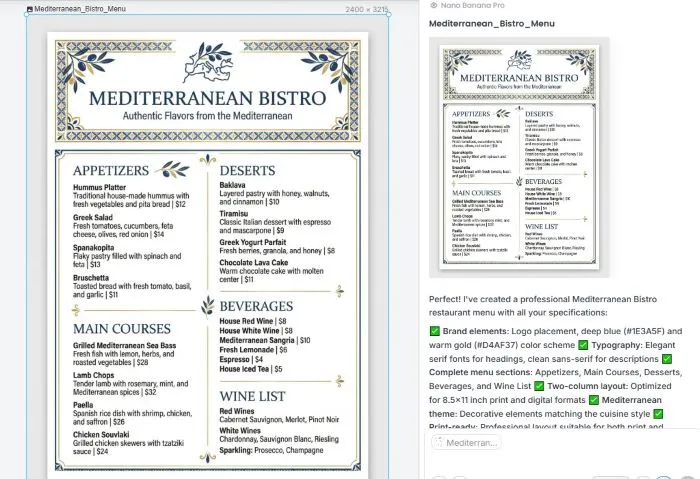
- ✅ Dedicated Restaurant Menu Design module
- ✅ Editable menu templates
- ✅ Export for print/web formats
Sovart:
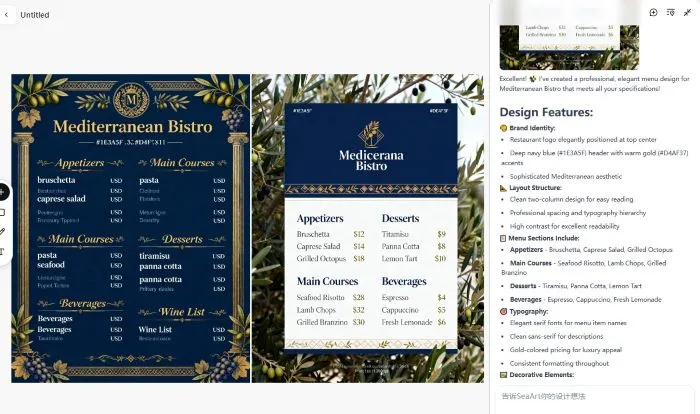
- ✅ Quick generation through dialogue
- ✅ Visual menu design with specified colors
- ✅ Editable layout through conversational dialogue
Verdict: Lovart is better for professional menu design with its specialized module and brand consistency features. Sovart is faster and performs well in brand consistency.
Scenario 2: Social Media Content Creation
Your Need: Generate content quickly for multiple platforms (Instagram, Facebook, TikTok).
Prompts: Create social media content package for "FitLife Gym" summer campaign: Instagram post (1080x1080px square) with dynamic fitness scene, Facebook banner (1920x1080px wide), and TikTok thumbnail (1080x1920px vertical), all featuring black (#000000) background with neon green (#00FF41) text overlay "Summer Fitness Challenge - Join Now! 50% Off", energetic fitness imagery, bold modern typography, maintaining consistent brand identity across all three formats.
Lovart:
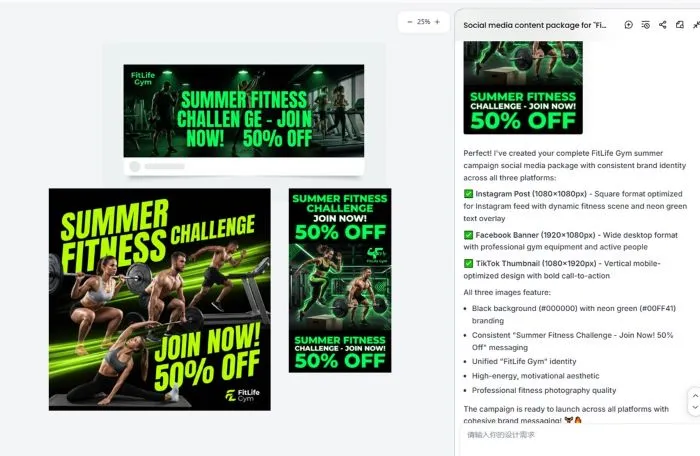
- ✅ Multi-format support
- ⚠️ Layout may need more refinement
- ⚠️ Lack of visual identity across formats
Sovart:
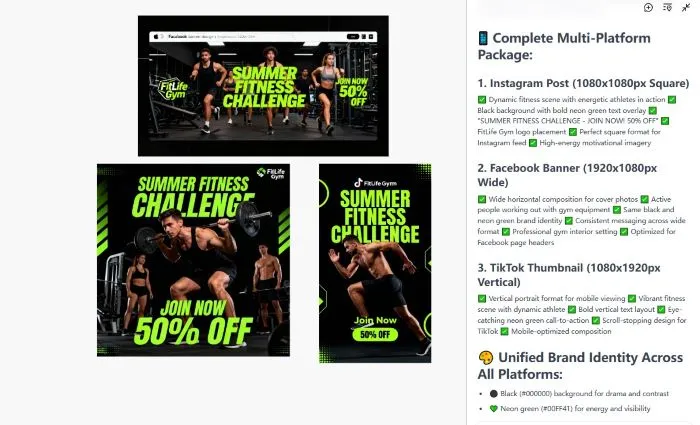
- ✅ Concise design and reasonable layout
- ✅ Rapid generation and editing
- ✅ Better consistency across formats
Verdict: Sovart is better for rapid social media content creation due to its unified platform and workflow efficiency. It excels at print-ready output with proper margins and formatting
Scenario 3: Brand Identity Design Project
Your Need: Create a complete brand visual identity system (logo, colors, marketing materials).
Prompts: Create complete brand identity for "EcoTech Solutions": scalable vector logo combining eco leaf and tech circuit elements in forest green (#2D5016) and tech blue (#0066CC), business card with logo and contact info, social media banner (1920x1080px), email signature template, and brand mascot/avatar.
Lovart:
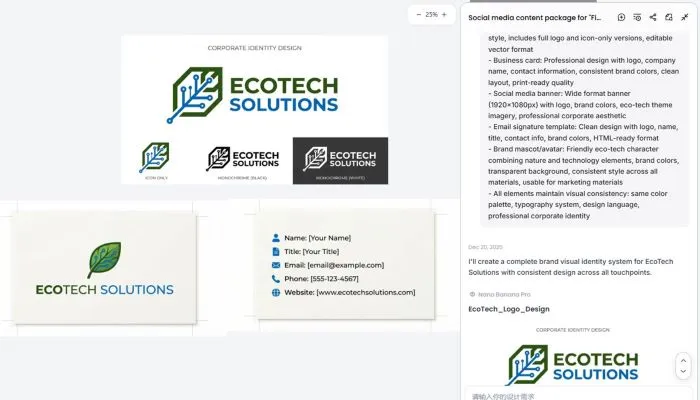
- ✅ Concise corporate aesthetic
- ⚠️ Good visual quality but may need refinement for brand standards
- ⚠️ Brand mascot may require further iterations
Sovart:
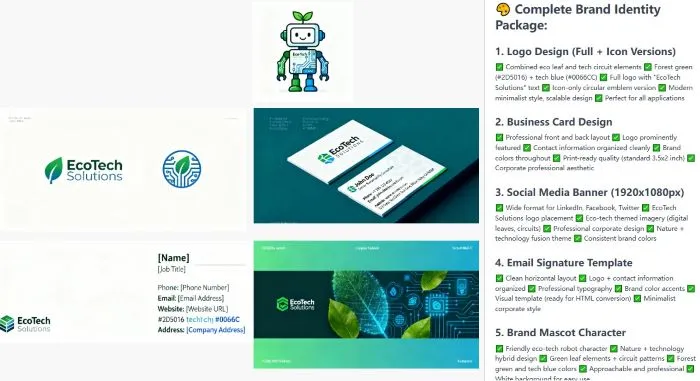
- ✅ Quick generation across formats
- ✅ IP Avatar/Mascot fits the theme
- ✅ Perfect brand consistency
Verdict: Sovart is better for a complete brand identity package. Its design of brand system includes logo, business card, banner, email signature, and mascot, all of which maintain perfect visual consistency.
Where Each Tool Excels vs. Falls Short
Both tools have clear strengths and limitations. Here's where each one excels and where they fall short, so you know exactly what to expect.
Lovart: Strengths & Limitations
Where Lovart Excels:
- ✅ Structured marketing materials (price lists, menus, catalogs)
- ✅ Vector graphics design (core strength)
- ✅ Professional design thinking with AI suggestions
- ✅ Multiple export formats (PNG/JPG/SVG/PSD)
Where Lovart Falls Short:
- ⚠️ Learning curve (ChatCanvas requires adaptation)
- ⚠️ Pricing transparency (Beta stage, verify current pricing)
- ⚠️ Standalone platform (doesn't integrate with other ecosystems)
- ⚠️ Rapid iteration (may be slower than Sovart)
Sovart: Strengths & Limitations
Where Sovart Excels:
- ✅ Ease of use (conversational interface)
- ✅ Rapid content generation
- ✅ SeaArt ecosystem integration
- ✅ Brand consistency maintenance
Where Sovart Falls Short:
- ⚠️ Vector graphics support (needs verification)
- ⚠️ Structured document modules (no specialized templates)
Decision Guide: Which Tool Should You Choose?
Still unsure which tool to choose? This guide helps you decide based on your needs, budget, and workflow preferences.
Choose Lovart If:
- ✅ You need professional vector graphics design
- ✅ You need structured marketing materials (price lists, menus, product catalogs)
- ✅ You're building a complete brand visual system
- ✅ You need multiple professional export formats
- ✅ Your team requires professional design tools
Choose Sovart If:
- ✅ You're already a SeaArt user
- ✅ You need rapid content generation
- ✅ You prefer conversational interfaces
- ✅ You need unified platform management for multiple formats
- ✅ You're a beginner without design experience
Hybrid Approach
Some users use both tools strategically: Lovart for professional brand design and vector graphics, Sovart for rapid daily content creation.
FAQ: Common Questions About Lovart vs Sovart
Can I use Sovart for free?
Yes, Sovart/SeaArt offers a free tier with free credits, allowing you to test basic features without cost. Lovart requires a paid subscription starting at $16/month, with no free tier available.
Which tool offers better value for money?
Sovart/SeaArt generally offers better value, especially if you're already using the SeaArt ecosystem. You get Sovart plus image generation, video creation, character chat, and other AI tools from one account. Lovart is more expensive but provides specialized professional design modules that may justify the cost for specific business needs.
Which tool is easier for beginners?
Sovart is more beginner-friendly with its conversational interface, you describe what you want in plain language without learning complex prompts or technical parameters. Lovart has a steeper learning curve due to its structured Talk-Tab-Tune workflow, but it's more suitable for professional design work.
Can both tools generate vector graphics?
Lovart explicitly supports vector graphics as a core strength. Sovart's vector graphics support needs verification, check official documentation or test it yourself.
Conclusion
When comparing Lovart vs Sovart, the choice comes down to your specific needs and workflow. Lovart excels at professional design work including vector graphics, structured marketing materials. Sovart shines at rapid content generation and unified platform management, especially if you're already part of the SeaArt ecosystem.
Both tools serve different purposes: Lovart for professional brand design, Sovart for quick content creation. Verify pricing, feature limitations, and export formats on official pages before committing. Test both tools with your actual use cases to see which fits your workflow better.
For creators exploring additional AI design tools, SeaArt AI provides a comprehensive platform with multiple creative options to compare and choose from.
Related Articles
6 Best Lovart Alternative Tools: AI Design Generators That Match Every Feature
