

Kling 3.0 Review: Multi-Shot Storyboarding & Tutorial
Here's the thing about Kling 3.0: it's not just an upgrade from version 2.6. It's a completely different animal.
I've spent the last few days testing every feature Kuaishou packed into this release, and honestly? I kept saying "wait, it can do THAT?" The AI video space has felt stagnant lately, but Kling 3.0 changes that. This is the era of the AI Director - where you control storyboards, camera angles, and multi-language dialogue in one unified workflow. On SeaArt AI, this kind of multi-shot control represents the next evolution of AI video creation - moving from random clips to deliberate storytelling.
Let me show you what actually matters.
What Makes Kling 3.0 Different (The Real Upgrades)
Forget the marketing hype. Here's what changed:
Kling 3.0 is a multimodal all-in-one model. That means input (text, image, video) and output (video + native audio) happen together. No more generating video, then dubbing audio separately.
Core Upgrades vs Kling 2.6
| Feature | Kling 2.6 | Kling 3.0 |
|---|---|---|
| Max Duration | 10 seconds | 15 seconds (custom 3-15s) |
| Multi-Shot | Single shot only | Up to 6 shots with transitions |
| Languages | English, Chinese | 5 languages + dialects |
| Character Consistency | Limited | Video subject extraction + voice binding |
| Text Preservation | Basic | Improved in I2V scenarios |
| Speaker Control | 2 people max | 3+ people with clear attribution |
That table tells you the specs. Here's what it means in practice:
Before (Kling 2.6): You generated one 10-second shot. If you wanted a dialogue scene, you prayed the AI understood "two people talking." It usually didn't.
Now (Kling 3.0): You write "Shot 1: Close-up, Character A says 'Hello' in English. Shot 2: Reverse angle, Character B replies in Spanish." It works. First try.
The Two Breakthrough Features That Matter
Feature 1: Multi-Shot Storyboarding (The AI Director)
This is the feature that makes Kling 3.0 feel like a director's tool instead of a random video generator.
You get two modes:
Smart Storyboard Mode: You write one prompt. The AI breaks it into multiple shots automatically.
I tested this with a narrative scene:
Example Prompt: "Two men in a dim interrogation room. Detective asks 'Why did you kill him?' Camera looks down at young man: 'I wanna help you, but... let me know what happened.' Close-up, young man's eyes show panic. Boy starts painful recollection, sweat running down his cheek. Flashback scene showing the man being beaten."
What Kling 3.0 delivered:
- Shot 1 (2s): Two men in interrogation room, detective asks "Why did you kill him?"
- Shot 2 (2s): Camera looks down at young man: "I wanna help you, but... let me know what happened."
- Shot 3 (2s): Close-up, young man's eyes show panic
- Shot 4 (2s): Boy starts painful recollection, sweat running down his cheek
- Shot 5 (4s): Flashback scene, the man being beaten
Total generation time: 5 minutes including revisions. The AI handled the dramatic pacing, camera angles, and emotional beats across all five shots.
The result? Actual narrative pacing. The timing felt natural. The camera angles matched the dramatic beats. The AI even nailed the transition between dialogue moments and action sequences - the pause before key lines, the zoom on critical reactions, and the spatial consistency across all six shots.
That's not luck. That's Kling 3.0 understanding narrative structure.
Feature 2: Multi-Language Native Audio (Finally Works)
I'm calling this feature "finally works" because audio has been AI video's weakest link since forever.
Kling 3.0 supports:
- English, Chinese, Japanese, Korean, Spanish
- Regional dialects and accents
- 3+ speakers with individual voice attribution
- Separate control for dialogue, sound effects, and background music
I tested it with a ridiculous scenario - five fantasy creatures, each speaking a different language, all in one 12-second scene. Chinese, English, Japanese, Korean, Spanish. The prompt specified who says what and when.
Every line matched. Every mouth movement synced. No overlapping dialogue. No confusion about who's speaking.
For content creators working in multiple markets, this is huge. You can generate localized video variants without re-shooting or dubbing.
How to Use Kling 3.0 (Step-by-Step)
Inside SeaArt AI, the workflow is designed to be straightforward. Here's how the generation process works:
Step 1: Write Your Prompt and Define Scene Structure
Start with a prompt that describes the overall concept, visual style, and key actions. Then decide how many scenes you need (2-6) and how long the total video should run (3-15 seconds).
A rough guide for pacing:
- 3-5 seconds: Single shot, one clear action
- 6-10 seconds: 2-3 shots, simple scene transitions
- 11-15 seconds: 4-6 shots, full narrative arc
Don't go crazy with shots. Six cuts in 15 seconds is already fast-paced. More shots = less time for each scene to breathe.
Step 2: Choose Your Storyboard Mode
Smart Storyboard: Write one high-level prompt. The AI breaks it into multiple shots with appropriate camera angles and pacing automatically. Best when you want speed and don't need precise control over every cut.
Custom Storyboard: Define each shot manually - duration, camera angle, and specific actions. Format: "Shot X (duration): [camera angle], [action description]". Best when you have a clear vision of exactly how the sequence should unfold.
Step 3: Add Dialogue and Audio (Optional)
For scenes with dialogue, specify which character speaks and in what language:
Character A (English): "We need to move, now."
Character B (Spanish): "¿A dónde vamos?"
Kling 3.0 handles lip sync and speaker attribution natively. You can also upload reference audio if you need a specific voice tone or cadence.
Step 4: Generate, Review, and Iterate
Hit generate and review the result. If a specific shot doesn't land, adjust that scene's prompt or timing and regenerate. The model keeps character positioning and visual style consistent across iterations, so you're refining rather than starting from scratch.
Step 5: Extract Subjects for Reuse
Once you've generated a video with a character you like, extract their appearance and voice data. Then import that subject into new generations - the character stays visually and vocally consistent across separate clips. This is how you build a series of videos with the same cast without re-describing them every time.
Kling 3.0 vs the Competition
Kling 3.0 vs Runway Gen-3
| Feature | Kling 3.0 | Runway Gen-3 |
|---|---|---|
| Max Duration | 15 seconds | 10 seconds |
| Multi-Shot | Yes (6 shots) | No (single shot) |
| Native Audio | Yes (multi-language) | No (add separately) |
| Character Consistency | Yes (extraction + reuse) | Limited (image reference only) |
| Quality | 4K output | 4K output |
| Pricing | Credit-based | $12/month (Standard) |
My Take: Runway Gen-3 delivers cleaner, more cinematic single shots. But Kling 3.0 wins on versatility. If you need multi-shot sequences or localized audio, Kling is the only real option.
Kling 3.0 vs Sora 2
| Feature | Kling 3.0 | Sora 2 |
|---|---|---|
| Max Duration | 15 seconds | 10-15 seconds |
| Storyboard Control | Yes (manual shots) | No (single shot) |
| Audio | Native multi-language | Native audio with dialogue sync |
| Prompt Following | High accuracy | High accuracy |
| Physics Simulation | Good | Excellent |
| Availability | Credit-based (rolling out) | Waitlist/ChatGPT Pro |
My Take: Sora 2 produces the most visually stunning raw footage - better physics, better lighting, better camera movement. But Kling 3.0 gives you way more control over narrative structure. Sora is for wow factor. Kling is for actual storytelling.
Related reading: Complete Sora 2 Tutorial
Real-World Use Cases
Use Case 1: Cinematic Long Takes - 15-Second Narrative Flow
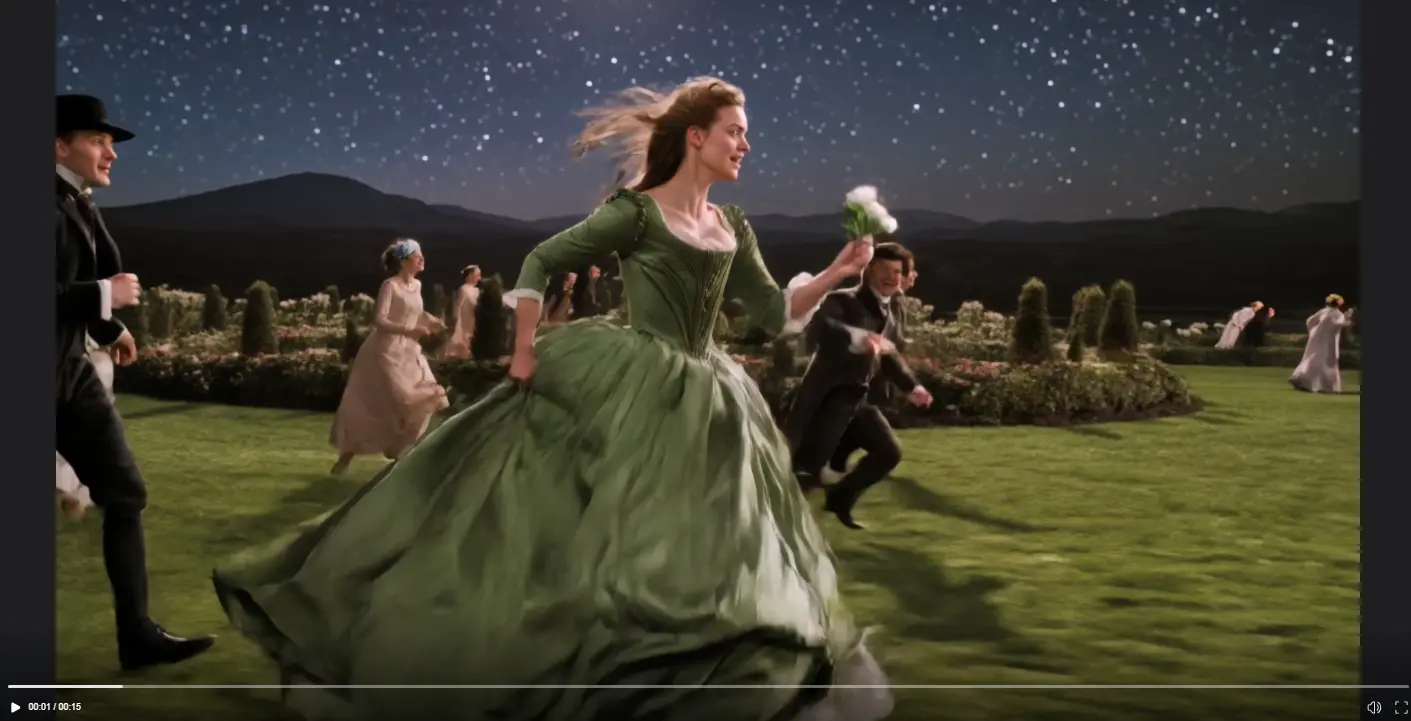
Kling 3.0's 15-second maximum allows for complete narrative arcs within a single generation. This official example demonstrates the capability:
Prompt: "Ultra-wide medium-long shot with horizontal tracking opening, low-angle stabilized movement near the ground, high-contrast romantic cinematic color grading with cold blue night and silvery starry sky, poetic realism and classical epic atmosphere; the subject is a young woman in a dark green long dress running at full speed on a grassy field at night."
What this demonstrates:
- Full 15-second continuous shot with consistent camera movement
- Complex action sequence (running figure with flowing dress physics)
- Maintained cinematic color grading throughout (cold blue night tones, silvery starlight)
- Smooth horizontal tracking that follows the subject across the frame
- No cuts needed - the entire romantic scene unfolds in real progression
This is the key advantage of 15-second generation: you can capture a complete moment with beginning, middle, and end. Previous 10-second limits forced you to either rush the action or split it across multiple clips. Now the model comfortably accommodates complex sequences within one generation.
Source: Kling AI Official Release Notes
Use Case 2: Localized Social Media Content
Create one video with English dialogue. Then regenerate with the same character but switch the language to Spanish, Japanese, or Korean. Same visuals, different audio track.
I tested this with a 10-second product explainer:
- English version: Character explains the feature in American English
- Spanish version: Same character, same gestures, Spanish dialogue with matched lip sync
- Japanese version: Adjusted speech pacing to fit Japanese sentence structure
Each variant took about 2 minutes to generate. For global brands running ads across multiple regions, that's localization without reshooting or hiring voice actors.
Use Case 3: Storyboard Pre-Visualization
Film directors can test shot sequences before committing to expensive production. Upload a rough storyboard sketch, let Kling 3.0 generate a moving version. Show it to your client or DP for feedback.
Here's a practical workflow I tried:
- Sketched 4 rough frames on paper for a short dialogue scene
- Described each frame as a shot in Custom Storyboard Mode
- Generated a 12-second preview with camera angles and basic dialogue
- Shared the result with a friend in production - he immediately spotted a framing issue in shot 3
That kind of feedback loop used to require hiring actors and renting a space for a test shoot. Now it's a 5-minute AI generation.
What Kling 3.0 Still Gets Wrong
Let's be honest - it's not perfect.
Issue 1: Text Rendering Is Better, Not Perfect
Kling 3.0 improved text preservation in image-to-video scenarios. But if you need on-screen text (like subtitles or logos), you'll still need to add it in post. Small text still warps or becomes unreadable.
Issue 2: Complex Physics Still Break
Fluid simulations (water, smoke, fire) look better than Kling 2.6, but they're still not Sora 2 level. Expect some unnatural movements if your scene involves liquids or soft materials.
Issue 3: Hand and Finger Details
The classic AI weakness. Hands are better than before, but extreme close-ups of fingers doing precise actions (typing, playing instruments) still glitch.
Pricing and Access
Kling 3.0 runs on a credit system. Credit costs scale with video duration and shot count - a 15-second video with 6 custom shots naturally costs more credits than a 5-second single shot.
Access is currently rolling out to subscribers first. Check the official Kling AI platform for the latest pricing tiers and availability. You can also use Kling 3.0 through SeaArt AI with their credit-based system.
Who Should Use Kling 3.0?
Best for:
- Content creators who need multi-shot sequences (not just single clips)
- Marketing teams creating localized video ads
- Filmmakers doing pre-visualization and storyboard testing
- Social media managers producing narrative-driven content
Skip it if:
- You only need single-shot beauty shots (Runway Gen-3 is cleaner)
- You prioritize physics realism over editing control (Sora 2 wins)
- You're making abstract or experimental visuals
FAQ
Can Kling 3.0 generate videos longer than 15 seconds?
No, 15 seconds is the hard limit per generation. But you can chain multiple generations together in post-production, or use the extracted subject feature to maintain character consistency across separate clips.
How does Smart Storyboard decide shot composition?
It analyzes your prompt for narrative beats and action sequences, then applies cinematography conventions (establishing shots, close-ups, reaction shots, etc.). It won't break Hollywood rules unless you explicitly tell it to in Custom mode.
Can I upload my own audio for lip sync?
Yes. Kling 3.0 lets you upload reference audio files or select from previous generations. The character will lip-sync to that audio track while matching the voice tone.
What file formats does Kling 3.0 output?
MP4 video with embedded audio. Resolution goes up to 4K depending on your settings. You can download with or without watermarks based on your subscription tier.
Does Kling 3.0 work with image-to-video?
Yes. You can upload a starting image and the AI generates video from that frame. The text preservation upgrade specifically helps here - if your image has text (like a sign or book cover), it's more likely to stay readable in the video.
Can I edit a video after generation?
Not directly. You can't edit individual shots within a completed video. But you can extract subjects (characters, objects) and reuse them in new generations. For video-to-video editing, there's a separate Kling 3.0 Omni Image Editing model, though most users stick with the main text-to-video workflow.
How does multi-language support work in practice?
You specify which character speaks which language in your prompt. Example: "Character A says 'Hello' in English. Character B responds '你好' in Chinese." The AI generates appropriate lip movements and voice tones for each language. Dialects (like British vs American English) can be specified too.
Is shot-reverse-shot reliable?
In my tests, yes - when you explicitly request it. Kling 3.0 understands camera angles well enough to maintain spatial consistency across cuts. The two characters stay in their correct screen positions, and eyelines match.
Final Verdict: The Era of AI Directors
So, does Kling 3.0 deserve the hype?
Yes - if you need narrative control.
This isn't just a faster or prettier AI video generator. It's a tool that finally lets you direct AI-generated footage. Multi-shot editing, character consistency, multi-language audio - these features transform AI video from "cool tech demo" to "actual production tool."
For content creators, this is the era where AI becomes your director, not just your effects artist. You can storyboard a 15-second sequence with dialogue, camera movements, and emotional beats - then watch AI execute it in minutes.
Is it perfect? No. Text rendering still glitches. Physics aren't Sora-level. Hands are hit or miss.
But here's what matters: Kling AI's latest model solves the storytelling problem. Previous AI video tools gave you beautiful single shots with no narrative control. Kling gives you shots that connect into scenes, scenes that tell stories, and stories that work in multiple languages.
That's not an upgrade. That's a different category of tool.
The AI Director era is here. And with platforms like SeaArt AI making these models accessible to everyone, there's never been a better time to start experimenting.
Related Articles
Complete Sora 2 Tutorial: How to Use Sora 2 (Mobile & PC)
Kling 2.6 vs Sora 2: Production Reality vs. The Hype
Kling 2.6 vs Kling 2.5 Turbo Review: Performance & Value Compared
Kling O1 vs Kling 2.5 Turbo: Which Video Model Fits Your Creative Workflow
Kling 2.6 vs Veo 3.1: Full Comparison for Creators