
> Workflow configuration
The goal of this project was to build a workflow that would allow anyone to generate stable looping videos on SeaArt.
The final configuration is as follows:
* Node used
Load CLIP
Load CLIP Vision
Load Image
Load VAE
Unet Loader (GGUF)
Load Checkpoint
Load LoRA
CLIP Text Encode (Prompt)
CLIP Vision Encode
PlaySound🐍
WanFirstLastFrameToVideo
Latent Blend
KSampler
Video Combine🎥🅥🅗🅢
SaveAnimatedWEBP
* Workflow
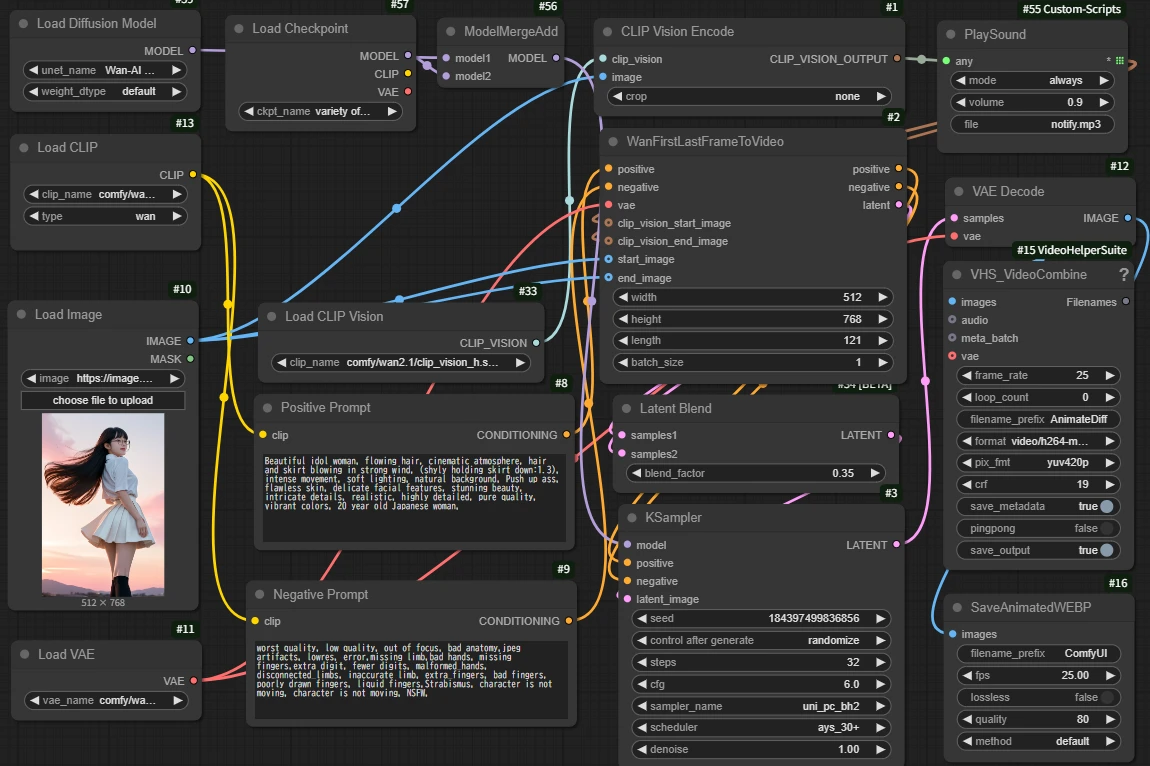
The values are my recommendations based on testing results.
> Overcoming the Mist
The most difficult thing to overcome this time was the mist phenomenon that occurred at the joints (beginning and end).
The cause of this fog is
①There is a slight time lag between the Image connected to ClipVision
and the Image connected to WanFirstLastFrameToVideo
②Slight nonlinearity that occurs during latent interpolation between
WanFirstLastFrameToVideo and KSampler
was assumed to be due to.
So the first thing we did to deal with this was
Increased the number of steps to improve noise reduction accuracy.
(Please note that for video generation, timeouts are likely to occur if you exceed 35 steps)
Next, the following measures were implemented:
① Finely suppress the influence of ClipVision features by PlaySound
→ PlaySound is used as a special any2any node that allows you to reduce the input strength
without changing the nature of the information.
② Apply Latent Blend to make the continuity smoother
→To enhance the effect of the prompt and image, add two Latents from WanFirstLastFrameToVideo.
In addition, we tested various combinations of schedulers and samplers.
* Scheduler and Sampler Considerations

unipc_bh2 + normal: High stability, but the haze at the seams is obvious.
unipc_bh2 + karras: The seams are smooth, but the screen collapses quickly

unipc_bh2 + ays_30+: Well balanced, with clear depth
ipndm + karras: The transitions are smooth, but the screen slowly collapses

ipndm + ays_30+: The haze is natural. The image quality is high,
but the depth (three-dimensionality of space) is slightly shallow.
ipndm + ays: Great for reducing haze and making it more natural, but the depth becomes even more flat.
This time, the **unipc_bh2 + ays_30+** configuration is determined that this was optimal because it "naturally reduces haze" and "maintains images with a sense of depth."
For reference, we have lined up videos of "unipc_bh2 + normal", "ipndm + ays_30+", and "ipndm + ays_30+".
Since the seeds were not fixed, it may be difficult to compare, but I think you can see the difference in image quality and depth.
The AI application created this time: https://www.seaart.ai/ja/workFlowAppDetail/d07a26te878c73e6hbdg
[Bonus Considerations]
> About samplers for video generation (partly by system)
Euler type : Requires a high number of steps, but the generation speed is fast so there is no problem.
The image quality is soft and flat. Good for anime and fantasy images.
DPM system : High performance, but requires a large number of steps to be stable and the generation speed is slow,
so it is prone to timeouts in SeaArt.
ipndm series : Generation speed is slow. High image quality with noise suppression even in fast-moving scenes.
However, spatial 3D expression is weak.
unipc series : Fast generation speed. Noise is likely to occur in fast-moving scenes. Strong spatiality and expressiveness.
> About the scheduler for video generation (partial)
normal : Default, balanced type. No major features. If you're having trouble, this is the one to go for.
karras : Fixes details early on, and slows down later.
It is suitable for still images because it makes the image quality firm,
but it is prone to collapse in videos.
Exponential : The removal proceeds all at once, with a fast initial action. Tends to be unstable.
simple : Linear progression, straightforward noise removal. Natural but prone to roughness.
ddim_uniform : DDIM-style uniform removal. No major features. However, normal is more stable.
kl_optimal : High convergence but has some quirks.
Try it out and see if it suits your needs. Not very versatile.
ays / ays+ : There is little information, but it seems to enhance the characteristics of the sampler.
Personally, I think it is the easiest to use.
beta / linear_quadratic : Theory-oriented, ideal removal pattern.
It is said to be fast in special environments. It is difficult to master.
For the reasons above, I value versatility and mainly use the combination of “unipc_bh2+ays_30+” for video generation.
→ However, if you prioritize a sense of speed over spatiality, "ipndm+ays" may be more suitable.
> To even greater heights
By combining this looping technique with the frame division technique from Part 2, you can also do the following:
・Fix the seed and prepare three images (①②③) of the same person in different poses.
Using this start/end image specification technique, a loop video can be created that moves from ① to ② in X seconds, from ② to ③ in X seconds, and from ③ back to ① in X seconds.
(And it also speeds up production!)
What? "It works instantly if you use ControlNet" and "If it's a loop, FLF2V is just the right choice"?
It's true that it's better if you want to make the movement more definite, but I think that would cut the freedom of the AI in half and make it less interesting. :P
Also, as you can see from the official samples, FLF2V is currently inferior in image quality and expressiveness to Wan2.1, so I think I'll wait and see.
(High-quality versions require high specs. And the 14B model is about 33GB)
Therefore, we are currently considering the above method.
Thank you for reading to the end.
Note: This report was generated using SeaArt's ComyfyUI environment. Please note that results may vary in other environments.